About CDC for Cassandra
DataStax CDC for Apache Cassandra® is open-source software (OSS) that sends Cassandra mutations for tables having Change Data Capture (CDC) enabled to IBM Elite Support for Apache Pulsar or your own self-managed Apache Pulsar™) deployment, which in turn can write the data to platforms such as Elasticsearch® or Snowflake®.
Key Features
-
Supports Apache Cassandra version 3.11 or later, Apache Cassandra version 4.0 or later, and DataStax Enterprise (DSE) version 6.8.16 or later
-
Supports IBM Elite Support for Apache Pulsar (formerly DataStax Luna Streaming) and self-managed Apache Pulsar version 2.8.1 or later
-
De-duplicates updates from multiple replicas
-
Propagates Cassandra schema change to the built-in Pulsar schema registry
-
Supports AVRO message format
Architecture
Other than the prerequisite Cassandra and Pulsar clusters, CDC for Cassandra has two components:
-
DataStax Change Agent for Apache Cassandra®, which is an event producer deployed as a JVM agent on each Cassandra data node
-
DataStax Cassandra Source Connector (CSC) for Apache Pulsar™, which is a source connector deployed in your Pulsar cluster
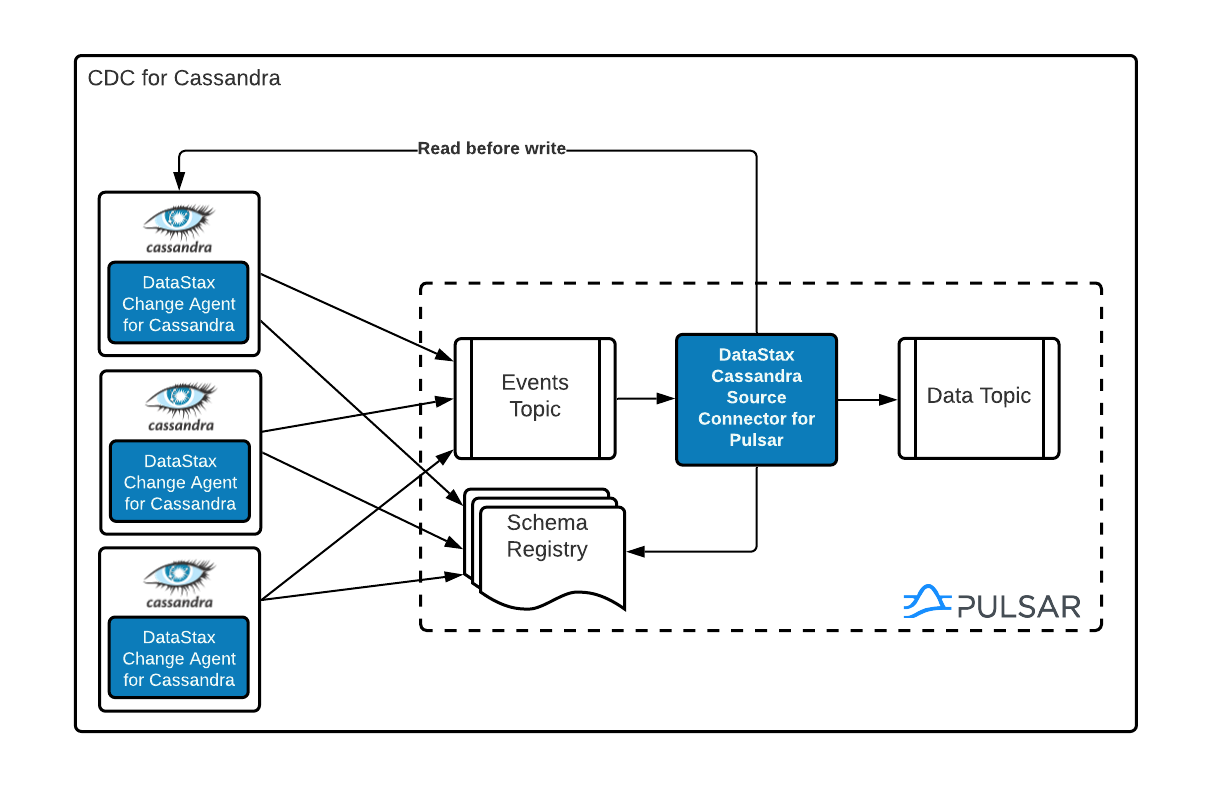
Since version 3.0, Cassandra has included a change data capture (CDC) feature.
The CDC feature can be enabled on the table level by setting the table property cdc=true, after which any commit log containing data for a CDC-enabled table is moved to the CDC directory specified in cassandra.yaml on discard/flush (default: cdc_raw).
Since Cassandra 4.0 (and back ported in Cassandra 3.11 and later), the Cassandra CDC feature has been improved such that commit logs can be synced to the cdc_raw directory periodically (by default, 10 seconds). This improvement makes the Cassandra CDC feature near real-time.
When CDC is enabled:
-
The change agent running on each node reads the Cassandra
commitlogfiles in thecdc_rawdirectory and emits a message for each Cassandra mutation on a CDC-enabled table to a per-table events topic. -
The Change Agent for Cassandra processes these events and fetches the mutated Cassandra row.
-
The Cassandra Source Connector writes the row into the data topic with necessary processing tasks that make sure the most recent state of the Cassandra table is replicated into the data topic correctly (no duplication, right order, etc.)
-
Once the change agent processes all mutations in the commit log, it deletes the file from the
cdc_rawdirectory.
Change Agent for Cassandra is tolerant of failures when processing the commit logs in the cdc_raw directory.
It maintains a processing offset for each commit log.
If the Change Agent for Cassandra restarts, it picks up where it left off using the recorded offset value.
| Type | Event Data |
|---|---|
insert |
Key set to primary key of the row, value set to all column values |
update |
Key set to primary key of the row, value set to all column values |
delete |
Key set to primary key of the row, value set to null |
The CSC for Pulsar updates the schema registry to dynamically reflect the Cassandra table schema. You can then deploy various sink connectors to replicate data into the backends of your choice. For more, see Pulsar built-in sink connectors.
Sink connectors processing messages from the data topic should interpret an event with a null value as a delete.
For example, with the Pulsar Elasticsearch connector, you need to set nullValueAction to DELETE.
The change agent runs on all Cassandra data nodes. This means that the agent processes the original write plus its replicas. To minimize the number of duplicate events that end up in the data topic, the Change Agent for Cassandra maintains an in-memory de-duplication cache. For each update to the table, an MD5 digest is calculated to de-duplicate the updates from the replicas.
Change Agent deployment matrix
| Cassandra version | Self-managed Apache Pulsar or IBM Elite Support for Apache Pulsar (formerly DataStax Luna Streaming) agent |
|---|---|
Cassandra 3.x |
|
Cassandra 4.x |
|
DSE 6.8.16 or later |
Compatibility
- Supported streaming platforms
-
-
IBM Elite Support for Apache Pulsar (formerly DataStax Luna Streaming) 2.8 and later (current version is 3.1)
-
Self-managed Apache Pulsar version 2.8.1 and later
-
- Connectors
- Supported databases
-
-
Open-source Apache Cassandra® 3.11.x and 4.x
-
DataStax Enterprise (DSE) 6.8.16 or later
-
- Supported Cassandra data structures
-
The following CQL data types are encoded as AVRO logical types:
-
ascii (string)
-
bigint (long)
-
blob(bytes)
-
boolean (boolean)
-
Collection types:
-
list (array)
-
set (array)
-
map (map)
-
-
date (date)
-
decimal (cql_decimal)
-
double (double)
-
duration (cql_duration)
-
float (float)
-
inet (string)
-
int (int)
-
smallint (int)
-
text (string)
-
time (time-micros)
-
timestamp (timestamp-millis)
-
timeuuid (uuid)
-
tinyint (int)
-
tuple (record)
-
User Defined Types (record)
-
uuid (uuid)
-
varint (cql_varint)
If using the
key-value-jsonoutput format, the supported Cassandra types are the same as AVRO. The output is an exact schema with logical types, but with a JSON schema type.Cassandra static columns are supported in the following ways:
-
On row-level updates, static columns are included in the message value.
-
On partition-level updates, the clustering keys are null in the message key, and the message value only has static columns on
insert/updateoperations.
For data types that aren’t supported, columns using those data types are omitted from the events sent to the data topic. If a row update contains both supported and unsupported data types, the event includes only columns with supported data types.
-
Limitations
CDC for Cassandra has the following limitations:
-
Doesn’t manage table truncates. Don’t use the
TRUNCATE TABLE_NAMEcommand. -
Doesn’t sync data available before starting the Change Agent for Cassandra.
-
Doesn’t replay logged batches.
-
Doesn’t manage time-to-live (TTL).
-
Doesn’t support range deletes.
-
CQL column names cannot match Pulsar primitive type names, such as the following:
Pulsar primitive types Primitive type Description BOOLEAN
A binary value
INT8
A 8-bit signed integer
INT16
A 16-bit signed integer
INT32
A 32-bit signed integer
INT64
A 64-bit signed integer
FLOAT
A single precision (32-bit) IEEE 754 floating-point number
DOUBLE
A double-precision (64-bit) IEEE 754 floating-point number
BYTES
A sequence of 8-bit unsigned bytes
STRING
A Unicode character sequence
TIMESTAMP (DATE, TIME)
A logic type represents a specific instant in time with millisecond precision.
It stores the number of milliseconds since January 1, 1970, 00:00:00 GMT as an INT64 value
Manage schema updates on topics
Schema registry updates on a Pulsar topic are controlled by the is-allow-auto-update-schema option:
-
trueallows the broker to register a new schema for a topic and connect the producer if the schema isn’t registered. -
falserejects the producer’s connection to the broker if the schema isn’t registered.
To ensure the CSC for Pulsar can automatically update the schema on the Pulsar topic, set the option to true. For more, see Schema Auto-Update.
Deploy on multiple Cassandra datacenters
In a multi-datacenter Cassandra configuration, enable CDC and install the change agent in only one datacenter. To ensure the data sent to all datacenters are delivered to the data topic, make sure to configure replication to the datacenter that has CDC enabled on the table.
For example, given a Cassandra cluster with three datacenters (DC1, DC2, and DC3), you would enable CDC and install the change agent in only DC1.
To ensure all updates in DC2 and DC3 are propagated to the data topic, configure the table’s keyspace to replicate data from DC2 and DC3 to DC1.
For example, replication = {'class': 'NetworkTopologyStrategy', 'dc1': 3, 'dc2': 3, 'dc3': 3}.
The data replicated to DC1 is processed by the change agent and eventually end up in the data topic.
