

Defining a basic primary key
A simple primary key consists of only the partition key which determines which node stores the data.
NULL value cannot be
inserted into a PRIMARY KEY column. This restriction applies to
both partition keys and clustering columns.Often, your first venture into using Cassandra involves tables with simple primary keys. Keep in mind that only the primary key can be specified when retrieving data from the table (unless you use secondary indexes). If an application needs a simple lookup table using a single unique identifier, then a simple primary key is the right choice. The table shown uses id as the primary key.
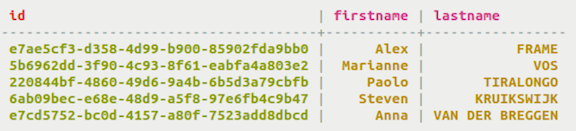
If you have simple retrieval needs, use a simple primary key.
Using a simple primary key
Use a simple primary key to create columns that you can query to return sorted results.
NULL value cannot be
inserted into a PRIMARY KEY column. This restriction applies to
both partition keys and clustering columns.A simple primary key table can be created in three different ways, as shown.
Procedure
-
Create the table cyclist_name in the
cycling keyspace, making id the
primary key. Insert the
PRIMARY KEYkeywords after the column name in theCREATE TABLEdefinition. Before creating the table, set the keyspace with aUSEstatement.USE cycling; CREATE TABLE cyclist_name ( id UUID PRIMARY KEY, lastname text, firstname text );
-
This same example can be written with the primary key identified at the end of
the table definition. Insert the
PRIMARY KEYkeywords after the last column definition in theCREATE TABLEdefinition, followed by the column name of the key. The column name is enclosed in parentheses.USE cycling; CREATE TABLE cyclist_name ( id UUID, lastname text, firstname text, PRIMARY KEY (id) );
-
The keyspace name can be used to identify the keyspace in the
CREATE
                        TABLE
statement instead of theUSEstatement.CREATE TABLE cycling.cyclist_name ( id UUID, lastname text, firstname text, PRIMARY KEY (id) );