Use the Astra Streaming Pulsar Admin API
Use the Astra Streaming Pulsar Admin API to manage resources within your Astra Streaming tenants, such as namespaces, topics, and subscriptions.
|
More endpoints
This page summarizes commonly used endpoints. For more information and all endpoints, see the Astra Streaming Pulsar Admin API specification reference. |
Other available APIs include the Astra Streaming DevOps API and the OSS Apache Pulsar™ REST APIs.
Prerequisites
To send requests to the Astra Streaming Pulsar Admin API, you need the following:
-
An active Astra account with access to Astra Streaming.
-
An Astra Streaming tenant.
-
A Pulsar token for your tenant.
An Astra application token isn’t the same as a Pulsar token. For more information, see Manage tokens.
-
Your tenant’s Web Service URL.
To get the Web Service URL, do the following:
-
In the Astra Portal header, click Applications, and then select Streaming.
-
Click the name of your tenant.
-
Click the Connect tab.
-
Find the Tenant Details section. This section includes the essential information you need to communicate with your Pulsar tenant, including the Web Service URL.
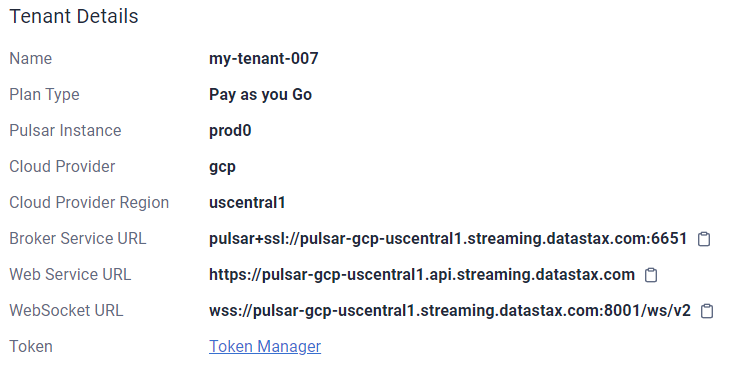
The Web Service URL isn’t the same as the Pulsar Broker Service URL.
Web Service URLs start with
http. Broker Service URLs start withpulsar(+ssl).
-
-
Depending on the operations you need to perform, you might need additional information about your tenant, such as the subscription name or topic name. You can get this information with
GET "https://api.astra.datastax.com/v2/streaming/tenants"or from the Tenant Details section in the Astra Portal.
Set environment variables
Due to their frequency in Astra Streaming Pulsar Admin API calls, you might find it helpful to set environment variables for the credentials, tenant details, and other values:
export PULSAR_TOKEN="TENANT_PULSAR_TOKEN"
export WEB_SERVICE_URL="TENANT_PULSAR_WEB_SERVICE_URL"
export NAMESPACE="NAMESPACE_NAME"
export TENANT="TENANT_NAME"
export TOPIC="TOPIC_NAME"
export NUM_OF_PARTITIONS="PARTITIONS"
export SUBSCRIPTION="SUBSCRIPTION_NAME"
export INSTANCE="TENANT_INSTANCE_NAME"
export SOURCE="SOURCE_CONNECTOR_NAME"
export SINK="SINK_NAME"
export FUNCTION="FUNCTION_DISPLAY_NAME"
export TOKENID="PULSAR_TOKEN_UUID"
To learn how to get these values, see Prerequisites.
The examples in this guide use environment variables for these values. For example:
curl -sS --fail -L -X GET "$WEB_SERVICE_URL/admin/v3/sinks/builtinsinks" \
  --header "Authorization: $PULSAR_TOKEN"
Format responses
The default response is a single JSON string.
You can use modifications like | jq . or | python3 -mjson.tool to format the output for easier reading.
Formatting the response is optional; it isn’t required to execute API requests.
Many examples in this reference use | python3 -mjson.tool to format the JSON response.
Additionally, the examples use the -sS --fail options to suppress trivial output and handle errors more gracefully while passing the content of successful responses to stdout.
Omit the -sS --fail options for debugging or to get the full output, including progress bars and warnings.
Namespace operations
Use the following Astra Streaming Pulsar Admin API endpoints to manage Astra Streaming namespaces.
Silent success
Many of the Astra Streaming Pulsar Admin API endpoints don’t return a response when the request succeeds. Unless otherwise noted, a lack of response indicates that the request was successful.
Get namespaces
Get a list of namespaces in a tenant:
curl -sS --fail -L -X GET "https://$WEB_SERVICE_URL/admin/v2/namespaces/$TENANT" \
  --header "Authorization: Bearer $PULSAR_TOKEN" \
  | python3 -mjson.tool
[
"mytenant/default",
"mytenant/mynamespace"
]Create a namespace
curl -sS --fail -L -X PUT "$WEB_SERVICE_URL/admin/v2/namespaces/$TENANT/NAMESPACE_TO_CREATE" \
--header "Authorization: Bearer $PULSAR_TOKEN" \
--data-raw '{
  NAMESPACE_POLICIES
}'
There are many settings you can configure for a namespace, such as message retention, backlog quota, and message TTL.
If the request body is empty, default values are used for the namespace configuration.
For more information, see the PUT /admin/v2/namespaces/$TENANT/$NAMESPACE specification.
Edit namespace policies
After you create a namespace, you can use targeted endpoints to get and set specific policies without needing to pass the entire namespace configuration in the request.
The following examples demonstrate some of these endpoints. For more information and all endpoints, see the Astra Streaming Pulsar Admin API specification reference.
Message retention policy
Get the message retention settings for a namespace:
curl -sS --fail -L -X GET "$WEB_SERVICE_URL/admin/v2/namespaces/$TENANT/$NAMESPACE/retention" \
  --header "Authorization: Bearer $PULSAR_TOKEN" \
  | python3 -mjson.tool
The result is a JSON object containing the current message retention settings:
{
  "retentionTimeInMinutes": 0,
  "retentionSizeInMB": 0
}
Edit the message retention settings for a namespace, passing the new settings in the request body:
curl -L -X POST "$WEB_SERVICE_URL/admin/v2/namespaces/$TENANT/$NAMESPACE/retention" \
  --header "Content-Type: application/json" \
  --header "Authorization: Bearer $PULSAR_TOKEN" \
  --data '{
    "retentionTimeInMinutes": 360,
    "retentionSizeInMB": 102
}'|
Use the response from the |
Backlog quota policy
Get the backlog quota settings for a namespace:
curl -sS --fail -L -X GET "$WEB_SERVICE_URL/admin/v2/namespaces/$TENANT/$NAMESPACE/backlogQuotaMap" \
  --header "Authorization: Bearer $PULSAR_TOKEN" \
  | python3 -mjson.tool
The result is a JSON object containing the current backlog quota settings:
{
  "destination_storage": {
    "limit": -1,
    "limitSize": 102400,
    "limitTime": 3600,
    "policy": "producer_exception"
  }
}
Edit the backlog quota settings for a namespace, passing the new settings in the request body:
curl -sS --fail -L -X POST "$WEB_SERVICE_URL/admin/v2/namespaces/$TENANT/$NAMESPACE/backlogQuota" \
  --header "Authorization: Bearer $PULSAR_TOKEN" \
  --header "Content-Type: application/json" \
  --data '{
    "limit": -1,
    "limitSize": 102400,
    "limitTime": 3600,
    "policy": "producer_exception"
}'|
Use the response from the |
Message TTL policy
Get the message time-to-live (TTL) setting for a namespace:
curl -sS --fail -L -X GET "$WEB_SERVICE_URL/admin/v2/namespaces/$TENANT/$NAMESPACE/messageTTL" \
  --header "Authorization: Bearer $PULSAR_TOKEN" \
  | python3 -mjson.tool
The response is a number representing the TTL duration in seconds, such as 3600.
Edit the message TTL policy for a namespace, passing the new TTL in seconds in the request body:
curl -sS --fail -L -X POST "$WEB_SERVICE_URL/admin/v2/namespaces/$TENANT/$NAMESPACE/messageTTL" \
  --header "Authorization: Bearer $PULSAR_TOKEN" \
  --header "Content-Type: application/json" \
  --data 5000
Automatic topic creation policy
Edit the automatic topic creation settings for the specified namespace, passing the new settings in the request body:
curl -sS --fail -L -X POST "$WEB_SERVICE_URL/admin/v2/namespaces/$TENANT/$NAMESPACE/autoTopicCreation" \
  --header "Authorization: Bearer $PULSAR_TOKEN" \
  --header "Content-Type: application/json" \
  --data '{
    "allowAutoTopicCreation": true,
    "defaultNumPartitions" 3,
    "topicType": "partitioned"
  }'
allowAutoTopicCreation indicates whether automatic topic creation is allowed for the namespace.
defaultNumPartitions indicates the default number of partitions for automatically created partitioned topics.
topicType indicates the type of topic that can be automatically created.
It can be either non-partitioned or partitioned.
If set to non-partitioned, then the defaultNumPartitions field is ignored.
Maximum consumers per topic policy
Get the maximum number of consumers allowed for each topic in a namespace:
curl -sS --fail -L -X GET "$WEB_SERVICE_URL/admin/v2/namespaces/$TENANT/$NAMESPACE/maxConsumersPerTopic" \
  --header "Authorization: Bearer $PULSAR_TOKEN" \
  | python3 -mjson.tool
Edit the maximum consumers per topic policy, passing the new limit in the request body:
curl -sS --fail -L -X POST "$WEB_SERVICE_URL/admin/v2/namespaces/$TENANT/$NAMESPACE/maxConsumersPerTopic" \
  --header "Authorization: Bearer $PULSAR_TOKEN" \
  --header "Content-Type: application/json" \
  --data 100
Maximum topics per namespace policy
Get the maximum number of topics allowed in a namespace:
curl -sS --fail -L -X GET "$WEB_SERVICE_URL/admin/v2/namespaces/$TENANT/$NAMESPACE/maxTopicsPerNamespace" \
  --header "Authorization: Bearer $PULSAR_TOKEN" \
  | python3 -mjson.tool
Edit the maximum topics per namespace policy, passing the new limit in the request body:
curl -sS --fail -L -X POST "$WEB_SERVICE_URL/admin/v2/namespaces/$TENANT/$NAMESPACE/maxTopicsPerNamespace" \
  --header "Content-Type: application/json" \
  --header "Authorization: Bearer $PULSAR_TOKEN" \
  --data 1000
Delete a namespace
curl -sS --fail -L -X DELETE "$WEB_SERVICE_URL/admin/v2/namespaces/$TENANT/NAMESPACE_TO_DELETE" \
  --header "Authorization: Bearer $PULSAR_TOKEN"
Topic operations
Use the following Astra Streaming Pulsar Admin API endpoints to manage topics in your Astra Streaming Pulsar namespaces.
Get topics in a namespace
There are multiple endpoints you can use to get a list of topics in a namespace using different filters:
-
Get all persistent topics in a namespace:
curl -sS --fail -L -X GET "$WEB_SERVICE_URL/admin/v2/persistent/$TENANT/$NAMESPACE" \ --header "Authorization: Bearer $PULSAR_TOKEN" \ | python3 -mjson.tool -
Get partitioned persistent topics in a namespace:
curl -sS --fail -L -X GET "$WEB_SERVICE_URL/admin/v2/persistent/$TENANT/$NAMESPACE/partitioned" \ --header "Authorization: Bearer $PULSAR_TOKEN" \ | python3 -mjson.tool -
Get non-persistent topics in a namespace:
curl -sS --fail -L -X GET "$WEB_SERVICE_URL/admin/v2/non-persistent/$TENANT/$NAMESPACE" \ --header "Authorization: Bearer $PULSAR_TOKEN" \ | python3 -mjson.tool -
Get partitioned non-persistent topics in a namespace:
curl -sS --fail -L -X GET "$WEB_SERVICE_URL/admin/v2/non-persistent/$TENANT/$NAMESPACE/partitioned" \
  --header "Authorization: Bearer $PULSAR_TOKEN" \
  | python3 -mjson.tool
For all of these endpoints, the result is a list of topics in the given namespace that match the endpoint’s filter. For example, the following result includes partitioned and non-partitioned persistent topics:
[
  "persistent://testtenant/ns0/mytopic-partition-0",
  "persistent://testtenant/ns0/mytopic-partition-1",
  "persistent://testtenant/ns0/topic1",
  "persistent://testtenant/ns0/topic2",
  "persistent://testtenant/ns0/tp1-partition-0",
  "persistent://testtenant/ns0/tp1-partition-1",
  "persistent://testtenant/ns0/tp1-partition-2",
  "persistent://testtenant/ns0/tp1-partition-3"
]
Create a topic
There are multiple endpoints you can use to create different types of topics:
-
Create a persistent, non-partitioned topic:
curl -sS --fail -L -X PUT "$WEB_SERVICE_URL/admin/v2/persistent/$TENANT/$NAMESPACE/$TOPIC" \ --header "Authorization: Bearer $PULSAR_TOKEN" -
Create a persistent, partitioned topic:
curl -sS --fail -L -X PUT "$WEB_SERVICE_URL/admin/v2/persistent/$TENANT/$NAMESPACE/$TOPIC/partitions" \ --header "Authorization: Bearer $PULSAR_TOKEN" \ --header "Content-Type: application/json" \ --data $NUM_OF_PARTITIONS -
Create a non-persistent, non-partitioned topic:
curl -sS --fail -L -X PUT "$WEB_SERVICE_URL/admin/v2/non-persistent/$TENANT/$NAMESPACE/$TOPIC" \ --header "Authorization: Bearer $PULSAR_TOKEN" -
Create a non-persistent, partitioned topic:
curl -sS --fail -L -X PUT "$WEB_SERVICE_URL/admin/v2/non-persistent/$TENANT/$NAMESPACE/$TOPIC/partitions" \
  --header "Authorization: Bearer $PULSAR_TOKEN" \
  --header "Content-Type: application/json" \
  --data $NUM_OF_PARTITIONS
Delete a topic
Delete a persistent topic:
curl -sS --fail -L -X DELETE "$WEB_SERVICE_URL/admin/v2/persistent/$TENANT/$NAMESPACE/$TOPIC" \
  --header "Authorization: Bearer $PULSAR_TOKEN"
Delete a non-persistent topic:
curl -sS --fail -L -X DELETE "$WEB_SERVICE_URL/admin/v2/non-persistent/$TENANT/$NAMESPACE/$TOPIC" \
  --header "Authorization: Bearer $PULSAR_TOKEN"
Get topic details
There are multiple endpoints you can use to get information about topics, including filtered and unfiltered responses.
The following examples demonstrate some of these endpoints. For more information and all endpoints, see the Astra Streaming Pulsar Admin API specification reference.
Get internal statistics for a persistent, non-partitioned topic
curl -sS --fail -L -X GET "$WEB_SERVICE_URL/admin/v2/persistent/$TENANT/$NAMESPACE/$TOPIC/internalStats" \
  --header "Authorization: Bearer $PULSAR_TOKEN" \
  | python3 -mjson.tool
{
"entriesAddedCounter": 0,
"numberOfEntries": 0,
"totalSize": 0,
"currentLedgerEntries": 0,
"currentLedgerSize": 0,
"lastLedgerCreatedTimestamp": "2023-04-25T15:35:45.136Z",
"waitingCursorsCount": 0,
"pendingAddEntriesCount": 0,
"lastConfirmedEntry": "275812:-1",
"state": "LedgerOpened",
"ledgers": [
{
"ledgerId": 275812,
"entries": 0,
"size": 0,
"offloaded": false,
"underReplicated": false
}
],
"cursors": {},
"schemaLedgers": [],
"compactedLedger": {
"ledgerId": -1,
"entries": -1,
"size": -1,
"offloaded": false,
"underReplicated": false
}
}Get statistics for a persistent, non-partitioned topic
curl -sS --fail -L -X GET "$WEB_SERVICE_URL/admin/v2/persistent/$TENANT/$NAMESPACE/$TOPIC/stats" \
  --header "Authorization: Bearer $PULSAR_TOKEN" \
  | python3 -mjson.tool
{
"msgRateIn": 0.0,
"msgThroughputIn": 0.0,
"msgRateOut": 0.0,
"msgThroughputOut": 0.0,
"bytesInCounter": 0,
"msgInCounter": 0,
"bytesOutCounter": 0,
"msgOutCounter": 0,
"averageMsgSize": 0.0,
"msgChunkPublished": false,
"storageSize": 0,
"backlogSize": 0,
"publishRateLimitedTimes": 0,
"earliestMsgPublishTimeInBacklogs": 0,
"offloadedStorageSize": 0,
"lastOffloadLedgerId": 0,
"lastOffloadSuccessTimeStamp": 0,
"lastOffloadFailureTimeStamp": 0,
"publishers": [],
"waitingPublishers": 0,
"subscriptions": {},
"replication": {},
"deduplicationStatus": "Disabled",
"nonContiguousDeletedMessagesRanges": 0,
"nonContiguousDeletedMessagesRangesSerializedSize": 0,
"compaction": {
"lastCompactionRemovedEventCount": 0,
"lastCompactionSucceedTimestamp": 0,
"lastCompactionFailedTimestamp": 0,
"lastCompactionDurationTimeInMills": 0
}
...TRUNCATED FOR READABILITY...
}Get statistics for a persistent, partitioned topic
curl -sS --fail -L -X GET "$WEB_SERVICE_URL/admin/v2/persistent/$TENANT/$NAMESPACE/$TOPIC/partitioned-stats" \
  --header "Authorization: Bearer $PULSAR_TOKEN" \
  | python3 -mjson.tool
{
"msgRateIn": 0.0,
"msgThroughputIn": 0.0,
"msgRateOut": 0.0,
"msgThroughputOut": 0.0,
"bytesInCounter": 0,
"msgInCounter": 0,
"bytesOutCounter": 0,
"msgOutCounter": 0,
"averageMsgSize": 0.0,
"msgChunkPublished": false,
"storageSize": 0,
"backlogSize": 0,
"publishRateLimitedTimes": 0,
"earliestMsgPublishTimeInBacklogs": 0,
"offloadedStorageSize": 0,
"lastOffloadLedgerId": 0,
"lastOffloadSuccessTimeStamp": 0,
"lastOffloadFailureTimeStamp": 0,
"publishers": [],
"waitingPublishers": 0,
"subscriptions": {},
"replication": {},
"nonContiguousDeletedMessagesRanges": 0,
"nonContiguousDeletedMessagesRangesSerializedSize": 0,
"compaction": {
"lastCompactionRemovedEventCount": 0,
"lastCompactionSucceedTimestamp": 0,
"lastCompactionFailedTimestamp": 0,
"lastCompactionDurationTimeInMills": 0
},
"metadata": {
"partitions": 2,
"deleted": false
},
"partitions": {
"persistent://testcreate/ns0/mytopic-partition-1": {
"msgRateIn": 0.0,
"msgThroughputIn": 0.0,
"msgRateOut": 0.0,
"msgThroughputOut": 0.0,
"bytesInCounter": 0,
"msgInCounter": 0,
"bytesOutCounter": 0,
"msgOutCounter": 0,
"averageMsgSize": 0.0,
"msgChunkPublished": false,
"storageSize": 0,
"backlogSize": 0,
"publishRateLimitedTimes": 0,
"earliestMsgPublishTimeInBacklogs": 0,
"offloadedStorageSize": 0,
"lastOffloadLedgerId": 0,
"lastOffloadSuccessTimeStamp": 0,
"lastOffloadFailureTimeStamp": 0,
"publishers": [],
"waitingPublishers": 0,
"subscriptions": {},
"replication": {},
"deduplicationStatus": "Disabled",
"nonContiguousDeletedMessagesRanges": 0,
"nonContiguousDeletedMessagesRangesSerializedSize": 0,
"compaction": {
"lastCompactionRemovedEventCount": 0,
"lastCompactionSucceedTimestamp": 0,
"lastCompactionFailedTimestamp": 0,
"lastCompactionDurationTimeInMills": 0
}
},
"persistent://testcreate/ns0/mytopic-partition-0": {
"msgRateIn": 0.0,
"msgThroughputIn": 0.0,
"msgRateOut": 0.0,
"msgThroughputOut": 0.0,
"bytesInCounter": 0,
"msgInCounter": 0,
"bytesOutCounter": 0,
"msgOutCounter": 0,
"averageMsgSize": 0.0,
"msgChunkPublished": false,
"storageSize": 0,
"backlogSize": 0,
"publishRateLimitedTimes": 0,
"earliestMsgPublishTimeInBacklogs": 0,
"offloadedStorageSize": 0,
"lastOffloadLedgerId": 0,
"lastOffloadSuccessTimeStamp": 0,
"lastOffloadFailureTimeStamp": 0,
"publishers": [],
"waitingPublishers": 0,
"subscriptions": {},
"replication": {},
"deduplicationStatus": "Disabled",
"nonContiguousDeletedMessagesRanges": 0,
"nonContiguousDeletedMessagesRangesSerializedSize": 0,
"compaction": {
"lastCompactionRemovedEventCount": 0,
"lastCompactionSucceedTimestamp": 0,
"lastCompactionFailedTimestamp": 0,
"lastCompactionDurationTimeInMills": 0
}
}
}
...TRUNCATED FOR READABILITY...
}Get statistics for all topics in a namespace
curl -sS --fail -L -X GET "$WEB_SERVICE_URL/admin/v2/stats/topics/$TENANT/$NAMESPACE" \
  --header "Authorization: Bearer $PULSAR_TOKEN" \
  | python3 -mjson.tool
{
"persistent://testcreate/ns0/mytopic3": {
"name": "persistent://testcreate/ns0/mytopic3",
"totalMessagesIn": 0,
"totalMessagesOut": 0,
"totalBytesIn": 0,
"totalBytesOut": 0,
"msgRateIn": 0,
"msgRateOut": 0,
"throughputIn": 0,
"throughputOut": 0,
"subscriptionCount": 0,
"producerCount": 0,
"consumerCount": 0,
"subscriptionDelayed": 0,
"storageSize": 0,
"backlogStorageByteSize": 0,
"msgBacklogNumber": 0,
"updatedAt": "2023-04-25T16:00:24.252397617Z"
},
"persistent://testcreate/ns0/t1": {
"name": "persistent://testcreate/ns0/t1",
"totalMessagesIn": 0,
"totalMessagesOut": 0,
"totalBytesIn": 0,
"totalBytesOut": 0,
"msgRateIn": 0,
"msgRateOut": 0,
"throughputIn": 0,
"throughputOut": 0,
"subscriptionCount": 0,
"producerCount": 0,
"consumerCount": 0,
"subscriptionDelayed": 0,
"storageSize": 0,
"backlogStorageByteSize": 0,
"msgBacklogNumber": 0,
"updatedAt": "2023-04-25T16:00:24.252466612Z"
},
"persistent://testcreate/ns0/t1-partition-0": {
"name": "persistent://testcreate/ns0/t1-partition-0",
"totalMessagesIn": 516,
"totalMessagesOut": 514,
"totalBytesIn": 637776,
"totalBytesOut": 637674,
"msgRateIn": 0,
"msgRateOut": 0,
"throughputIn": 0,
"throughputOut": 0,
"subscriptionCount": 1,
"producerCount": 0,
"consumerCount": 0,
"subscriptionDelayed": 0,
"storageSize": 1899200,
"backlogStorageByteSize": 0,
"msgBacklogNumber": 0,
"updatedAt": "2023-04-25T16:00:24.252410963Z"
},
"persistent://testcreate/ns0/t1-partition-1": {
"name": "persistent://testcreate/ns0/t1-partition-1",
"totalMessagesIn": 534,
"totalMessagesOut": 531,
"totalBytesIn": 696340,
"totalBytesOut": 692347,
"msgRateIn": 0,
"msgRateOut": 0,
"throughputIn": 0,
"throughputOut": 0,
"subscriptionCount": 1,
"producerCount": 0,
"consumerCount": 0,
"subscriptionDelayed": 0,
"storageSize": 2020678,
"backlogStorageByteSize": 2151,
"msgBacklogNumber": 3,
"updatedAt": "2023-04-25T16:00:24.252425482Z"
},
"persistent://testcreate/ns0/t1-partition-2": {
"name": "persistent://testcreate/ns0/t1-partition-2",
"totalMessagesIn": 522,
"totalMessagesOut": 519,
"totalBytesIn": 653487,
"totalBytesOut": 649286,
"msgRateIn": 0,
"msgRateOut": 0,
"throughputIn": 0,
"throughputOut": 0,
"subscriptionCount": 1,
"producerCount": 0,
"consumerCount": 0,
"subscriptionDelayed": 0,
"storageSize": 1916574,
"backlogStorageByteSize": 0,
"msgBacklogNumber": 0,
"updatedAt": "2023-04-25T16:00:24.252438306Z"
},
"persistent://testcreate/ns0/t1-partition-3": {
"name": "persistent://testcreate/ns0/t1-partition-3",
"totalMessagesIn": 516,
"totalMessagesOut": 514,
"totalBytesIn": 631638,
"totalBytesOut": 631536,
"msgRateIn": 0,
"msgRateOut": 0,
"throughputIn": 0,
"throughputOut": 0,
"subscriptionCount": 1,
"producerCount": 0,
"consumerCount": 0,
"subscriptionDelayed": 0,
"storageSize": 1890920,
"backlogStorageByteSize": 1586,
"msgBacklogNumber": 4,
"updatedAt": "2023-04-25T16:00:24.252452735Z"
...TRUNCATED FOR READABILITY...
}
...TRUNCATED FOR READABILITY...
}Subscription operations
Use the following Astra Streaming Pulsar Admin API endpoints to manage Pulsar subscriptions.
|
Like other Pulsar Admin API endpoints, there are separate endpoints for managing subscriptions for persistent and non-persistent topics. The following sections demonstrate some, but not all, of these endpoints. |
Get subscriptions
Get subscriptions for a persistent topic:
curl -sS --fail -L -X GET "$WEB_SERVICE_URL/admin/v2/persistent/$TENANT/$NAMESPACE/$TOPIC/subscriptions" \
  --header "Authorization: Bearer $PULSAR_TOKEN" \
  | python3 -mjson.tool
[
"mysub",
"subscript2"
]Create a subscription
Create a subscription on a topic, using the replicated query parameter to set the subscription’s replication behavior:
-
Create a replicated subscription for a persistent topic:
curl -sS --fail -L -X PUT "$WEB_SERVICE_URL/admin/v2/persistent/$TENANT/$NAMESPACE/$TOPIC/subscription/$SUBSCRIPTION?replicated=true" \ --header "Authorization: Bearer $PULSAR_TOKEN" \ --header "Content-Type: application/json" -
Create a non-replicated subscription for a persistent topic:
curl -sS --fail -L -X PUT "$WEB_SERVICE_URL/admin/v2/persistent/$TENANT/$NAMESPACE/$TOPIC/subscription/$SUBSCRIPTION?replicated=false" \
  --header "Authorization: Bearer $PULSAR_TOKEN" \
  --header "Content-Type: application/json"
Delete a subscription
Delete a subscription from a topic:
curl -sS --fail -L -X DELETE "$WEB_SERVICE_URL/admin/v2/persistent/$TENANT/$NAMESPACE/$TOPIC/subscription/$SUBSCRIPTION" \
  --header "Authorization: Bearer $PULSAR_TOKEN"
Clear a subscription
Clear a subscription on a topic by skipping all pending messages:
curl -sS --fail -L -X POST "$WEB_SERVICE_URL/admin/v2/persistent/$TENANT/$NAMESPACE/$TOPIC/subscription/$SUBSCRIPTION/skip_all" \
  --header "Authorization: Bearer $PULSAR_TOKEN"
Function operations
Use the following Astra Streaming Pulsar Admin API endpoints to manage Pulsar functions.
Get functions in a namespace
curl -sS --fail -L -X GET "$WEB_SERVICE_URL/admin/v3/functions/$TENANT/$NAMESPACE" \
  --header "Authorization: Bearer $PULSAR_TOKEN" \
  | python3 -mjson.tool
[
"testfunction1"
]Get function status
curl -sS --fail -L -X GET "$WEB_SERVICE_URL/admin/v3/functions/$TENANT/$NAMESPACE/$FUNCTION/status" \
  --header "Authorization: Bearer $PULSAR_TOKEN" \
  | python3 -mjson.tool
{
"numInstances": 1,
"numRunning": 0,
"instances": [
{
"instanceId": 0,
"status": {
"running": false,
"error": "",
"numRestarts": 0,
"numReceived": 0,
"numSuccessfullyProcessed": 0,
"numUserExceptions": 0,
"latestUserExceptions": null,
"numSystemExceptions": 0,
"latestSystemExceptions": null,
"averageLatency": 0.0,
"lastInvocationTime": 0,
"workerId": "pulsar-aws-useast2-function-0"
}
}
]
}Get function statistics
curl -sS --fail -L -X GET "$WEB_SERVICE_URL/admin/v3/functions/$TENANT/$NAMESPACE/$FUNCTION/stats" \
  --header "Authorization: Bearer $PULSAR_TOKEN" \
  | python3 -mjson.tool
{
"receivedTotal": 0,
"processedSuccessfullyTotal": 0,
"systemExceptionsTotal": 0,
"userExceptionsTotal": 0,
"avgProcessLatency": null,
"1min": {
"receivedTotal": 0,
"processedSuccessfullyTotal": 0,
"systemExceptionsTotal": 0,
"userExceptionsTotal": 0,
"avgProcessLatency": null
},
"lastInvocation": null,
"instances": [
{
"instanceId": 0,
"metrics": {
"receivedTotal": 0,
"processedSuccessfullyTotal": 0,
"systemExceptionsTotal": 0,
"userExceptionsTotal": 0,
"avgProcessLatency": null,
"1min": {
"receivedTotal": 0,
"processedSuccessfullyTotal": 0,
"systemExceptionsTotal": 0,
"userExceptionsTotal": 0,
"avgProcessLatency": null
},
"lastInvocation": null,
"userMetrics": {}
}
}
]
}Get function details
curl -sS --fail -L -X GET "$WEB_SERVICE_URL/admin/v3/functions/$TENANT/$NAMESPACE/$FUNCTION" \
  --header "Authorization: Bearer $PULSAR_TOKEN" \
  | python3 -mjson.tool
{
"runtimeFlags": null,
"tenant": "mytenant",
"namespace": "mynamespace",
"name": "testfunction1",
"className": "TransformFunction",
"inputs": null,
"customSerdeInputs": null,
"topicsPattern": null,
"customSchemaInputs": null,
"customSchemaOutputs": null,
"inputSpecs": {
"testcreate/ns0/tp1": {
"schemaType": null,
"serdeClassName": null,
"schemaProperties": {},
"consumerProperties": {},
"receiverQueueSize": null,
"cryptoConfig": null,
"poolMessages": false,
"regexPattern": false
}
},
"output": "mytenant/mynamespace/tp2",
"producerConfig": {
"maxPendingMessages": null,
"maxPendingMessagesAcrossPartitions": null,
"useThreadLocalProducers": false,
"cryptoConfig": null,
"batchBuilder": ""
},
"outputSchemaType": null,
"outputSerdeClassName": null,
"logTopic": null,
"processingGuarantees": "ATLEAST_ONCE",
"retainOrdering": false,
"retainKeyOrdering": false,
"batchBuilder": null,
"forwardSourceMessageProperty": true,
"userConfig": {
"steps": [
{
"schema-type": "STRING",
"type": "cast"
}
]
},
"secrets": null,
"runtime": "JAVA",
"autoAck": true,
"maxMessageRetries": null,
"deadLetterTopic": null,
"subName": null,
"parallelism": 1,
"resources": {
"cpu": 0.25,
"ram": 1000000000,
"disk": 1000000000
},
"fqfn": null,
"windowConfig": null,
"timeoutMs": 11000,
"jar": null,
"py": null,
"go": null,
"functionType": null,
"cleanupSubscription": false,
"customRuntimeOptions": "",
"maxPendingAsyncRequests": null,
"exposePulsarAdminClientEnabled": null,
"subscriptionPosition": "Latest"
}Start a function
curl -sS --fail -L -X POST "$WEB_SERVICE_URL/admin/v3/functions/$TENANT/$NAMESPACE/$FUNCTION/start" \
  --header "Authorization: Bearer $PULSAR_TOKEN"
Stop a function
curl -sS --fail -L -X POST "$WEB_SERVICE_URL/admin/v3/functions/$TENANT/$NAMESPACE/$FUNCTION/stop" \
  --header "Authorization: Bearer $PULSAR_TOKEN"
Restart a function
curl -sS --fail -L -X POST "$WEB_SERVICE_URL/admin/v3/functions/$TENANT/$NAMESPACE/$FUNCTION/restart" \
  --header "Authorization: Bearer $PULSAR_TOKEN"
Sink connector operations
Use the following Astra Streaming Pulsar Admin API endpoints to manage sink connectors.
|
The Astra Streaming Pulsar Admin API endpoints for source and sink connectors have similar paths and parameters.
If you reuse requests for both sources and sinks, be sure to set the Additionally, each connector has different configuration options. For configuration details, see the documentation for your preferred sink and source connectors. |
Get available sink connectors
Get a list of sink connectors that are available in your Astra Streaming Pulsar tenant:
curl -sS --fail -L -X GET "$WEB_SERVICE_URL/admin/v3/sinks/builtinsinks" \
  --header "Authorization: Bearer $PULSAR_TOKEN"
  | python3 -mjson.tool
Get sinks in a namespace
Get a list of sinks deployed in a namespace:
curl -sS --fail -L -X GET "$WEB_SERVICE_URL/admin/v3/sinks/$TENANT/$NAMESPACE" \
  --header "Authorization: Bearer $PULSAR_TOKEN" \
  | python3 -mjson.tool
[
"mysink1"
]Get the status of a sink
Get the status of all instances of a sink connector:
curl -sS --fail -L -X GET "$WEB_SERVICE_URL/admin/v3/sinks/$TENANT/$NAMESPACE/$SINK_NAME/status" \
  --header "Authorization: Bearer $PULSAR_TOKEN" \
  | python3 -mjson.tool
The response includes an instances array with one object for each connector instance:
{
  "numInstances": 1,
  "numRunning": 0,
  "instances": [
    {
      "instanceId": 0,
      "status": {
        "running": false,
        "error": "",
        "numRestarts": 0,
        "numReadFromPulsar": 0,
        "numSystemExceptions": 0,
        "latestSystemExceptions": null,
        "numSinkExceptions": 0,
        "latestSinkExceptions": null,
        "numWrittenToSink": 0,
        "lastReceivedTime": 0,
        "workerId": "pulsar-useast-function-1"
      }
    }
  ]
}
Get the status of an individual instance of a sink connector:
curl -sS --fail -L -X GET "$WEB_SERVICE_URL/admin/v3/sinks/$TENANT/$NAMESPACE/$SINK_NAME/$SINK_INSTANCE_ID/status" \
  --header "Authorization: Bearer $PULSAR_TOKEN" \
  | python3 -mjson.tool
The response includes a single object with the details for the specified connector instance:
{
 "running": true,
 "error": "string",
 "numRestarts": 0,
 "numReadFromPulsar": 0,
 "numSystemExceptions": 0,
 "latestSystemExceptions": [
   {
     "exceptionString": "string",
     "timestampMs": 0
   }
 ],
 "numSinkExceptions": 0,
 "latestSinkExceptions": [
   {
     "exceptionString": "string",
     "timestampMs": 0
   }
 ],
 "numWrittenToSink": 0,
 "lastReceivedTime": 0,
 "workerId": "string"
}
Get sink details
Get the configuration for an existing sink connector:
curl -sS --fail -L -X GET "$WEB_SERVICE_URL/admin/v3/sinks/$TENANT/$NAMESPACE/$SINK_NAME" \
  --header "Authorization: Bearer $PULSAR_TOKEN" \
  | python3 -mjson.tool
{
"archive": "builtin://data-generator",
"autoAck": true,
"className": "org.apache.pulsar.io.datagenerator.DataGeneratorPrintSink",
"cleanupSubscription": false,
"configs": {},
"customRuntimeOptions": "internal_data",
"deadLetterTopic": null,
"inputSpecs": {
"persistent://testcreate/ns0/tp1": {
"consumerProperties": {},
"cryptoConfig": null,
"poolMessages": false,
"receiverQueueSize": null,
"regexPattern": false,
"schemaProperties": {},
"schemaType": null,
"serdeClassName": null
}
},
"inputs": [
"persistent://testcreate/ns0/tp1"
],
"maxMessageRetries": null,
"name": "mysink1",
"namespace": "ns0",
"negativeAckRedeliveryDelayMs": null,
"parallelism": 1,
"processingGuarantees": "ATLEAST_ONCE",
"resources": {
"cpu": 0.15,
"disk": 500000000,
"ram": 400000000
},
"retainKeyOrdering": false,
"retainOrdering": false,
"runtimeFlags": null,
"secrets": null,
"sourceSubscriptionName": null,
"sourceSubscriptionPosition": "Latest",
"tenant": "testcreate",
"timeoutMs": 5000,
"topicToSchemaProperties": null,
"topicToSchemaType": null,
"topicToSerdeClassName": null,
"topicsPattern": null,
"transformFunction": null,
"transformFunctionClassName": null,
"transformFunctionConfig": null
}Create a sink
To create a sink connector on a topic, you must provide the sink connector configuration in JSON format.
The following example configures the built-in Apache Kafka® sink connector in Astra Streaming:
{
  "tenant": "testcreate",
  "namespace": "ns0",
  "name": "mykafkaconnector",
  "archive": "builtin://kafka",
  "parallelism": 1,
  "autoAck": true,
  "cleanupSubscription": false,
  "configs": {
    "acks": "1",
    "batchSize": "16384",
    "bootstrapServers": "localhost:55200,localhost:55201",
    "maxRequestSize": "1048576",
    "producerConfigProperties": {
      "client.id": "astra-streaming-client",
      "sasl.jaas.config": "sensitive_data_removed",
      "sasl.mechanism": "PLAIN",
      "sasl.password": "sensitive_data_removed",
      "sasl.username": "myuserid",
      "security.protocol": "SASL_SSL"
    },
    "topic": "mykafka-topic"
  },
  "inputs": [ "persistent://testcreate/ns0/mytopic3" ]
}
You can pass the configuration in-line or with a configuration file.
The following example uses the previous configuration file example, kafka-sink-config.json:
curl -sS --fail -L -X POST "$WEB_SERVICE_URL/admin/v3/sinks/$TENANT/$NAMESPACE/$SINK_NAME" \
  --header "Authorization: Bearer $PULSAR_TOKEN" \
--form "sinkConfig=@kafka-sink-config.json;type=application/json"|
To use a file as input for a curl command, use the Relative paths are resolved from the current working directory. The file must be in a location that the shell can access, and the user running the command must have permission to read the file. |
Start a sink
Start all instances of a sink connector:
curl -sS --fail -L -X POST "$WEB_SERVICE_URL/admin/v3/sinks/$TENANT/$NAMESPACE/$SINK_NAME/start" \
  --header "Authorization: Bearer $PULSAR_TOKEN"
Start an individual instance of a sink connector
curl -sS --fail -L -X POST "$WEB_SERVICE_URL/admin/v3/sinks/$TENANT/$NAMESPACE/$SINK_NAME/$SINK_INSTANCE_ID/start" \
  --header "Authorization: Bearer $PULSAR_TOKEN"
Stop a sink
Stop all instances of a sink connector:
curl -sS --fail -L -X POST "$WEB_SERVICE_URL/admin/v3/sinks/$TENANT/$NAMESPACE/$SINK_NAME/stop" \
  --header "Authorization: Bearer $PULSAR_TOKEN"
Stop an individual instance of a sink connector:
curl -sS --fail -L -X POST "$WEB_SERVICE_URL/admin/v3/sinks/$TENANT/$NAMESPACE/$SINK_NAME/$SINK_INSTANCE_ID/stop" \
  --header "Authorization: Bearer $PULSAR_TOKEN"
Restart a sink
Restart all instances of a sink connector:
curl -sS --fail -L -X POST "$WEB_SERVICE_URL/admin/v3/sinks/$TENANT/$NAMESPACE/$SINK_NAME/restart" \
  --header "Authorization: Bearer $PULSAR_TOKEN"
Restart an individual instance of a sink connector:
curl -sS --fail -L -X POST "$WEB_SERVICE_URL/admin/v3/sinks/$TENANT/$NAMESPACE/$SINK_NAME/$SINK_INSTANCE_ID/restart" \
  --header "Authorization: Bearer $PULSAR_TOKEN"
Delete a sink
Delete all instances of a sink connector from a namespace:
curl -sS --fail -L -X DELETE "$WEB_SERVICE_URL/admin/v3/sinks/$TENANT/$NAMESPACE/$SINK_NAME" \
  --header "Authorization: Bearer $PULSAR_TOKEN"
Source connector operations
Use the following Astra Streaming Pulsar Admin API endpoints to manage source connectors.
|
The Astra Streaming Pulsar Admin API endpoints for source and sink connectors have similar paths and parameters.
If you reuse requests for both sources and sinks, be sure to set the Additionally, each connector has different configuration options. For configuration details, see the documentation for your preferred sink and source connectors. |
Get available source connectors
Get a list of source connectors that are available in your Astra Streaming Pulsar tenant:
curl -sS --fail -L -X GET "$WEB_SERVICE_URL/admin/v3/sources/builtinsources" \
  --header "Authorization: Bearer $PULSAR_TOKEN"
Get sources in a namespace
Get a list of source connectors deployed in a namespace:
curl -sS --fail -L -X GET "$WEB_SERVICE_URL/admin/v3/sources/$TENANT/$NAMESPACE" \
  --header "Authorization: Bearer $PULSAR_TOKEN" \
  | python3 -mjson.tool
[
"mysource1"
]Get the status of a source
Get the status of all instances of a source connector:
curl -sS --fail -L -X GET "$WEB_SERVICE_URL/admin/v3/sources/$TENANT/$NAMESPACE/$SOURCE_NAME/status" \
  --header "Authorization: Bearer $PULSAR_TOKEN" \
  | python3 -mjson.tool
The response includes an instances array with one object for each connector instance:
{
  "numInstances": 1,
  "numRunning": 1,
  "instances": [
    {
      "instanceId": 0,
      "status": {
        "running": true,
        "error": "",
        "numRestarts": 0,
        "numReceivedFromSource": 0,
        "numSystemExceptions": 0,
        "latestSystemExceptions": [],
        "numSourceExceptions": 0,
        "latestSourceExceptions": [],
        "numWritten": 0,
        "lastReceivedTime": 0,
        "workerId": "pulsar-aws-useast2-function-0"
      }
    }
  ]
}
Get the status of an individual instance of a source connector:
curl -sS --fail -L -X GET "$WEB_SERVICE_URL/admin/v3/sources/$TENANT/$NAMESPACE/$SOURCE_NAME/$SOURCE_INSTANCE_ID/status" \
  --header "Authorization: Bearer $PULSAR_TOKEN" \
  | python3 -mjson.tool
The response includes a single object with the details for the specified connector instance:
{
  "running": true,
  "error": "string",
  "numRestarts": 0,
  "numReceivedFromSource": 0,
  "numSystemExceptions": 0,
  "latestSystemExceptions": [
    {
      "exceptionString": "string",
      "timestampMs": 0
    }
  ],
  "numSourceExceptions": 0,
  "latestSourceExceptions": [
    {
      "exceptionString": "string",
      "timestampMs": 0
    }
  ],
  "numWritten": 0,
  "lastReceivedTime": 0,
  "workerId": "string"
}
Get source details
Get the configuration for an existing source connector:
curl -sS --fail -L -X GET "$WEB_SERVICE_URL/admin/v3/sources/$TENANT/$NAMESPACE/$SOURCE_NAME" \
  --header "Authorization: Bearer $PULSAR_TOKEN" \
  | python3 -mjson.tool
{
"archive": "builtin://netty",
"batchBuilder": null,
"batchSourceConfig": null,
"className": "org.apache.pulsar.io.netty.NettySource",
"configs": {
"host": "127.0.0.1",
"numberOfThreads": "1",
"port": "10999",
"type": "tcp"
},
"customRuntimeOptions": "internal_data",
"name": "mysource",
"namespace": "ns0",
"parallelism": 1,
"processingGuarantees": "ATLEAST_ONCE",
"producerConfig": {
"batchBuilder": "",
"cryptoConfig": null,
"maxPendingMessages": null,
"maxPendingMessagesAcrossPartitions": null,
"useThreadLocalProducers": false
},
"resources": {
"cpu": 0.25,
"disk": 1000000000,
"ram": 1000000000
},
"runtimeFlags": null,
"schemaType": null,
"secrets": null,
"serdeClassName": null,
"tenant": "testcreate",
"topicName": "persistent://testcreate/ns0/t1"
}Create a source
To create a source connector on a topic, you must provide the source connector configuration in JSON format.
You can pass the configuration in-line or with a configuration file.
The following example uses a configuration file name mynetty-source-config.json:
curl -sS --fail -L -X POST "$WEB_SERVICE_URL/admin/v3/sources/$TENANT/$NAMESPACE/$SOURCE_NAME" \
  --header "Authorization: Bearer $PULSAR_TOKEN" \
--form "sourceConfig=@mynetty-source-config.json;type=application/json"|
To use a file as input for a curl command, use the Relative paths are resolved from the current working directory. The file must be in a location that the shell can access, and the user running the command must have permission to read the file. |
Start a source
Start all instances of a source connector:
curl -sS --fail -L -X POST "$WEB_SERVICE_URL/admin/v3/sources/$TENANT/$NAMESPACE/$SOURCE_NAME/start" \
  --header "Authorization: Bearer $PULSAR_TOKEN"
Start an individual instance of a source connector:
curl -sS --fail -L -X POST "$WEB_SERVICE_URL/admin/v3/sources/$TENANT/$NAMESPACE/$SOURCE_NAME/$SOURCE_INSTANCE_ID/start" \
  --header "Authorization: Bearer $PULSAR_TOKEN"
Stop a source
Start all instances of a source connector:
curl -sS --fail -L -X POST "$WEB_SERVICE_URL/admin/v3/sources/$TENANT/$NAMESPACE/$SOURCE_NAME/stop" \
  --header "Authorization: Bearer $PULSAR_TOKEN"
Start an individual instance of a source connector:
curl -sS --fail -L -X POST "$WEB_SERVICE_URL/admin/v3/sources/$TENANT/$NAMESPACE/$SOURCE_NAME/$SOURCE_INSTANCE_ID/stop" \
  --header "Authorization: Bearer $PULSAR_TOKEN"
Restart a source
Restart all instances of a source connector:
curl -sS --fail -L -X POST "$WEB_SERVICE_URL/admin/v3/sources/$TENANT/$NAMESPACE/$SOURCE_NAME/restart" \
  --header "Authorization: Bearer $PULSAR_TOKEN"
Restart an individual instance of a source connector:
curl -sS --fail -L -X POST "$WEB_SERVICE_URL/admin/v3/sources/$TENANT/$NAMESPACE/$SOURCE_NAME/$SOURCE_INSTANCE_ID/restart" \
  --header "Authorization: Bearer $PULSAR_TOKEN"
Delete a source
Delete all instances of a source connector from a namespace:
curl -sS --fail -L -X DELETE "$WEB_SERVICE_URL/admin/v3/sources/$TENANT/$NAMESPACE/$SOURCE_NAME" \
  --header "Authorization: Bearer $PULSAR_TOKEN"