About DSE OpsCenter
DSE OpsCenter is a visual management and monitoring solution for DataStax Enterprise (DSE). OpsCenter Lifecycle Manager (LCM) provisions DSE clusters and centrally manages cluster configurations.
OpsCenter enables architects, database administrators, and operations staff to intelligently and proactively ensure that their database clusters are running optimally. OpsCenter also simplifies administration tasks such as:
-
Adding and expanding clusters
-
Configuring nodes
-
Viewing performance metrics
-
Correcting issues
-
Monitoring cluster health on the dashboard
DSE OpsCenter features
DSE OpsCenter includes the following key features:
- Dashboard monitoring
-
Quickly access an overview that shows any alerts and condenses the dashboards of multiple clusters.
-
shows an overview of commonly monitored performance metrics.
-
Provides the ability to add and edit performance metrics graphs in the dashboard.
-
Includes monitoring capabilities of DSE In-Memory tables.
-
Enables viewing the Spark Console.
-
- Lifecycle Manager (LCM)
-
Simplify deploying DSE clusters. Centrally manage cluster, datacenter, and node configurations from a single location.
-
Run an install, configure, and upgrade job to install DSE, push configurations to cluster nodes, and upgrade DSE.
-
Import a cluster topology to centrally manage cluster configurations from LCM.
-
- Configuration and administration
-
Provision DSE clusters, centrally manage cluster configurations, and simplify cluster administration.
-
Complete administrative tasks, such as adding a cluster, using simple point-and-click actions.
-
Manage multiple clusters from a single OpsCenter instance using agents.
-
Configure automatic failover from the primary OpsCenter instance to a backup OpsCenter instance.
-
Rebalance data across a cluster after adding or removing non-virtual nodes.
-
Manage multiple nodes simultaneously for certain bulk operations.
-
- Security management
-
Define security options and role-based authentication.
-
Configure security options with the ability to define user roles, authenticate with LDAP or Kerberos, configure SSL, and encrypt sensitive configuration values.
-
Configure security logging to record user activity in OpsCenter.
-
- Alerts
-
Configure alert warnings and trigger events for impending issues.
-
Enable alerts posted to a URL to post events.
-
Enable SMTP email alerts to send alerts to multiple email addresses.
-
- Metrics
-
View historical metrics more than one week into the past and download cluster data and diagnostic information.
-
Collect metrics every minute from Cassandra, DSE Analytics, and DSE Search nodes, and store the data in a keyspace created by OpsCenter.
-
Download a cluster report.
-
Generate a diagnostics tarball to send to support for further troubleshooting.
-
- DSE Management Services
-
Configure backup and restore operations, manage cluster performance, repair keyspaces and tables, and complete other management tasks on DSE clusters.
-
Configure automatic or manual backup and restore of DSE clusters using the Backup Service.
-
Continuously validate that data is synchronized on all replicas using the NodeSync Service.
-
Run and continuously perform repair operations across DSE clusters using the Repair Service.
-
Understand cluster performance trends and plan for future capacity using the Capacity Service.
-
Schedule predefined best practice rules that check various properties of clusters using the Best Practice Service.
-
Monitor performance metrics and troubleshoot issues with suggested recommendations using the Performance Service.
-
DSE OpsCenter architecture
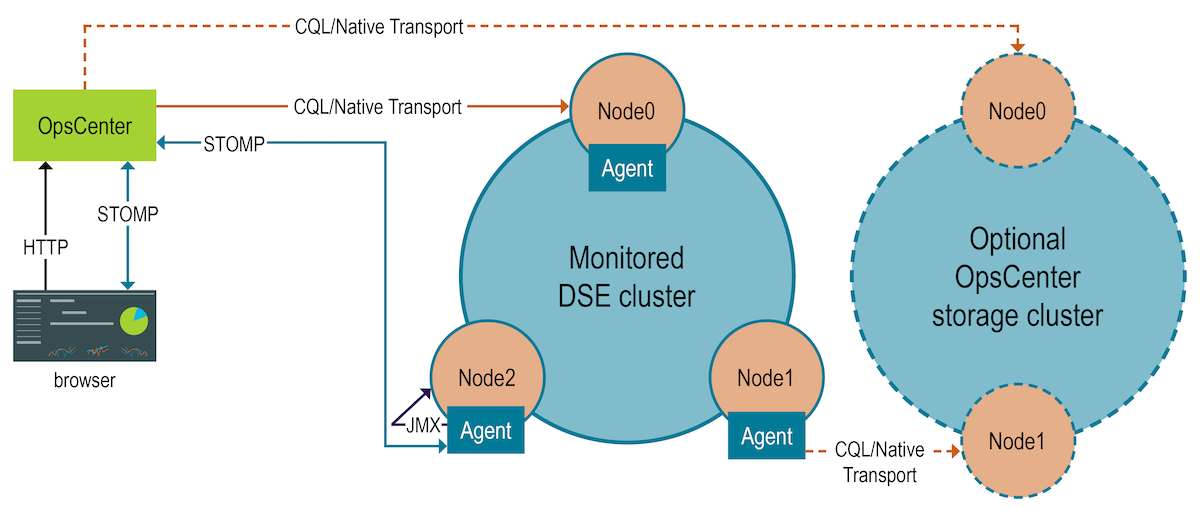
OpsCenter uses an architecture that employs a DataStax Agent on every managed node in the cluster. The DataStax Agent performs most of the functionality within OpsCenter. When creating a new cluster with Lifecycle Manager (LCM), the DataStax Agent is automatically installed. When adding a new cluster to manage with OpsCenter, you are given the option to automatically or manually install a DataStax Agent.
DataStax Enterprise (DSE) exposes a number of statistics and management operations through Java Management Extensions (JMX). The DataStax Agent uses JMX to monitor and manage each node on a monitored cluster and a STOMP connection between each DataStax Agent and OpsCenter. Using JMX, OpsCenter obtains metrics from a cluster and issues various node administration commands, such as flushing SSTables or doing a repair.
OpsCenter establishes a CQL/native transport connection with each seed node included in the cluster configuration. This connection allows OpsCenter to communicate with the node, and in turn, the cluster as a whole.
DataStax recommends using a separate OpsCenter storage cluster to store data in the OpsCenter keyspace for the DSE cluster being monitored. Unless the storage cluster is also monitored by OpsCenter, the separate storage cluster nodes don’t have a DataStax Agent. For more, see Storing collection data on a separate cluster.