Keyspace tables
When you create a table in Cassandra using an application, the CLI, or CQL version 2.0 or earlier, the table appears in OpsCenter.
In CQL version 3.0, the default query language in Cassandra, does not support dynamic tables.
Earlier versions of CQL and the CLI support dynamic tables.
In-memory tables are indicated next to the table name in the details section.
Use the steps to view or delete a table (formerly column family) in a keyspace, view metrics for a table, or truncate (delete) data from a table without deleting the table itself:
-
If OpsCenter authentication is enabled, you must have a role with the View Schema Data or Truncate Data permission.
-
Click Data in the left navigation pane.
-
From the list of keyspaces, select a keyspace.
The
(#TBL)shows how many tables each keyspace contains. -
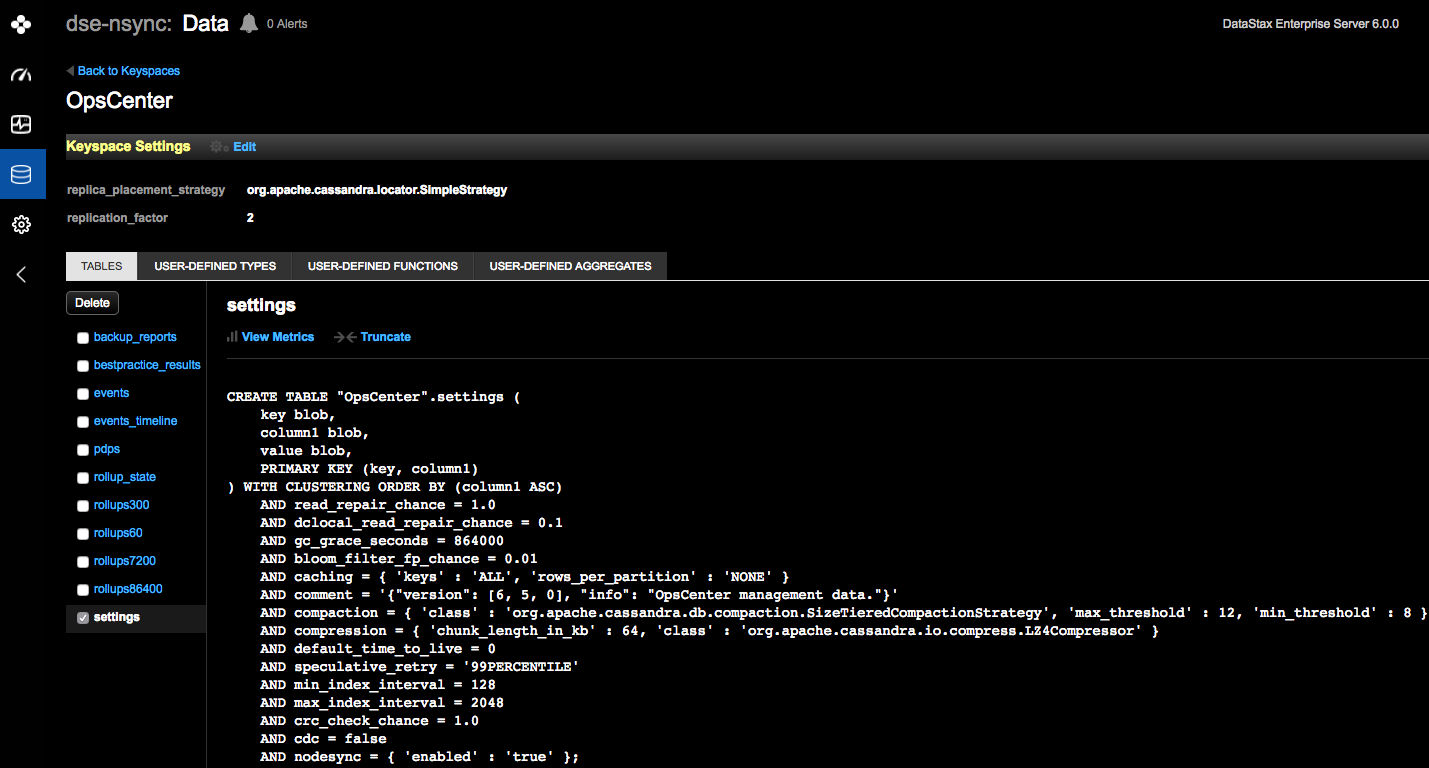
From the list of the tables, select a table.
The CQL statement for the table appears.
-
Perform any of the following actions:
-
Delete: Completely deletes the table from the keyspace. Select one or more tables in a keyspace to delete.
-
View Metrics: Presents metrics for a table. In the Metric Options dialog, select a table metric to view. To aggregate measurements across the entire cluster, all nodes in the datacenter, or in a particular node, select Cluster Wide, All Nodes, or the IP address of a node. At this point, you can add a graph of the measurements to the Performance Metrics area, or choose a different table to measure.
-
Truncate: Deletes all data from the table but does not delete the table itself. See Truncate table data.
-
