Agents status view
View the current installation, configuration, and connection status of each DataStax Agent. Agent status automatically updates in the list view as the information becomes available within OpsCenter. Use the features in the Agents view to set up, upgrade, and configure agents when the status prompts indicate issues and provide buttons to launch the DataStax Agent installation processes. Interpret the information provided to troubleshoot agent installation, configuration, and connections.
Access the Agents view
To access the Agents view:
-
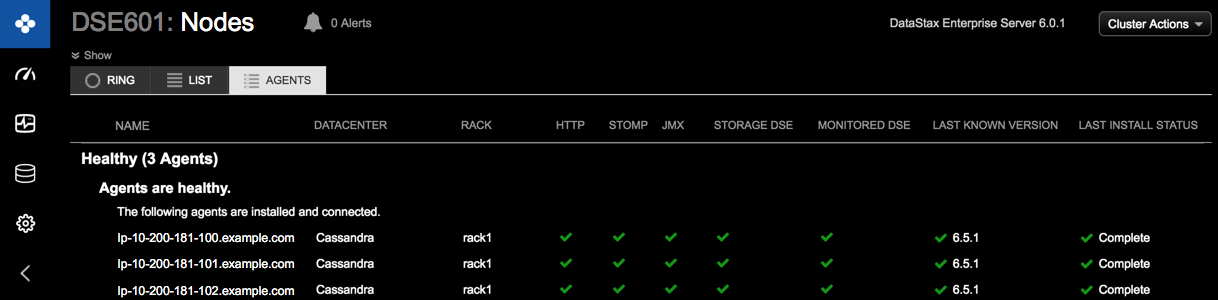
Click cluster > Nodes > Agents tab.
-
Agent issue indicators: If the agent issues banner appears in the header, click Show Details, and then click problems. The banner appears when an issue requires immediate attention, such as incompatible agent versions or connection issues. A red exclamation mark
 on the Agents tab also indicates there are issues that require your attention.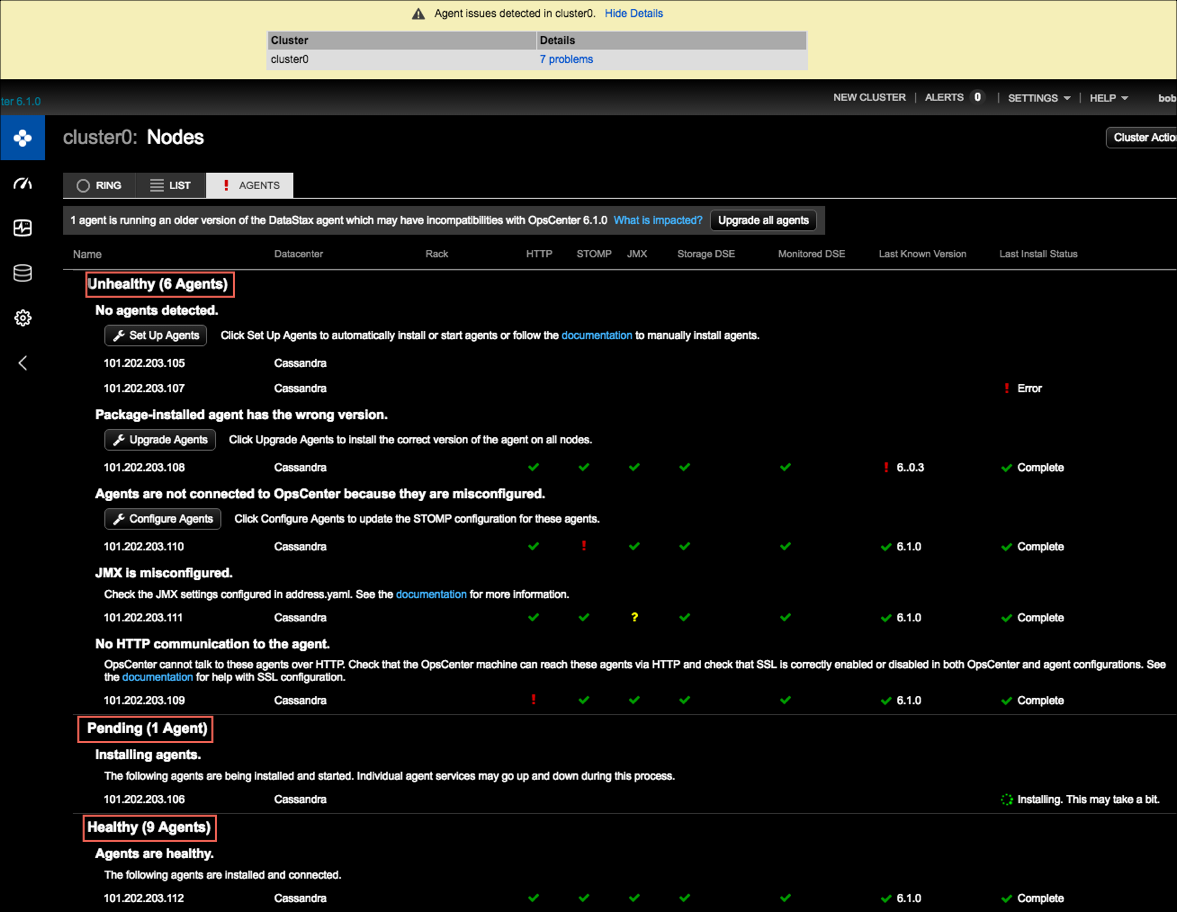
The Agents status page is divided into Healthy, Pending, and Unhealthy sections depending on the current status of your environment. Any unhealthy agents that need attention appear at the top of the list.
Also see Install agents.
Review DataStax Agent status information summary
Review the available DataStax Agent information:
-
An Upgrade all agents button is available to upgrade nodes that have an incompatible agent version installed. To view which services might be adversely impacted, click the What is impacted link.
When the upgrade all Agents prompt appears, DataStax recommends upgrading all agents immediately to avoid any loss of functionality.
-
An Upgrade agents button is available to upgrade nodes that do not have the most current version of the DataStax Agent installed.
DataStax recommends keeping the installed agent versions up-to-date and homogeneous on all nodes.
For more details, see DataStax Agent version compatibility with OpsCenter version below.
-
A Set Up Agents button is available to queue installation for any nodes that currently do not have the agent installed.
-
A Configure Agents button is available when agents cannot connect to OpsCenter because the agents are misconfigured. Click Configure Agents to update the STOMP configuration for those agents.
-
If there is a problem with an agent connection to OpsCenter, the issue and status is clearly indicated in the appropriate column. Hover over each column to view its description:

-
When available, additional details can be seen by hovering over the status icons in each column:
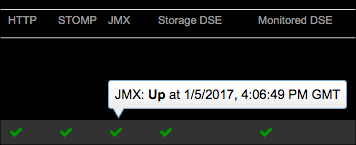
-
To view more details about the current state of an agent, click anywhere in the row for the agent. A JSON representation of the Agent status details is shown. The condition of an agent and the status of its individual services is visible. The type of agent install (package or tarball) is also indicated.
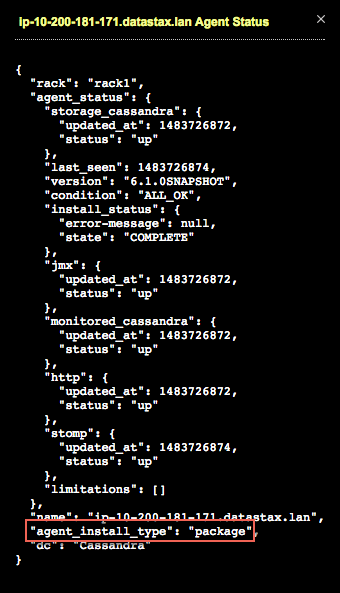
DataStax Agent version compatibility with OpsCenter version
The following table summarizes the visual indicators when the Agent version is earlier than, the same as, or greater than the currently installed version of OpsCenter:
| Installed DataStax Agent vs. OpsCenter version | Result and recommendation | Visual indicators |
|---|---|---|
DataStax Agent version is earlier than OpsCenter 6.1.0. For example, 6.0.3 as shown in the agent issues image above. |
Incompatible versions require upgrading agents. |
Red exclamation point |
DataStax Agent version is not up-to-date with the OpsCenter version but is 6.1.0 or later. For example, OpsCenter is version 6.1.2 (future hypothetical release version) but the agent is version 6.1.1. Going forward from OpsCenter version 6.1, OpsCenter has improved backward-compatibility with agent versions for future releases. |
Partially compatible versions. The currently installed version of OpsCenter is backward-compatible enough with the currently installed agent version so as not to cause any loss of service. Upgrading the agent version is recommended. |
Yellow warning bell |
DataStax Agent version is equal to OpsCenter version. |
Completely compatible versions. Ideal scenario. |
Green checkmark |


Icon status legend
The following table summarizes all of the icons that can appear in the Agents status columns:
| Icon | Description |
|---|---|
|
Currently installing, configuring, or upgrading a DataStax Agent. |
|
DataStax Agent install job pending. |
|
Unknown status. |
|
Down, incompatible version, agent install failed, or some other issue status as indicated in context within each column in the agents status view. |
|
DataStax Agent version limitations; partially compatible agent versions. |
|
Up, satisfactory, or install complete status. |