View the CQL for User-Defined Functions

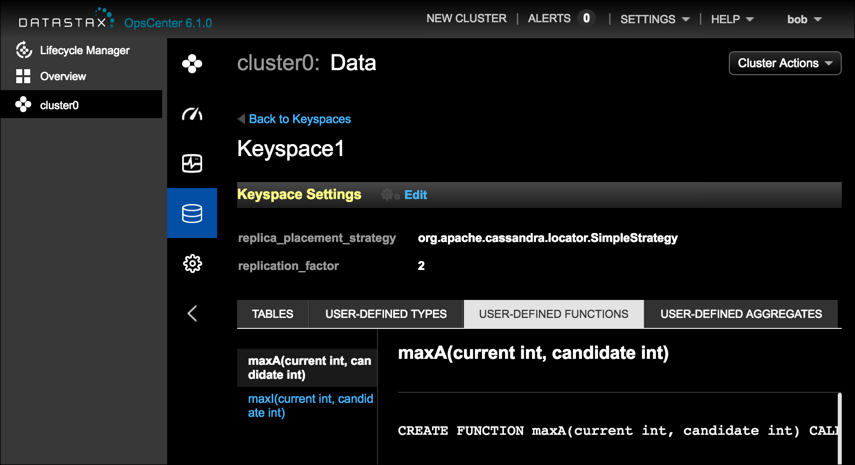
View the CQL definition for a user-defined function (UDF) within a keyspace in OpsCenter Monitoring. The CQL statements for user-defined functions are view-only in OpsCenter.

If OpsCenter authentication is enabled, users must have a role with the View Schema Data permission.

  1. Click Cluster > Data in the left navigation pane.

  2. From the list of keyspaces, select a keyspace.

  3. Click the User-Defined Functions tab.

  4. Select the defined function to view in the left navigation pane for the keyspace.

    If the keyspace has no UDFs, the UI shows a No user functions in keyspace message.

    User-Defined Functions view in OpsCenter

Was this helpful?

Give Feedback

How can we improve the documentation?

© Copyright IBM Corporation 2026 | Privacy policy | Terms of use |  Manage Privacy Choices

Apache, Apache Cassandra, Cassandra, Apache Tomcat, Tomcat, Apache Lucene, Apache Solr, Apache Hadoop, Hadoop, Apache Pulsar, Pulsar, Apache Spark, Spark, Apache TinkerPop, TinkerPop, Apache Kafka and Kafka are either registered trademarks or trademarks of the Apache Software Foundation or its subsidiaries in Canada, the United States and/or other countries. Kubernetes is the registered trademark of the Linux Foundation.

General Inquiries: Contact IBM