Security quickstart
Like many databases, Cassandra-based databases use rolenames and passwords for internal authentication. Role-based authentication applies to both users and roles to enforce authorization. Roles can represent either actual individual users or roles that users are granted in CQL.
|
Cassandra is configured with a default superuser role and password pair of cassandra/cassandra by default. Using this role, additional roles are created using CQL commands. To secure the system, this default role should be deleted once one non-default superuser has been created. |
Let’s look at an example of securing CQL users.
Roles-based access control (RBAC)
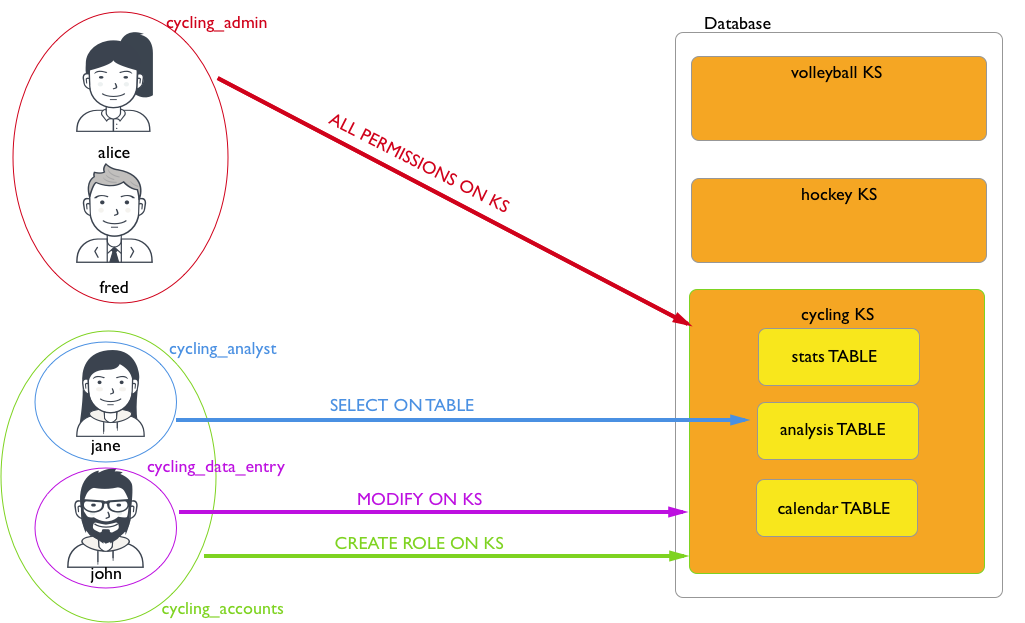
In order to create a role, a user must have:
-
login privileges
-
either a
superuserrole assigned already OR -
a non-superuser role already assigned that grants permissions for the role to create roles
Role with login privileges
Create a role named alice with login privileges:
CREATE ROLE IF NOT EXISTS alice
WITH LOGIN = true
  AND PASSWORD = 'enjoyLife';
The concept of a user is not a separate entity in CQL; only roles exist.
You assign a role to a user, so that you can grant them additional roles and/or permissions.
Superuser privileges allow a role to perform any database operations.
Roles are created with superuser or non-superuser status, and with or without login privileges.
Role with all permissions on a keyspace
Create a cycling_admin role, and then assign that role access to all the functionality of the cycling keyspace:
CREATE ROLE IF NOT EXISTS cycling_admin
  WITH PASSWORD = 'All4One2day!';
GRANT ALL PERMISSIONS ON KEYSPACE cycling TO cycling_admin;
The second command grants all permissions on the cycling keyspace to the cycling_admin role.
Specifically, those permissions are CREATE, ALTER, DROP, SELECT, MODIFY, AUTHORIZE, DESCRIBE, EXECUTE, UNMASK, and SELECT_MASKED.
If this role is assigned to another role, that role inherits all permissions on the cycling keyspace through the role hierarchy.
The next section further illustrates CQL permissions inheritance.
Permissions inheritance
When a role is assigned to another role, that role inherits the permissions granted to the original role. If the original role is modified, the inherited permissions also change accordingly.
Inheritance is hierarchical: Permissions are inherited from all associated ancestor roles. For example, if role A is granted to role B, and role B is granted to role C, then role C inherits permissions from role B and role A (through role B).
A role can be granted an unlimited number of other roles.
|
There is no separate concept of When granting roles to other roles, permissions and |
The following examples illustrate role and permission inheritance:
-
Create the
cycling_adminrole as explained in Role with all permissions on a keyspace, and then grant thecycling_adminrole to thealicerole:GRANT cycling_admin TO alice;The
alicerole now inherits the permissions from thecycling_adminrole. Specifically, thealicerole now has all permissions on thecyclingkeyspace in addition to any permissions granted directly to thealicerole.In the next steps, you will create two additional roles to demonstrate multi-level permission inheritance.
-
Create a role name
cycling_analystwith permissions to query (SELECT) thecycling.cyclist_alt_statstable:CREATE ROLE cycling_analyst WITH PASSWORD = 'zyxw9876'; GRANT SELECT ON TABLE cycling.cyclist_alt_stats TO cycling_analyst; -
Create a role named
hockey_analystwith permissions to query (SELECT) thehockey.analysistable:CREATE ROLE hockey_analyst WITH PASSWORD = 'password'; GRANT SELECT ON TABLE hockey.analysis TO hockey_analyst; -
Grant the
hockey_analystrole to thecycling_analystrole:GRANT hockey_analyst TO cycling_analyst;All roles with the
cycling_analystrole will now inherit thehockey_analystrole’s permissions. -
Grant the
cycling_analystrole toalice:GRANT cycling_analyst TO alice;Due to inheritance, this one role (
cycling_analyst) grantsalicepermissions to query both thecycling.cyclist_alt_statsandhockey.analysistables. You don’t need to explicitly granthockey_analysttoalice, becausehockey_analystis already granted tocycling_analyst.
Use roles to manage roles and permissions
Roles can be authorized to create roles and authorize permissions.
-
Create a
role_adminrole:CREATE ROLE IF NOT EXISTS role_admin WITH PASSWORD = 'password';If you want this role to be able to log in, you must also grant it the
LOGINprivilege and a password:CREATE ROLE IF NOT EXISTS role_admin WITH PASSWORD = 'password' AND LOGIN = true; -
Allow the
role_adminrole to create roles and manage permissions on thecyclingkeyspace:GRANT CREATE ON ALL ROLES TO role_admin; GRANT AUTHORIZE ON KEYSPACE cycling TO role_admin; -
Log in as
role_admin, or assignrole_adminto another role that can log in, and then log in as that role. -
Test the permissions by running
CREATE ROLE,GRANT, andREVOKEcommands.
