Create and manage Astra Streaming tenants, namespaces, and topic
|
Effective October 9, 2026, Astra Streaming subscriptions are discontinued and the service is considered deprecated. For existing subscriptions, access to the service remains available for the duration of your subscription. For more information, see the Astra Streaming discontinuation announcement, contact your account representative, or contact IBM Support. |
This page summarizes how to create, view, edit, and delete Astra Streaming streaming tenants, namespaces, and topics. The primary actions can be performed programmatically and in the Astra Portal. However, some details are available in the Astra Portal only.
|
If you’re new to Astra Streaming, try the Astra Streaming quickstart to learn about creating tenants, namespaces, and topics. |
Create a tenant
- Astra Portal
-
-
In the Astra Portal header, click Applications, and then select Streaming.
-
Click Create tenant.
-
Enter a name for the streaming tenant.
-
Select a cloud provider and region that supports Astra Streaming. Not all Astra DB regions support Astra Streaming. If your preferred region isn’t available, contact your DataStax account representative or IBM Support.
-
Click Create tenant.
-
- API
-
Use
POST "https://api.astra.datastax.com/v2/streaming/tenants". - CLI
View and edit a tenant, namespace, or topic
After you create a tenant, you can inspect the tenant, create and manage namespaces and topics, and configure tenant settings.
Get tenant details
- Astra Portal
-
-
In the Astra Portal header, click Applications, and then select Streaming.
-
Click the name of your tenant.
-
Click any of the tabs to access tenant details and settings, such as Connect or Sinks.
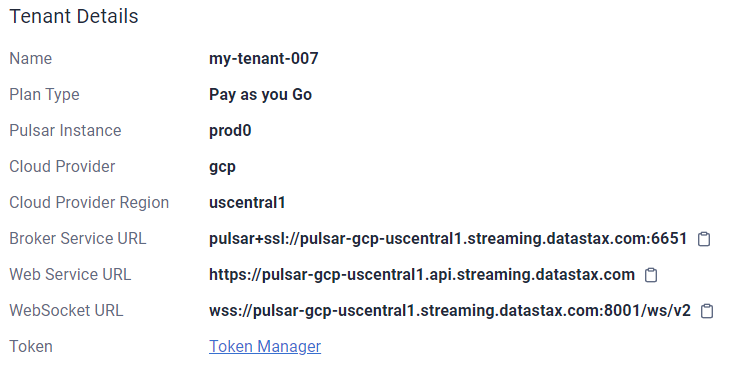
On the Connect tab, the Tenant Details section contains essential information for connecting to your Astra Streaming Pulsar tenant, including the Web Service URL, cluster ID, and tenant ID.
You can also create a Pulsar token from this section.
-
- API
-
Use
GET "https://api.astra.datastax.com/v2/streaming/tenants". - CLI
-
Use
astra streaming get.
Manage namespaces
- Astra Portal
-
-
In the Astra Portal header, click Applications, and then select Streaming.
-
Click the name of your tenant, and then click the Namespace And Topics tab to manage namespaces:
-
Create a namespace: Click Create Namespace, enter a namespace name, and then click Create Namespace.
-
Configure replication: See Geo-replication.
-
Delete a namespace: Find the namespace you want to delete, click Modify Namespace, find the Delete This Namespace section, and then click Delete Namespace.
-
Return to all namespaces: When modifying an individual namespace, click Back to Namespaces to return to the list of all namespaces in the current tenant.
-
-
- API
Manage topics
- Astra Portal
-
-
In the Astra Portal header, click Applications, and then select Streaming.
-
Click the name of your tenant, and then click the Namespace And Topics tab to manage topics:
-
Create a topic: Find the namespace where you want to create the topic, click Add Topic, enter a topic name, and then click Add Topic.
-
Inspect and configure a topic: Click Expand to view the list of topics in a specific namespace, click the name of the topic you want to manage, and then use the tabs to access the topic’s information and settings, such as Subscriptions and Consumers.
-
Delete a topic: Click Expand to view the list of topics in a specific namespace, find the topic you want to delete, click More, and then select Delete Topic.
-
-
- API
Terminate a tenant
|
Terminating a tenant is a destructive operation that permanently deletes the tenant and all associated sinks, topics, messages, and namespaces. |
- Astra Portal
-
-
In the Astra Portal header, click Applications, and then select Streaming.
-
Find the tenant that you want to delete, click More, and then select Terminate.
-
- API
-
Use
DELETE "https://api.astra.datastax.com/v2/streaming/tenants/TENANT_NAME/clusters/CLUSTER_NAME". - CLI
