Mission Control installation requirements
Before installing Mission Control, ensure your environment meets all necessary requirements. This guide details the hardware specifications, storage needs, networking configurations, and other prerequisites for a successful deployment.
Mission Control deployment topologies
Mission Control serves as a platform and interface for deploying and managing DataStax Enterprise (DSE), Hyper-Converged Database (HCD), and Apache Cassandra® database clusters across logical and physical regions.
Here are some examples of deployment topologies:
-
Deploy one instance of Mission Control for the entire organization.
-
Dedicate multiple targeted installations to specific groups.
-
Dedicate one instance per DEV, TEST, and PROD environments.
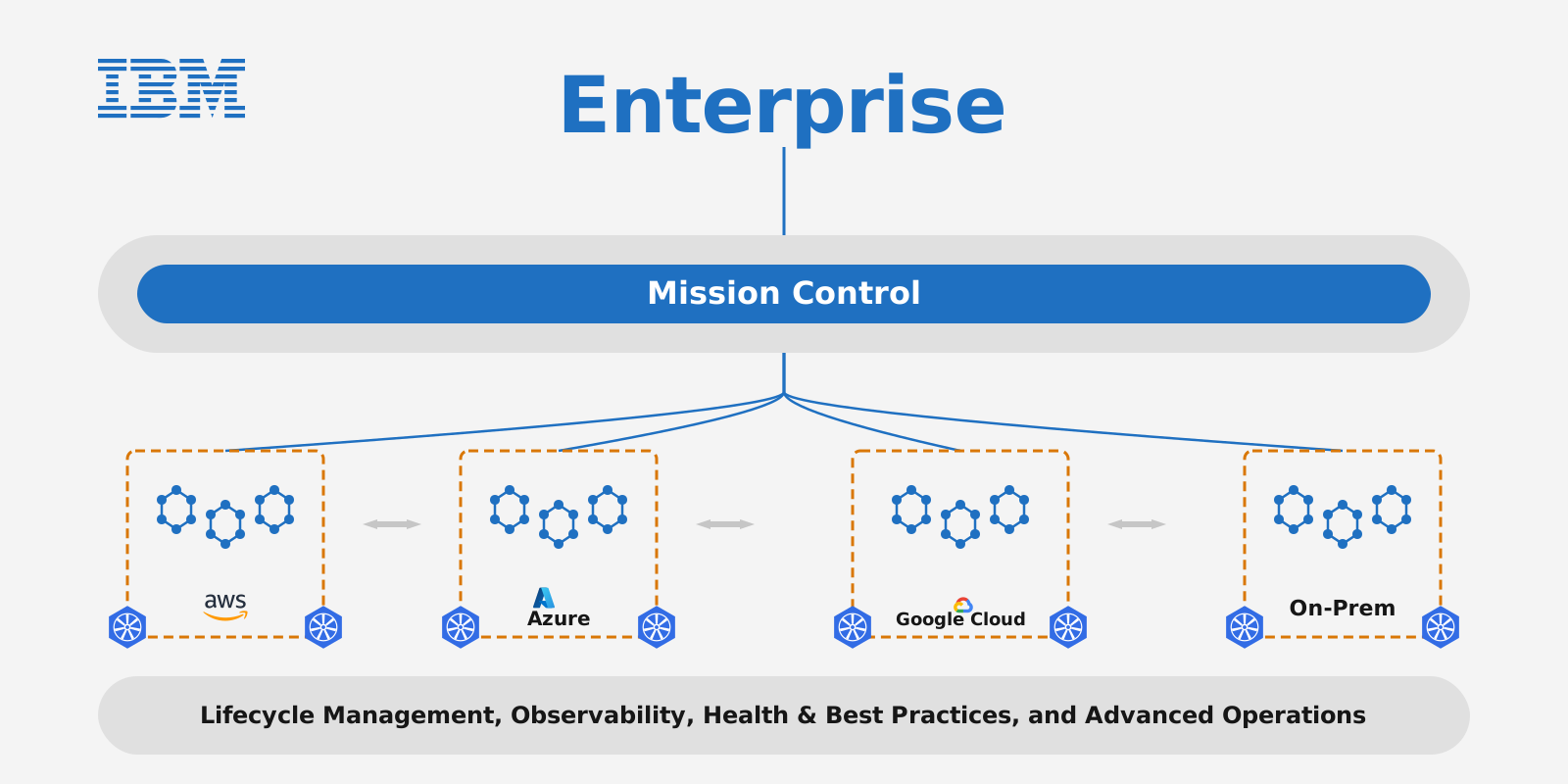
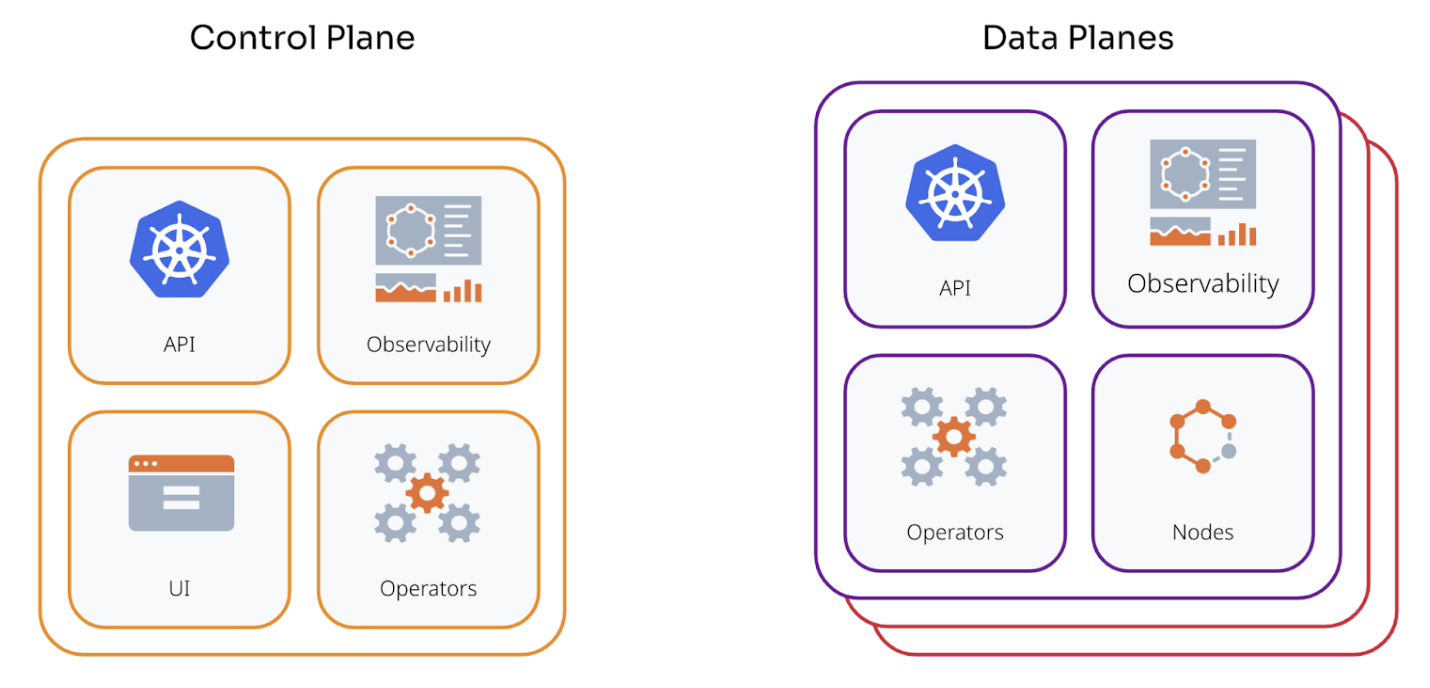
At the top-level, Mission Control consists of a centralized control plane and optional regionally deployed data planes.
- Control plane
-
Provides the core interface for Mission Control, including the top-level API service, user interface, and observability endpoints. The control plane manages coordination across each data plane’s region boundaries.
- Data plane
-
Each deployed data plane includes DSE, HCD, or Cassandra nodes and provides a self-contained environment for local resource management.
|
The control plane can function as a data plane since it contains all the necessary components. As a result, you don’t need a separate data plane. For a single region deployment, DataStax recommends a single control plane. |
Resource capacity requirements
Installing Mission Control requires different instance types and varying resource capacities. Follow these guidelines as the minimum requirement. You might need to increase CPU capacity, memory, and disk space beyond the recommended minimums.
Platform instances
Mission Control observability includes metrics and logging from all components within the platform. These metrics and logs are centralized, aggregated, then shipped to an external object store. For more information, see Storage requirements. Managed database instances generate most Mission Control metrics and logs. The recommended values depend on the number of clusters deployed and their individual schemas because each table holds a number of tracked metrics. The following recommendations assume minimal deployment in 1 region with a single managed cluster and associated logical database datacenter.
-
2 Instances
-
32 CPU cores
-
64 GB RAM (for observability stack capacity)
-
1 TB storage
|
Platform services include the platform UI, API, observability stack (Loki, Mimir, Grafana), and operators. Configure the |
Database instances
Database instances host all scheduled HCD, DSE, and Cassandra nodes.
This sizing guidance assumes each node maps to a single Kubernetes worker. Alternatively, you can co-locate multiple instances on a single worker.
|
Resource contention often occurs when you tune this deployment. |
Adjust the values according to your expected database node resource requirements.
-
3 Instances
-
16 physical CPU cores-32 hyper-threaded cores
-
64 GB RAM minimal
-
1.5 TB storage
DataStax benchmark testing shows that resource requirements and performance are similar between bare-metal VMs and Kubernetes install types. For production, DataStax recommends the following specifications as general guidelines for Cassandra, HCD, or DSE:
-
8 to 16 cores
-
32GB to 128GB RAM
Larger values might be required for certain workloads and performance requirements. For more information about hardware sizing and configuration, see the planning guide for your database:
Tune CPU and RAM by monitoring JVM processes
The precise amount of RAM required depends on the workload. You might need to test, adjust, and retest to find the ideal balance. Because RAM is consumed by JVM processes, one way to determine the appropriate amount of RAM is to observe Garbage Collection (GC) metrics.
RAM and heap are set in relationship to one another:
-
RAM memory requirements: Typically double the heap size.
By default, the JVM allows processes to use as much off-heap memory as the configured on-heap memory. With a heap size of 8GB, the JVM might use up to 16 GB of RAM, depending on off-heap memory usage.
-
Heap size: Typically a reasonable value that matches the available memory on the worker nodes.
For example, assume you have 32 GB RAM for each worker node, Kubernetes system components, and related processes, such as metrics or log collectors. It is reasonable to set heap to 8 GB and memory requests to 16 GB. Then, run test workloads on your cluster and monitor GC metrics. If GC pressure is too high, you can raise heap to 12 GB and memory requests to 24 GB.
Resource scheduling
When using Mission Control to deploy an initial cluster to test your configuration, allow the monitoring stack to run on the database nodes so that all components, such as Mimir, can be scheduled on the same worker nodes. For testing purposes, this considers all infrastructure instances available for scheduling, which might lead to unexpected utilization of hardware resources.
In production, DataStax recommends scheduling the monitoring stack and the database pods on separate node pools. However, you must still leave some RAM available for system pods that allow Kubernetes operations, such as networking. For example, if you have 48 GB RAM per worker, leave 2 GB for the extra pods by setting your resource requests to 46 GB.
To enable concurrent scheduling of all components, set CPU requests to a minimum, such as 1 core. This limit applies to scheduling only; processes continue to use as many cores as possible.
Storage requirements
In addition to the local storage requirements for database and observability instances, Mission Control requires one of the following bucket types for object storage:
-
Amazon Web Services Simple Storage Service (AWS S3) or S3 compatible. For example Red Hat OpenShift Data Foundation Object Bucket Claim or SeaweedFS
-
Google Cloud Storage (GCS)
-
Azure Blob Storage
Mission Control stores observability data and database backups in object storage for long-term retention.
|
For EKS installations, define a default storage class before you install Mission Control. |
Database persistent volume storage
Use local storage such as local SSDs or NVMe drives for database persistent volumes. Do not use NFS.
When hostNetwork: true is enabled, multiple database pods scheduled on the same worker node attempt to bind to the same ports, causing port conflicts and service disruptions.
Load balancing requirements
The Mission Control UI is accessed through a specific port on any of the cluster worker nodes. DataStax recommends placing this service behind a load balancer that directs traffic from all worker nodes within the cluster to port 30880.
This ensures that the UI remains available should an instance go down.
|
Mission Control doesn’t support load balancing in front of database instances. Cassandra databases are designed to avoid the need for load balancers between databases and clients. Doing so can severely degrade performance and availability, complicate scaling, and increase costs. All high-level clients, such as Cassandra drivers, implement load balancing directly to distribute requests across a cluster. |
Configure pod-to-pod routing
Ensure that all database pods can route to each other. This is a critical requirement for proper operation and data consistency.
The requirement applies to:
-
All database pods within the same region or availability zone.
-
All database pods across different availability zones within the same region.
-
All database pods across different regions for multi-region deployments.
-
All database pods across different racks in the same datacenter for multi-region deployments.
The way you configure pod-to-pod routing depends on your cluster architecture:
- Single-cluster deployments
-
The cluster’s Container Network Interface (CNI) typically provides pod-to-pod network connectivity for database pods within a single Kubernetes cluster. You usually need no additional configuration beyond standard Kubernetes networking.
- Security considerations for shared clusters
-
If your database cluster shares a Kubernetes cluster with other applications, implement security controls to prevent unauthorized access to database internode ports (7000/7001):
-
NetworkPolicy isolation (required): Use Kubernetes NetworkPolicy to restrict access to internode ports to only authorized database pods. NetworkPolicy prevents other applications in the cluster from accessing these ports even if underlying firewall rules are broad.
-
Internode TLS encryption (required): Enable internode TLS to protect data in transit and prevent unauthorized nodes from joining the cluster.
-
Dedicated node pools (recommended): Consider dedicated node pools or subnets for database workloads to enable more granular firewall controls at the infrastructure level.
-
- Multi-cluster deployments
-
For database pods that span multiple Kubernetes clusters, NetworkPolicy alone doesn’t provide sufficient connectivity. You must establish Layer 3 network connectivity or overlay connectivity between the database pod networks (pod CIDRs or node subnets depending on your deployment). Kubernetes NetworkPolicy operates only within a single cluster boundary and can’t provide cross-cluster connectivity.
-
Choose one of the following approaches to establish pod network connectivity across clusters:
-
Routed pod CIDRs (recommended): Use cloud provider native routing solutions when your platform supports them. This approach provides the best performance and simplest operational model.
-
AWS: VPC Peering, Transit Gateway, or AWS Cloud WAN.
-
Azure: VNet Peering or Virtual WAN.
-
GCP: VPC Peering or Cloud VPN.
-
-
Submariner: Open-source multi-cluster connectivity solution, common in OpenShift multi-cluster deployments. Submariner provides encrypted tunnels between clusters. For more information, see the Submariner documentation.
-
Cilium Cluster Mesh: For clusters that use Cilium CNI. For more information, see the Cilium documentation.
-
Cilium Cluster Mesh provides native multi-cluster networking with Cilium.
-
Cilium Cluster Mesh enables pod-to-pod connectivity across clusters.
-
-
-
After you establish cross-cluster connectivity, implement the following security measures. Traditional firewall rules alone lack application awareness and can’t distinguish between different pods or services within a cluster. Use Kubernetes NetworkPolicy for pod-level access control within clusters, and combine it with network-level firewalls for defense in depth.
-
Enable internode TLS encryption to protect data in transit between clusters.
-
Configure firewall rules at the network level to restrict traffic between cluster pod CIDRs.
-
Use NetworkPolicy within each cluster to further restrict access to database ports.
-
Consider using dedicated subnets or VPCs for database clusters to enable network-level isolation.
-
-
To verify that pod-to-pod routing has been configured properly, do the following:
-
Test connectivity between database pods using
nodetool statusorcqlsh. -
Check that all nodes can see each other in the cluster topology.
-
Monitor for connection errors or timeouts in database logs.
-
Verify that gossip protocol communication functions correctly.
If pod-to-pod routing isn’t implemented correctly, you might experience the following:
-
Connectivity issues between database pods.
-
Cluster instability.
-
Data consistency issues.
-
Failed replication.
-
Incomplete or failed cluster operations.
Plan your networking
Open TCP and UDP ports 1024-65535 between all hosts within a given region, a given control plane, or a given data plane.
This allows for the seamless shifting of workloads between instances due to changing environments.
| Instance type | Port | Purpose |
|---|---|---|
Platform |
|
UI service |
Platform |
|
Vector Aggregator |
Database |
|
UI service |
Database |
|
Cassandra Native Protocol, client connections |
Database |
|
Internode communications |
Database |
|
Encrypted internode communications |
Database |
|
Management API |
For more information about database ports and networking, see the documentation for your database:
Kubernetes platform-specific requirements
Some Kubernetes platforms have specific configurations that might affect Mission Control installation and operation.
Rancher requirements
By default, Rancher deploys an nginx proxy in front of the Kubernetes API server with a max_body_size of 1 MB, which is lower than etcd’s default 1.5 MB object-size limit.
A Mission Control custom resource definition (CRD) is between 1 MB - 1.5 MB in size, and will therefore be rejected by the Kubernetes API server.
To resolve this limitation, DataStax recommends increasing the nginx max_body_size to 1.5 MB in your Rancher deployment.
For more information, see the Rancher documentation.
