Deletes and tombstones
By design, distributed databases like Hyper-Converged Database (HCD) handle data deletion in a way that ensures consistency and fault-tolerance across all replicas. There are few cases where data is immediately deleted. Instead, the database marks deleted records with a tombstone that is propagated to the replicas before being dropped permanently during compaction.
Immediate deletion
Data is immediately and permanently deleted when an operation removes a table because there are no rows on which to mark the tombstones.
Such operations include DROP KEYSPACE and DROP TABLE.
Use caution when running these commands because the data cannot be recovered except by restoring from a backup.
Tombstone lifecycle
At a high level, HCD creates a tombstone when data is deleted from a keyspace that has a replication factor (RF) greater than 1.
However, deletion doesn’t exclusively occur through DELETE commands; there are many operations that generate tombstones.
For example:
-
Using the CQL
DELETEcommand. -
Expiring data with time-to-live (TTL).
-
Using internal operations, such as materialized views.
-
UPDATEoperations on a collection column (map,set, orlist), which generate tombstones differently for frozen and non-frozen collections.
Functionally, all deletes are processed as writes of tombstones:
-
If the deletion targets an existing record, the database marks the record with a tombstone.
-
If the deletion targets a non-existing record, the database still writes a tombstone, even though there is no true record to mark for deletion.
The tombstones go through the write path, and are written to SSTables on one or more nodes. Eventually, the tombstones are dropped during compaction, which is when the record is actually removed from the database.
Grace period
To allow time for deletes to distribute to replicas, tombstones have a built-in expiration known as the grace period.
This time limit is set by the gc_grace_seconds table property.
The default value is 864,000 seconds (10 days).
Each table can have its own value for this property.
On a single-node cluster, this property can safely be set to 0 because there are no replicas.
When the grace period expires, the tombstone is dropped during the next compaction, if it no longer marks any deleted data in another SSTable. If a client writes a new update to the tombstoned record during the grace period, the database overwrites the tombstone with the new record.
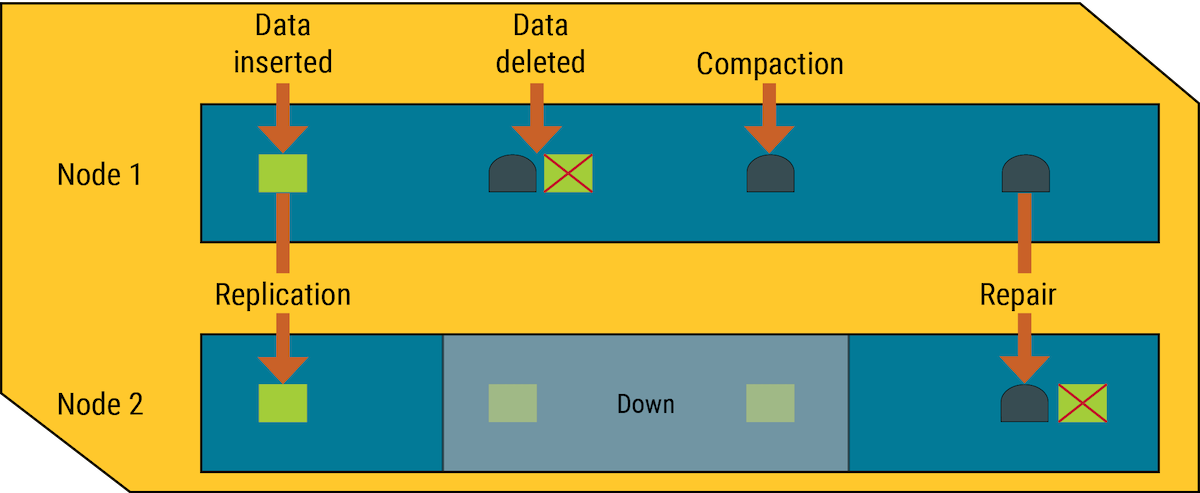
To prevent read failure due to conflicting data between replicas, the coordinator node defaults to the most recent record (last write wins). For example, if one node has a tombstone and another node has an older value for the same record, then the reconciled record will use the tombstone.
Avoid excessive tombstones
An excessive number of tombstones in a table can negatively affect application performance and read latency. The presence of many tombstones can indicate issues with the data model or the application’s query patterns.
If a table or node is performing poorly due to too many tombstones, you can reduce gc_grace_seconds to clear tombstones more frequently.
However:
-
After changing
gc_grace_secondsyou must run a full token range repair (nodetool repair) within the newgc_grace_secondsperiod. Be aware that full repairs can take a significant amount of time to process, potentially longer thangc_grace_seconds. -
If
gc_grace_secondsis too low, tombstones might be removed before all replicas have seen the deletion (whether they are down or replication is delayed), resulting in resurrected deletes (zombies). -
If
gc_grace_secondsis too low, it can impact hinted handoff by preventing collection and replaying of hints. If hinted handoff cannot replay hints, you must manually run repair on the nodes.
Zombie records and missed deletes in distributed databases
In a multi-node cluster, HCD can store replicas of the same data on two or more nodes. This helps prevent data loss, but issues can occur when replicas aren’t synchronized.
When a node receives a delete for data that it stores locally, the node marks the specified record with a tombstone, and then it attempts to propagate the tombstone to replica nodes. If a replica node is unresponsive at that time, the replica doesn’t receive the tombstone, and it retains the unflagged, pre-delete version of the record.
Once a tombstone expires, it is dropped during compaction, and the database has no memory that the record ever existed. If a tombstone is written and dropped on all other nodes before an unresponsive node recovers, then the database perceives the retained record on the recovered node as a missed write and propagates it to the rest of the cluster. Deleted records that reappear in a database are called zombies.
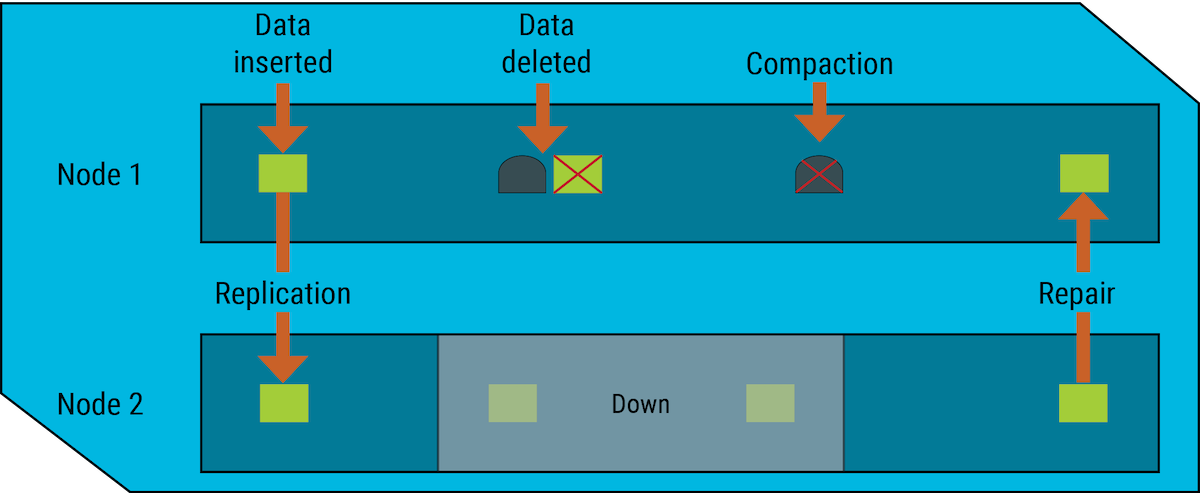
Repair down nodes before the grace period expires
To help prevent the reappearance of zombies, the database gives each tombstone a grace period. The purpose of the grace period is to give unresponsive nodes time to recover and process tombstones normally. After the tombstone’s grace period ends, HCD deletes the tombstone during compaction, and the nodes have no memory of the deleted data.
|
If any nodes in a cluster are down during a deletion, those nodes must rejoin the cluster and be repaired before the grace period ends to avoid zombies.
This can happen through hinted handoff, but you can run If a node is down longer than the grace period, you must remove all Cassandra data from it and perform a node replacement to avoid potentially severe data inconsistency issues. |
When an unresponsive node recovers, HCD uses hinted handoffs to replay the database mutations (INSERT, UPDATE, DELETE, and BATCH) that the node missed while it was down.
Hinted handoffs don’t replay mutations (batched or non-batched) for a tombstone during the grace period.
If the node doesn’t recover until after the grace period ends, the deletion might be missed, resulting in a zombie.
Zombies can also appear from replayed BATCH commands that repeat an INSERT or UPDATE after a record was removed from the rest of the cluster.
To completely prevent the reappearance of zombie records, run nodetool repair on a node after it recovers, and on each table at the interval set by gc_grace_seconds.
Expiring data with TTL
In addition to INSERT, UPDATE, and DELETE operations, columns can be marked with a time-to-live (TTL).
When this time limit expires, the database marks the record with a tombstone.
The tombstone is propagated to other nodes and eventually cleaned up like other tombstoned records.
Unlike non-TTL tombstones, you don’t need to run nodetool repair regularly if all records in a table have a TTL, all TTLs are allowed to expire, and no records are deleted manually (DELETE).
Drop tombstones with nodetool compact
If your compaction strategy is SizeTieredCompactionStrategy (STCS) or UnifiedCompactionStrategy (UCS) in tiered mode, you can drop any expired tombstones immediately by manually starting compaction with nodetool compact.
By design, this is usually not needed for leveled compaction or time windowed compaction.
If the table has indexes, the database compacts the SSTables for the base table and indexes separately.
Running nodetool compact -s on a table removes tombstones from the base table, but not from the indexes.
To remove tombstones from an index, run the following:
nodetool compact -s keyspace_name table_name.index_nameIf using nodetool rebuild_index to rebuild an index, old index files remain alongside the new files.
After rebuilding an index, run nodetool compact -s on the index again to remove old files and complete the cleanup.
Forced compaction might create one very large SSTable from all the data. Due to the way tiered compaction selects SSTables, very large SSTables can be bypassed for an extended period of time, and the data in these tables can become stale. Make sure your compaction strategy is configured appropriately to avoid long-lived stale SSTables.
Tombstone types
Tombstones can be marked on different parts of a partition depending on the type of delete operation:
-
Partition tombstones: Deletes an entire partition
-
Row tombstones: Deletes an entire row
-
Range tombstones: Deletes a range of rows
-
ComplexColumn tombstones: Deletes from a collection column (
map,list,set) -
Cell tombstones: Deletes a specific value in one column of one row
-
TTL tombstones: Deletes from expired TTLs
The following examples demonstrate how each tombstone type is created using a keyspace named cycling and tables named rank_by_year_and_name and cyclist_career_teams.
Create demo schema (optional)
If you want to follow along with the examples create the following schema in a test environment:
-
Create the
cyclingkeyspace:CREATE KEYSPACE cycling WITH replication = {'class': 'SimpleStrategy', 'replication_factor': '1'} AND durable_writes = true; -
Create the sample tables:
CREATE TABLE IF NOT EXISTS cycling.rank_by_year_and_name ( race_year int, race_name text, rank int, cyclist_name text, PRIMARY KEY ((race_year, race_name), rank) ) WITH CLUSTERING ORDER BY (rank ASC); CREATE TABLE IF NOT EXISTS cycling.cyclist_career_teams ( id UUID PRIMARY KEY, lastname text, teams set<text> ); -
Insert data into the
rank_by_year_and_nametable:INSERT INTO cycling.rank_by_year_and_name (race_year, race_name, cyclist_name, rank) VALUES (2015, 'Tour of Japan - Stage 4 - Minami > Shinshu', 'Benjamin PRADES', 1); INSERT INTO cycling.rank_by_year_and_name (race_year, race_name, cyclist_name, rank) VALUES (2015, 'Tour of Japan - Stage 4 - Minami > Shinshu', 'Adam PHELAN', 2); INSERT INTO cycling.rank_by_year_and_name (race_year, race_name, cyclist_name, rank) VALUES (2015, 'Tour of Japan - Stage 4 - Minami > Shinshu', 'Thomas LEBAS', 3); INSERT INTO cycling.rank_by_year_and_name (race_year, race_name, cyclist_name, rank) VALUES (2015, 'Giro d''Italia - Stage 11 - Forli > Imola', 'Ilnur ZAKARIN', 1); INSERT INTO cycling.rank_by_year_and_name (race_year, race_name, cyclist_name, rank) VALUES (2015, 'Giro d''Italia - Stage 11 - Forli > Imola', 'Carlos BETANCUR', 2); INSERT INTO cycling.rank_by_year_and_name (race_year, race_name, cyclist_name, rank) VALUES (2014, '4th Tour of Beijing', 'Phillippe GILBERT', 1); INSERT INTO cycling.rank_by_year_and_name (race_year, race_name, cyclist_name, rank) VALUES (2014, '4th Tour of Beijing', 'Daniel MARTIN', 2); INSERT INTO cycling.rank_by_year_and_name (race_year, race_name, cyclist_name, rank) VALUES (2014, '4th Tour of Beijing', 'Johan Esteban CHAVES', 3);
Later in the examples, you will insert data into the cyclist_career_teams table to test Cell tombstones and TTL tombstones.
Flush data from the memtable to SSTables
If you are following along with the examples, you must flush the data from the memtable to the SSTables after each change (INSERT or DELETE), and then output the SSTable data so you can inspect the tombstone record on disk.
If you skip the flush step, there will be no tombstone on disk in the SSTable output.
-
After each mutation, run the
nodetool flushcommand on thecyclingkeyspace:nodetool flush cycling -
Get the
Data.dbfile name from the/datadirectory for therank_by_year_and_nametable, and then run thesstabledumpcommand on that SSTable file.For more information about SSTable directories and file names, see SSTable file names, formats, and versions.
cd /var/lib/cassandra/data/cycling/rank_by_year_and_name-UUIDsstabledump SSTABLE_FILE_NAMEReplace
SSTABLE_FILE_NAMEwith the name of the table’sData.dbfile.
Partition tombstones
Partition tombstones are generated when an entire partition is deleted explicitly.
In the DELETE command, the WHERE clause is an equality condition against the partition key.
-
Delete data with an equality expression on the partition key:
DELETE from cycling.rank_by_year_and_name WHERE race_year = 2014 AND race_name = '4th Tour of Beijing'; -
Inspect the
sstabledumpoutput for this partition.The
deletion_infotombstone marker is at the partition level, and is not associated with any rows or cells within the partition.{ "partition" : { "key" : [ "2014", "4th Tour of Beijing" ], "position" : 0, "deletion_info" : { "marked_deleted" : "2018-05-16T19:40:06.454282Z", "local_delete_time" : "2018-05-16T19:40:06Z" } }, "rows" : [ ] }
Row tombstones
Row tombstones are generated when a particular row within a partition is deleted explicitly.
The schema has a composite primary key that includes both the partition key and the clustering key.
In the DELETE command, the WHERE clause is an equality condition against both the partition key and the clustering key columns.
-
Delete data with an equality expression on both the partition key and the clustering key:
DELETE from cycling.rank_by_year_and_name WHERE race_year = 2015 AND race_name = 'Giro d''Italia - Stage 11 - Forli > Imola' AND rank = 2; -
Inspect the
sstabledumpoutput for this partition.The
deletion_infotombstone marker is at the row level, and is identified by a clustering key under the partition. Neither the partition nor the row cells contain the tombstone marker.
{
    "partition" : {
      "key" : [ "2015", "Giro d'Italia - Stage 11 - Forli > Imola" ],
      "position" : 0
    },
    "rows" : [
      {
        "type" : "row",
        "position" : 74,
        "clustering" : [ 2 ],
        "deletion_info" : { "marked_deleted" : "2018-05-18T15:29:06.227148Z", "local_delete_time" : "2018-05-18T15:29:06Z" },
        "cells" : [ ]
      }
    ]
  }
Range tombstones
Range tombstones occur when several rows within a partition that can be expressed through a range search are deleted explicitly.
The schema has a composite primary key that includes both a partition key and a clustering key.
In the DELETE command, the WHERE clause is an equality condition against the partition key, plus an inequality condition against the clustering key.
-
If you followed along with these examples from the beginning, drop the
rank_by_year_and_nametable, and then re-create it and reinsert the sample data:-
Drop the table:
DROP TABLE IF EXISTS cycling.rank_by_year_and_name; -
Re-create and repopulate the table using the commands in Create demo schema (optional).
-
-
Delete data using a range expression:
DELETE from cycling.rank_by_year_and_name WHERE
race_year = 2015 AND race_name = 'Tour of Japan - Stage 4 - Minami > Shinshu' AND rank > 1;-
Inspect the
sstabledumpoutput for this partition.The
deletion_infotombstone marker is at the row level. A special boundary marker,range_tombstone_bound, marks the range scope (identified by the clustering key values) of the deleted rows.{ "partition" : { "key" : [ "2015", "Tour of Japan - Stage 4 - Minami > Shinshu" ], "position" : 252 }, "rows" : [ { "type" : "range_tombstone_bound", "start" : { "type" : "inclusive", "deletion_info" : { "marked_deleted" : "2018-05-18T16:09:21.474713Z", "local_delete_time" : "2018-05-18T16:09:21Z" } } }, { "type" : "range_tombstone_bound", "end" : { "type" : "exclusive", "clustering" : [ 1 ], "deletion_info" : { "marked_deleted" : "2018-05-18T16:09:21.474713Z", "local_delete_time" : "2018-05-18T16:09:21Z" } } } ] }
ComplexColumn tombstones
ComplexColumn tombstones are generated when inserting or updating a collection column (set, list, or map).
-
If you are following along with the examples, insert data into the
cyclist_career_teamstable:INSERT INTO cycling.cyclist_career_teams (id, lastname, teams) VALUES (cb07baad-eac8-4f65-b28a-bddc06a0de23, 'ARMITSTEAD', { 'Boels-Dolmans Cycling Team','AA Drink - Leontien.nl','Team Garmin - Cervelo' } ); -
Inspect the
sstabledumpoutput for this partition.No explicit manual deletion occurs on the partition, but a
deletion_infomarker is listed at the cell level for the collection type columnteams. This is because the collection was originally empty (null), so theINSERTacts as anUPSERT, replacing thenullcollection with new entries.{ "partition" : { "key" : [ "cb07baad-eac8-4f65-b28a-bddc06a0de23" ], "position" : 0 }, "rows" : [ { "type" : "row", "position" : 130, "liveness_info" : { "tstamp" : "2018-05-18T16:26:23.779724Z" }, "cells" : [ { "name" : "lastname", "value" : "ARMITSTEAD" }, { "name" : "teams", "deletion_info" : { "marked_deleted" : "2018-05-18T16:26:23.779723Z", "local_delete_time" : "2018-05-18T16:26:23Z" } }, { "name" : "teams", "path" : [ "AA Drink - Leontien.nl" ], "value" : "" }, { "name" : "teams", "path" : [ "Boels-Dolmans Cycling Team" ], "value" : "" }, { "name" : "teams", "path" : [ "Team Garmin - Cervelo" ], "value" : "" } ] } ] }
Cell tombstones
Cell tombstones are generated when explicitly deleting a value from a cell, such as a column for a specific row of a partition, or when inserting or updating a cell with null values, as shown in the following example.
-
Insert a
null:INSERT INTO cycling.rank_by_year_and_name (race_year, race_name, cyclist_name, rank) VALUES (2018, 'Giro d''Italia - Stage 11 - Osimo > Imola', null, 1); -
Inspect the
sstabledumpoutput for this partition.The
deletion_infotombstone marker is associated with a particular cell.{ "partition" : { "key" : [ "2018", "Giro d'Italia - Stage 11 - Osimo > Imola" ], "position" : 0 }, "rows" : [ { "type" : "row", "position" : 80, "clustering" : [ 1 ], "liveness_info" : { "tstamp" : "2018-05-18T17:13:42.602827Z" }, "cells" : [ { "name" : "cyclist_name", "deletion_info" : { "local_delete_time" : "2018-05-18T17:13:42Z" } } ] } ] }
TTL tombstones
Time-to-live (TTL) tombstones are generated when the TTL period expires for data that was written with a TTL. The TTL expiration marker can occur at either the row or cell level.
The database marks deletes from expired TTLs differently from other types of deletes. Even if a partition has only a single row (with no clustering key), the TTL mark is still made at the row level.
-
Insert a row with a TTL:
INSERT INTO cycling.cyclist_career_teams (id, lastname, teams) VALUES (e7cd5752-bc0d-4157-a80f-7523add8dbcd, 'VAN DER BREGGEN', { 'Rabobank-Liv Woman Cycling Team','Sengers Ladies Cycling Team','Team Flexpoint' }) USING TTL 1; -
Set a TTL for one cell:
UPDATE cycling.rank_by_year_and_name USING TTL 1 SET cyclist_name = 'Cloudy Archipelago' WHERE race_year = 2018 AND race_name = 'Giro d''Italia - Stage 11 - Osimo > Imola' AND rank = 1; -
Inspect the
sstabledumpoutput for this partition.The first CQL statement marks the row (partition key:
e7cd5752-bc0d-4157-a80f-7523add8dbcd) with an"expired" : trueTTL expiration marker in theliveness_infosection.{ "partition" : { "key" : [ "e7cd5752-bc0d-4157-a80f-7523add8dbcd" ], "position" : 0 }, "rows" : [ { "type" : "row", "position" : 134, "liveness_info" : { "tstamp" : "2018-05-18T17:38:13.135226Z", "ttl" : 1, "expires_at" : "2018-05-18T17:38:14Z", "expired" : true }, "cells" : [ { "name" : "lastname", "value" : "VAN DER BREGGEN" }, { "name" : "teams", "deletion_info" : { "marked_deleted" : "2018-05-18T17:38:13.135225Z", "local_delete_time" : "2018-05-18T17:38:13Z" } }, { "name" : "teams", "path" : [ "Rabobank-Liv Woman Cycling Team" ], "value" : "" }, { "name" : "teams", "path" : [ "Sengers Ladies Cycling Team" ], "value" : "" }, { "name" : "teams", "path" : [ "Team Flexpoint" ], "value" : "" } ] } ] }The second CQL statement marks the cell (partition key:
2018, clustering key:1, column name:cyclist_name) with an"expired" : trueTTL expiration marker for the specific cell.{ "partition" : { "key" : [ "2018", "Giro d'Italia - Stage 11 - Osimo > Imola" ], "position" : 0 }, "rows" : [ { "type" : "row", "position" : 95, "clustering" : [ 1 ], "cells" : [ { "name" : "cyclist_name", "value" : "Cloudy Archipelago", "tstamp" : "2018-05-18T18:22:52.532855Z", "ttl" : 1, "expires_at" : "2018-05-18T18:22:53Z", "expired" : true } ] } ] }
