Configure compaction
To keep the database healthy, the database periodically merges and rewrites SSTables while discarding old data through a process called compaction. This process combines existing SSTables by merging keys, combining columns, evicting tombstones, reconciling writes against the same row, and rebuilding the index in a new, consolidated SSTable.
|
HCD provides a start-up option to test compaction strategies without affecting your production workloads. |
Choose a compaction strategy
It is important that you choose an appropriate compaction strategy for your use case and data model. Misconfigured or unsuitable compaction strategies can degrade performance and overconsume system resources. The following table summarizes the supported compaction strategies and general configuration guidance for each strategy.
| Strategy | Use case | Configuration notes | General disk requirements |
|---|---|---|---|
Unifies and builds on tiered (STCS) and leveled (LCS) compaction. Recommended for all workloads with the exception of time series data with expiring time-to-live (TTL) workloads that is better suited to TimeWindowCompactionStrategy (TWCS). |
Understand how the scaling property works and make sure it is set to your preferred mode and performance targets. Many compaction properties for this strategy are sufficient at the default values, but you might need to tune them for certain workloads. |
Disk space requirements depend on the configured mode (STCS, LCS, balanced, or multiple tier-specific modes). The maximum disk space for this strategy is set by the |
|
Good for write-heavy workloads that prioritize fast writes over read latency. DataStax recommends UCS in tiered mode over traditional STCS. |
In most cases, the default properties are sufficient. If this strategy produces too many outliers, or compaction runs more often that you would like, then the size range and thresholds might need tuning. |
Make sure there is sufficient memory and storage available for the number and size of SSTables as well as overhead for the compaction process. The sum of all SSTables being compacted must be smaller than the remaining disk space, ideally less than 50 percent. Avoid exceeding 50 percent of free disk space, which is likely to occur with manual compaction where all SSTables are merged into one giant SSTable. |
|
Good for read-heavy workloads that perform best with fewer SSTables. DataStax recommends UCS in leveled mode or multiple tier-specific modes over traditional LCS, which can alleviate some performance concerns at high levels (L3 and above). |
Understand the mechanisms and resource requirements at L0 compared to L1 and higher.
Requires tuning |
Due to guaranteed non-overlapping row key ranges, LCS requires much less disk space for compaction compared to STCS. However, you must account for the use of STCS as a failsafe at L0, which requires more disk space. Furthermore, the maximum overhead for LCS increases dramatically beyond L3 because each level is approximately 10 times larger than the preceding level. I/O saturation is possible when compacting at the highest levels due to progressively larger SSTables at each additional level. For more information, see LCS compaction write amplification and disk requirements. |
|
Designed for time series data and expiring time-to-live (TTL) workloads, especially data that is written once, in chronological order, and never updated. |
TWCS must be enabled when you create a table. You cannot apply TWCS retroactively to existing tables that weren’t created with the proper time windowing layout. |
Similar to STCS, TWCS requires a maximum disk space overhead of 50 percent of the total size of SSTables in the last created bucket.
To ensure adequate disk space, determine the size of the largest bucket or window ever generated, and divide that value by 2: |
If you aren’t sure which strategy to use, see Compaction strategy questionnaire.
Configure compaction in cassandra.yaml
Compaction is configured primarily at the table-level, including the compaction strategy and options to tune each compaction strategy.
Additionally, there are higher-level settings that can impact compaction performance, particularly for large partitions that require more control over memory use and disk I/O.
The compaction parameters in cassandra.yaml configure global compaction behaviors for an entire node, such as compaction_throughput_mb_per_sec and concurrent_compactors.
These parameter’s aren’t a replacement for table-level compaction properties.
Additionally, memtable parameters in cassandra.yaml influence compaction performance because they determine how frequently memtable flushes happen.
|
To tune memtable flushes, use the Don’t set the |
Configure compaction with CREATE TABLE and ALTER TABLE
When you create or alter a table, you can set compaction properties.
The compaction strategy is set in the compaction.class property.
Additional compaction.* properties are determined by the strategy (class), and there are several properties that are available to all strategies.
All compaction properties are optional, and all have reasonable default values that provide adequate performance for most use cases, including class.
For example:
-
Create a table and set the compaction strategy to LCS:
CREATE TABLE users ( id UUID PRIMARY KEY, name text, email text ) WITH compaction = { 'class' : 'LeveledCompactionStrategy' }; -
Alter a table to use STCS and set the
min_thresholdproperty:ALTER TABLE users WITH compaction = {'class' : 'SizeTieredCompactionStrategy', 'min_threshold' : 6 }
|
Although it isn’t necessary to tune every compaction property, it is important that you understand which properties are most relevant to your chosen strategy and whether you need to tune certain properties based on your workloads. If a node’s compaction performance is unacceptable, consider tuning global compaction parameters in |
The following sections describe notable compaction properties for each strategy and specific use cases.
This isn’t a comprehensive reference of all possible compaction properties or values.
For more information about compaction properties and syntax, see the CQL documentation for CREATE TABLE and ALTER TABLE.
|
When you alter a table’s compaction properties, the changes apply to new SSTables only. To rewrite existing SSTables with the new configuration, run the following: |
Properties for the UnifiedCompactionStrategy class
UCS combines STCS and LCS.
The scaling property is the most important because it sets the compaction mode.
|
Specific configurations are recommended for SAI-heavy and vector search workloads. See Tune compaction for SAI and vector search |
- Compaction mode (scaling property)
-
UCS groups SSTables in hierarchical levels based on the logarithm of the SSTable size. The base of the logarithm is a fan-out factor (
f). Each level triggers a compaction when it reaches a threshold (t) of overlapping SSTables.When you create or alter a table,
fis set by thescaling_parametersproperty in thecompactionconfiguration. This property accepts a single value or a comma-separated list of values in any of the following forms:-
TforLfwherefis a whole number greater than 1. -
The special value
N. -
An integer
ωthat can be positive, negative, or0.
A single value applies the same compaction mode to all compaction hierarchy levels. This is appropriate for most workloads. Use a list only if you need a different compaction mode at each level. Each value’s zero-indexed position in the list corresponds with the matching zero-indexed hierarchy level, where position 0 sets level 0, position 1 sets level 1, and position n sets level n. The last value sets the corresponding level and all subsequent unspecified levels. For example,
[T2, N, L10]sets tiered mode for level 0, balanced mode for level 1, and leveled mode for levels 2 and higher.The following table describes the UCS compaction modes and behavior based on the value of
scaling_parameters. For a detailed explanation of the formulas and configuration options for UCS, see the Apache Cassandra documentation for UCS.Compaction mode, fan-out factor, and SSTable threshold based on the UCS scaling property Mode Scaling property Description Fan-out factor ( f)Compaction threshold ( t)Tiered (default)
Tfor a positive integer (ω > 0)Emulates STCS to reduce write amplification at the cost of increased read amplification. Best for write-heavy workloads.
The default value for UCS is
T4, which is the same as2(ω = 2). This is equivalent to the default STCS configuration (fan-out factor of 4). However, UCS structures SSTable levels in a more stable and predictable way than STCS. Whereas STCS groups SSTables by size, UCS groups by timestamp, effectively enabling it to track time order and whole-table expiration. This can make UCS suitable for some time series and TTL-bound datasets; although TWCS is still recommended for strictly append-only time series data.In tiered mode, compaction triggers when a level’s SSTables meet or exceed the
tthreshold. Compaction runs only once. Due to the highertthreshold, tiered mode allows multiple SSTables per level after compaction.finTfor|ω| + 2t = fFor tiered compaction, this prioritizes write amplification by allowing more SSTables per level before triggering compaction.
Balanced
Special value
Nor the integer0.A neutral configuration that produces the same compaction behavior when applied to either leveled or tiered mode. Read and write amplification are considered balanced because neither is prioritized in this mode.
N,T2,L2, and0are the same because they all setf = 2andt = 2In balanced mode, compaction triggers when a level has 2 SSTables because the
tthreshold is always 2.f = 2t = f = 2Leveled
Lfor a negative integer (ω < 0)Emulates LCS to reduce read amplification at the cost of increased write amplification. Best for read-heavy workloads.
Traditional LCS tends to trigger compaction more frequently than necessary due to fixed-size boundaries. UCS can avoid this by sharding on token boundaries, which reduces unnecessary compactions and improves write amplification control.
L10and-8are equivalent to the default LCS configuration (fan-out factor of 10).In leveled mode, compaction triggers when a level has 2 SSTables because the
tthreshold is always 2. To comply with the thresholdt, multiple recompactions can occur at each level.finLfor|ω| + 2t = 2For leveled compaction,
tis always2becausetcannot be negative, and leveled compaction must enforce the fewest possible SSTables per level to prioritize low read amplification.The scaling property is a reflection of a table’s tolerance for read and write amplification.
The further that the scaling property value deviates from balanced mode, the greater the disparity between read and write amplification. For example,
L10(ω = -8) aggressively prioritizes low read amplification at the expense of increased write amplification.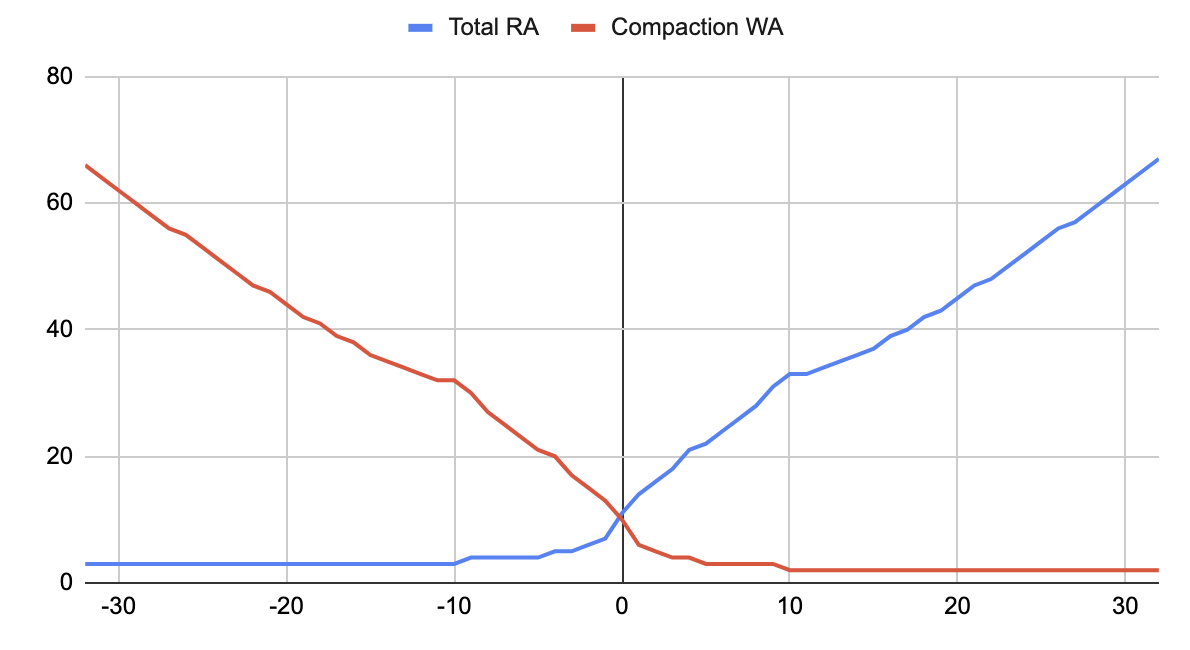 Relationship of read amplification (RA) to write amplification (WA) based on the UCS scaling property (ω).
 -
- Sharding
-
UCS uses sharding for parallel compaction. There are several properties related to sharding, and the defaults are acceptable for most use cases. If you need to tune these properties, it is typically more effective to tune properties related to SSTables size before setting a fixed number of shards.
target_sstable_size: A median SSTable size in bytes, such as100MiB. The default is1GiB. Actual SSTable sizes can be smaller or larger than this value. This value is used to calculate a range of acceptable SSTable sizes for shards (concurrent compactions).Smaller SSTables make streaming, repair, and compaction faster, but there are more SSTables overall, which requires more disk space, memory, and garbage collection. If memory pressure from SSTables is too high, then
target_sstable_sizeis probably too small.-
base_shard_count: The minimum number of shards at the lowest compaction levels. Lower values produce larger SSTables at level 0, which inherently limits maximum write throughput because all writes must pass through this level. This value is ignored if enforcing the base number of shards would create SSTables smaller thanmin_sstable_size. -
sstable_growth: A decimal between 0 and 1 that determines whether to favor SSTable size or number of shards as the database grows and compaction matures into higher levels.-
Values closer to
1: Produce fewer but larger SSTables.1exactly fixes the shard count to the base value. -
Median (
0.5): Equal increases in SSTable size and shards. This can be useful if large datasets aren’t producing enough SSTables in general. -
Default (
0.333): Shard growth slightly outpaces SSTable size growth. -
Values closer to
0: Produce more but smaller SSTables.
-
-
min_sstable_size: Set the minimum SSTable size in MB to enforce ifbase_shard_countwould create SSTables that are too small.min_sstable_sizeoverridesbase_shard_countby compacting SSTables in fewer parallel shards so that the resulting SSTables are at least the minimum size. Once SSTables are large enough,base_shard_counttakes effect again.-
auto: Dynamically set the minimum based on the size of newly flushed SSTables. -
A number of bytes (default): Sets the minimum SSTable size to the specified number of bytes. The default is
100MiB, which can also be set as100. -
0: Disable minimum SSTable size. Always applybase_shard_count.
-
-
max_sstables_per_shard_factor: Set the maximum number of SSTables that a shard can accumulate before forcing a major compaction on that shard. The default is10. The purpose of this property is to avoid accumulating too many SSTables in general, particularly outliers that are never naturally selected for compaction. For example, in a mature database with established SSTables, a period of slow writes can flush very small SSTables that fall outside the range ofbase_shard_countandtarget_sstable_size.
-
- Compaction threads
-
The following properties are for management of compaction threads. This is related to sharding but these properties don’t determine the number or size of shards.
DataStax recommends using the default values for
reserved_threadsandreservation_typefor balanced responsiveness and thread utilization. Tuning these properties is rarely necessary.However, optimal performance with the default values is dependent on the value of
concurrent_compactorsincassandra.yaml. This value significantly impacts UCS performance because it sets the total number of available compaction threads. Make sure this parameter is large enough to allow at least one dedicated compaction thread at each compaction hierarchy level. At minimum, setconcurrent_compactorsequal to the expected number of compaction levels. Higher values improve compaction performance specifically, but too many concurrent compaction threads can degrade read/write performance due to contention for CPU and I/O resources. If this value is too low, compaction tasks must wait for threads to become available, creating performance bottlenecks.-
reserved_threads: Specifies the number of threads per level to reserve for compaction tasks. Unreserved threads accept compaction tasks according to prioritization mechanisms. The default and recommended value ismax, which attempts to evenly distribute threads across all levels. The number of threads is based onconcurrent_compactorsincassandra.yaml. If you use a non-default value, you must also setconcurrent_compactorsaccordingly. -
reservation_type: Specifies whether reserved threads can be used by lower compaction levels.-
per_level: Reserved threads are limited to their assigned level. -
level_or_below(default): Reserved threads can be used by their assigned level and any lower levels.
-
-
parallelize_output_shards: Whether to allow shards to compact in parallel.-
true(default): The database uses multiple threads, if available, to compact shards in parallel. This can improve compaction throughput, especially at low levels where SSTables are smaller. However, this disables early open (reading new SSTables before compaction ends), which can degrade read performance on tables that are configured to have a few very large SSTables. -
false: The databases compacts shards sequentially. This reduces the number of threads used for compaction, but it increases the total duration of compaction and the associated I/O usage.
-
-
expired_sstable_check_frequency_seconds-
How often the database checks for expired SSTables. The default is
600(10 minutes). - UCS system properties
-
System properties set global configuration values. All UCS options can be set as system properties using the prefix
unified_compaction.. For example, to setsstable_growth, use-Dunified_compaction.sstable_growth. You can override these global values on specific tables by altering the table definition directly (CREATE TABLEorALTER TABLE). - Enable alternative default values for tables with vector columns
-
For tables with vector columns that use UCS, you can enable vector mode to automatically apply a vector-specific UCS configuration to those tables.
Vector mode is disabled by default. To enable vector mode, set the following system property:
-Dunified_compaction.override_ucs_config_for_vector_tables=trueWhen enabled, vector mode applies the following predefined default values:
-
scaling_parameters:L10. This is equivalent to LCS with the default fan factor10. -
target_sstable_size:5GiB. -
base_shard_count:1. -
sstable_growth:1. -
min_sstable_size:1GiB. -
Other properties: Properties without a vector mode default use standard default values or values set by system properties (if any).
To customize the global defaults for vector mode, including properties that don’t have a predefined vector mode default, set any UCS property as a system property with the prefix
unified_compaction.vector_. This means that you can set UCS system properties for both vector and non-vector tables. For example:-Dunified_compaction.vector_sstable_growth=1 -Dunified_compaction.sstable_growth=0.5If vector mode is disabled, then the
unified_compaction.vector_system properties are ignored.Vector mode values apply only when a property isn’t set directly in the table definition. For example, if you explicitly set
sstable_growthwithCREATE TABLE, the table-level value takes precedence over the vector mode default. -
static_scaling_factors-
If you are migrating or upgrading from DSE, the
static_scaling_factorsproperty and related legacy properties are supported for backwards compatibility.static_scaling_factorsaccepts only an integer forω. After migrating, you can replace thestatic_scaling_factorsproperty withscaling_parameterswithout changing the value forω. However, you must replace the other legacy parameters with their modern equivalents forscaling_parameters.Legacy UCS V1 is enabled if the
num_shardsproperty is set. This property is accepted for backwards compatibility only, and it cannot be used with modern UCS properties. concurrent_compactorsfor UCS levels-
concurrent_compactorsincassandra.yamlsignificantly impacts UCS performance because it sets the number of compaction threads available. Make sure this parameter is large enough to allow at least one dedicated compaction thread at each compaction hierarchy level. At minimum, setconcurrent_compactorsequal to the expected number of compaction levels.
Properties for the SizeTieredCompactionStrategy class
STCS selects SSTables for compaction based on their size, grouping SSTables of similar size into buckets and compacting them together into a new, larger SSTable.
bucket_lowandbucket_high-
The size range is based on the dynamically calculated average size of all SSTables for a given table with margins set by the
bucket_lowandbucket_highproperties. The values of these properties are multipliers that determine the lower and upper bounds of the size range relative to the average SSTable size. The entire range is calculated as follows:lower bound = average SSTable size in KB x bucket_low upper bound = average SSTable size in KB x bucket_high range in KB = [lower bound, upper bound]By default,
bucket_lowis0.5andbucket_highis1.5. This creates a margin of 50 percent on either side of the average: SSTables are selected for compaction if they are anywhere from 0.5 times the average up to 1.5 times the average. For most workloads, the default is acceptable. min_threshold-
The minimum number of SSTables required to trigger compaction is set by the
min_thresholdproperty. The default is 4 SSTables.To increase the probability for compaction, decrease
min_thresholdor adjust thebucket_*properties to expand the size range. However, be aware that more frequent compactions inherently impact performance through disk I/O. max_threshold-
STCS naturally produces outliers that never or rarely fall within the size range. It is also possible to create a temporary stalemate scenario where there aren’t enough matching SSTables to satisfy
min_threshold. To avoid accumulating too many SSTables overall, the database forcefully runs compaction when the number of SSTables reaches themax_threshold. The default is 32 SSTables. However, frequentmax_thresholdcompactions can indicate that STCS isn’t compacting frequently enough. min_sstable_size-
Workloads that flush memtables to very small SSTables (less than 50 MB) can cause STCS to cycle through excessive compactions of these small SSTables before producing SSTables of any notable size. To avoid these excessive compaction cycles, all SSTables smaller than
min_sstable_sizeare grouped into a single bucket for compaction. The default is 50 MB.Before tuning
min_sstable_size, DataStax recommends reducingmax_thresholdto 25 or 15. If your workloads hit the reduced threshold frequently, then tunemin_sstable_sizeor other parameters.
Properties for the LeveledCompactionStrategy class
LCS organizes SSTables into levels, where each level has a target size and SSTables are compacted to maintain this structure. This strategy helps to limit read amplification and maintain predictable performance for read-heavy workloads.
sstable_size_in_mb-
Sets the target SSTable size for leveling. SSTables at L1 and higher are merged into SSTables with a size greater than or equal to
sstable_size_in_mb. The default is 160 MB. - memtable tuning for L0
-
Because L0 receives all newly flushed SSTables, it isn’t predictably sized like higher levels. To prevent too many small SSTables from flooding L0, make sure all memtable parameters in
cassandra.yamlare tuned appropriately for your workloads. With LCS, DataStax recommends less frequent memtable flushes compared to tables that use STCS.
Properties for the TimeWindowCompactionStrategy class
TWCS compacts SSTables by chronological time windows where only one window is active (receiving new memtable flushes) at a time. When a window closes, all of the window’s SSTables are compacted into one final SSTable for that window.
The ideal configuration for TWCS is extremely use-case specific.
compaction_window_unitandcompaction_window_size-
Configure time window intervals:
-
compaction_window_unit: A JavaTimeUnitspecifying the unit of measurement for time windows, such asseconds,hours, ordays. -
compaction_window_size: An integer specifying the number of units per window.
The default is 1 day (
compaction_window_unit: 'days'andcompaction_window_size: 1)DataStax recommends planning your time window configuration so that there are fewer than 50 (ideally, 30) inactive (closed) time windows. To calculate this, divide your TTL period by the target number of inactive windows. For example, if your TTL period is 365 days with 30 inactive windows, 365 divided by 30 is approximately 12 days per window. Therefore, your time window configuration would be
compaction_window_unit: 'days'andcompaction_window_size: 12. -
- STCS properties for active window compactions
-
TWCS uses STCS for minor compactions in the active time window. This prevents the active window from accumulating an excessive number of SSTables before the final compaction when the window closes. As a result, you can use all STCS properties with the
TimeWindowCompactionStrategyclass to configure the active window’s compaction behavior.For TWCS, DataStax recommends setting
max_thresholdto no more than 20.
Tune single-SSTable tombstone compactions
To avoid accumulation of tombstones in SSTables that haven’t been selected for compaction by a table’s compaction strategy, the database can compact individual SSTables specifically to clean up tombstones. These tombstone compactions are in addition to compactions triggered by the table’s compaction strategy.
Before tuning tombstone compaction properties, be aware that tombstone compactions consume system resources like any other compaction event.
The following compaction properties can be set on individual tables to determine the frequency of single-SSTable tombstone compactions:
-
tombstone_threshold: Sets the maximum acceptable ratio of tombstones to all columns. Single-SSTable tombstone compactions are triggered when an SSTable’s estimated tombstone ratio is higher thantombstone_threshold. -
tombstone_compaction_interval: Sets the minimum SSTable age in seconds to be eligible for tombstone compaction. This applies to all SSTables (memtable flushes, compactions triggered by the compaction strategy, and previous tombstone compactions). The default is 86400 seconds (24 hours).To evict tombstones faster, reduce
tombstone_compaction_interval. If this value is too low, some SSTables might be continuously compacted. -
unchecked_tombstone_compaction: To disregard an SSTable’s age before triggering single-SSTable tombstone compaction, setunchecked_tombstone_compactiontotrue. -
provide_overlapping_tombstones: Compaction can consider overlapping tables that aren’t part of a compaction operation when checking for deleted or overwritten data in compacted tables. If such data is found, it can be safely discarded, which enables removal of tombstones over that data.Set
provide_overlapping_tombstonestoROWorCELLin the table’scompactionproperties to permanently configure the table to use overlapping tables as a source of deletions/overwrites.If set to
ROW, the operation discards only entire deleted rows or sets of rows. If set toCELL, the operation discards any cell (column within a row) with a deleted/overwritten value. To disable use of overlapping tables, set it toNONE(default).ROWandCELLincrease the disk load on compaction, especially with STCS, withCELLbeing most resource-intensive. If your workloads commonly delete entire rows, both options can improve read performance.You can run
nodetool garbagecollectwith-g CELLor-g ROWto trigger a single-table compaction and discard deleted data with a single command. This is a temporary alternative to theprovide_overlapping_tombstonesproperty.
Tune compaction for SAI and vector search
DataStax strongly recommends UCS for SAI and vector search workloads. These workloads often rely on extremely efficient reads (low read amplification and low read request latency). To achieve the required read performance, these tables must have the fewest possible number of SSTables.
The ideal is one SSTable, but this is not always achievable in practice.
Typically, it is more performant to have a few large SSTables with a higher target SSTable size to limit the number of SSTables involved in a read.
For example, set high values for target_sstable_size (such as 10GiB) and sstable_growth (such as 0.5).
If further tuning is required for extremely latency-sensitive workloads, set base_shard_count to 1 to disable sharding (uses only one shard) and use severe level-specific scaling, such as [T4, T2, L10].
This makes compaction extremely resource intensive (heavy write amplification, unable to support many ongoing writes) but it achieves optimal search performance after compaction.
For vector search specifically, you can enable alternative default values for tables that have a vector column and use UCS.
If you choose to use LCS, the recommended configuration is fanout_size of 2 and the largest sstable_size_in_mb that your environment can reasonably support.
Monitor compaction
You can monitor the performance impact of compaction configuration changes using compaction metrics and logs.
|
HCD provides a start-up option to test compaction strategies without affecting your production workloads. |
Check pending compactions
Too many pending compactions often indicates a compaction tuning issue.
To retrieve pending compactions, use your preferred monitoring solution or one of the following commands:
nodetool sjk mx -f Value -mg -b org.apache.cassandra.metrics:type=Compaction,name=PendingTasksnodetool compactionstatsCompaction metrics
The following compaction metrics attributes are exposed through CompactionManagerMBean:
| Attribute | Description |
|---|---|
|
Total number of bytes compacted since server start or restart. |
|
Number of completed compactions since server start or restart. |
|
Estimated number of compactions remaining to perform. |
|
Total number of compactions since server start or restart. |
For more information, see Monitor Hyper-Converged Database (HCD) clusters.
Extended logging
|
Extended compaction logging applies to the entire cluster. Enabling extended compaction logs on any table enables extended logging for all tables on all nodes in the entire cluster. |
To enable extended logging for compaction, set log_all to true in the table’s compaction properties.
Extended compaction logs are stored in a separate file. For more information, see Read extended compaction logging.
