Phase 5: Connect client applications to the target cluster
Phase 5 is the last phase of the migration process, after you route all read requests to your target Astra DB Serverless cluster in Phase 4.
In this final phase, you connect your client applications directly and exclusively to your target Astra cluster. This removes the dependency on ZDM Proxy and the origin cluster, thereby completing the migration process.
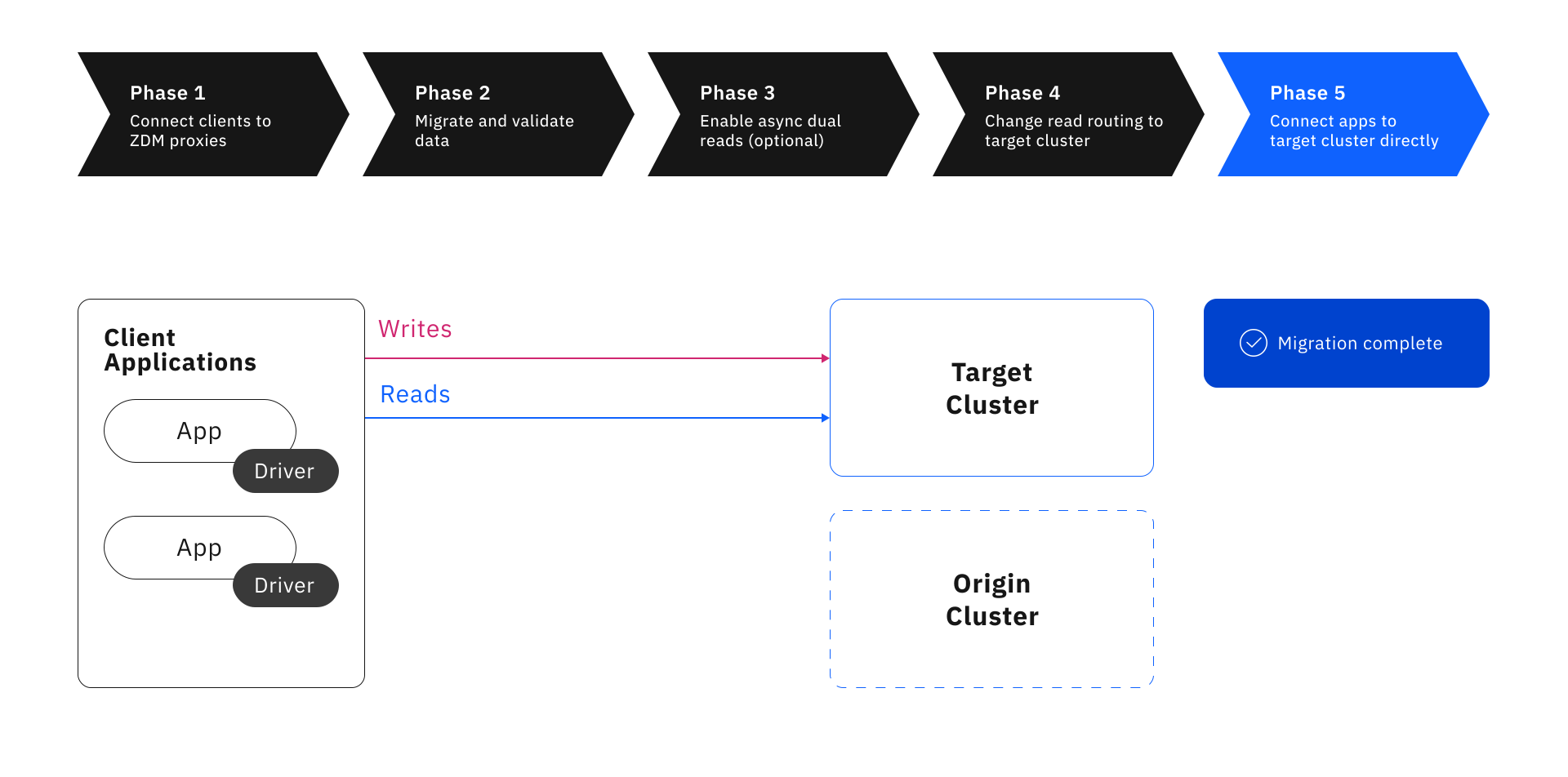
The minimum requirements for reconfiguring these connections depend on the differences between your origin and target clusters as well as the APIs and libraries you use in your client applications. Parts of this page assume you are migrating to a target Astra cluster. If this is not the case, see the ZDM documentation for your actual target cluster.
|
Once your client applications connect directly to the target cluster, you can no longer seamlessly roll back to the origin cluster. From this point onward, the clusters are no longer be synchronized, and the target cluster becomes the source of truth for all reads and writes. Be sure that you have thoroughly validated your data (Phase 2), tested your target cluster’s performance (Phase 3), and routed all reads to the target (Phase 4) before permanently switching the connection. |
Verify driver compatibility
Make sure your Cassandra driver is compatible with your target Astra cluster and the Astra features that you want to use. If the driver is incompatible, connection failures and other errors can occur.
Upgrade your driver version if necessary. When upgrading your driver, review the driver’s release notes for enhancements, deprecations, and removals that might impact your application code.
For Astra-compatible drivers, see Cassandra driver compatibility.
Identify feature disparity
If necessary, change your application code to account for feature disparity between your origin and target clusters. A feature supported by your origin cluster might not be supported by your target cluster.
For example, because Astra DB is a managed service, some functionality that is available to self-managed clusters is restricted in Astra DB. These restrictions can require additional code changes outside the connection strings when migrating to or from Astra DB. Some specific examples include the following:
-
After migrating to Astra DB, drivers cannot create keyspaces because CQL for Astra DB doesn’t support
CREATE KEYSPACE. -
Astra DB Serverless doesn’t support DSE-specific features like DSE Insights Monitoring and DSE Advanced Workloads.
The timing of code changes based on feature disparity depends on your application’s requirements. A frequently used feature must be replaced immediately to avoid errors after connecting to the target cluster. In contrast, a rarely used feature that won’t cause an error can be replaced after connecting to the target cluster.
GoCQL support
Go applications might require a different GoCQL driver package, depending on the origin and target cluster connection types.
When migrating to Astra DB Serverless, Go applications must use gocql-astra instead of gocql.
The gocql-astra package includes gocql and additional support for connections to Astra.
For the required import statements and connection details, see Get started with the Go driver.
If your origin cluster is a self-managed cluster with a Mission Control CQL gateway, and your Go applications already use gocql-astra to support the CQL gateway connection, then you don’t need to change the driver package.
Update Cassandra driver connection strings
To connect a driver to Astra, you need to get the credentials for your Astra database, and then update the driver’s connection strings:
-
Generate an Astra application token.
The token must have a role with sufficient permissions to execute the required operations, such as the Database Administrator role.
-
Download your Astra database’s Secure Connect Bundle (SCB).
The SCB contains sensitive information that establishes an encrypted connection to your database. Treat it as you would any other sensitive values, such as passwords or tokens.
For multi-region Astra databases and Astra organizations that use custom domains, your database will have more than one SCB. Your driver connections must use the appropriate SCB for the desired region or domain when connecting to your databases. For more information, see Connection pools and initial contact points.
-
Update your driver connection strings as follows:
-
Set
usernameto the literal stringtoken. -
Set
passwordto your application token (AstraCS:…). -
Use the appropriate option for your driver to provide the path to the database’s SCB zip file. The name and format of this option depend on your driver language.
-
The following example demonstrates how the Cassandra Python driver connects to Astra using an application token and SCB. For more information and examples of Astra connections, see Compare driver connection parameters and the documentation for your Cassandra driver.
import os
from cassandra.cluster import Cluster
from cassandra.auth import PlainTextAuthProvider
import json

# Provide the path to the SCB
cloud_config= {
        'secure_connect_bundle': '/path/to/scb.zip'
        }

# The username is 'token' and the password is the application token value
auth_provider = PlainTextAuthProvider("token", os.environ["APPLICATION_TOKEN"])

# Create the Cluster and Session objects with Astra credentials
cluster = Cluster(cloud=cloud_config, auth_provider=auth_provider)
session = cluster.connect()
Connect unsupported drivers to Astra
Supported drivers for Astra have built-in support for the SCB. These drivers can automatically extract the necessary connection information, such as contact points, SSL context, and local datacenter, from the SCB zip file.
If your client application uses an earlier driver version without built-in SCB support, DataStax strongly recommends upgrading to a compatible driver to simplify configuration and get the latest features and bug fixes.
If you cannot upgrade your driver, you must do one of the following:
-
Use
cql-proxy. -
Extract the SCB archive and manually provide the required values to enable mTLS in your driver’s configuration. For an example, see DataStax Ruby and PHP drivers (Maintenance).
Compare driver connection parameters
Use the following table to compare required driver connection parameters and understand potential changes for your driver connection strings, depending on your origin and target cluster connection types:
| Parameter | Self-managed without Mission Control CQL gateway | Self-managed with CQL gateway | Astra DB |
|---|---|---|---|
Contact points |
Required, set manually |
Automatically set by the SCB |
Automatically set by the SCB |
Secure Connect Bundle (SCB) |
Not applicable |
Required |
Required |
SSL context |
Optional, set manually |
Automatically set by the SCB |
Automatically set by the SCB |
Local datacenter |
Required, set manually |
Automatically set by the SCB |
Automatically set by the SCB |
Database username |
Requirement depends on cluster configuration. If required, set to the relevant user name for authentication. |
Required. Must be a valid CQL role name for the target cluster. |
Required.
|
Database password |
Requirement depends on cluster configuration. If required, set to the relevant password for authentication. |
Required. Provide the password that corresponds with the given database username (CQL role name). |
Required.
|
Compare driver pseudocode
The following pseudocode example provides a simplified comparison of the way a Cassandra driver interacts with Astra DB and self-managed clusters. This pseudocode is for illustration purposes only; the exact syntax depends on your driver language and version.
The primary difference is the initial Cluster configuration:
-
For self-managed clusters without a CQL gateway, the contact points are set explicitly, and the authentication credentials depend on the cluster’s configuration.
This example uses plain username and password authentication with no SSL encryption. Other authentication methods can use other classes or options.
To enable SSL encryption, certificates and keyfiles must be provided explicitly to the driver. For these classes and options, see the documentation for your driver.
-
For self-managed cluster with a CQL gateway, the contact points and SSL context are set by the gateway SCB automatically. A CQL role name and password are used for authentication.
-
For Astra DB, the contact points and SSL context are set by the database’s SCB automatically. An Astra application token is used for authentication. The username is the literal string
tokenbecause the application token provides all authentication context, including role information.
After instantiating the Cluster, the interactions through the Cluster object are the same.
// Create an object to represent a self-managed cluster
Cluster my_cluster = Cluster.build_new_cluster(
    contact_points = "10.20.30.40",
    username="cluster_username",
    password="cluster_password"
)

// Or create an object to represent a self-managed cluster with a CQL gateway
Cluster my_cluster = Cluster.build_new_cluster(
    username="cluster_username",
    password="cluster_password",
    secure_connect_bundle="/path/to/scb.zip"
)

// Or create an object to represent an Astra database
Cluster my_cluster = Cluster.build_new_cluster(
    username="token",
    password="AstraCS:...",
    secure_connect_bundle="/path/to/scb.zip"
)

// Connect the Cluster object to the Cassandra cluster, returning a Session
Session my_session = my_cluster.connect()

// Execute a query, returning a ResultSet
ResultSet my_result_set = my_session.execute("select release_version from system.local")

// Retrieve a specific column from the first row of the result set
String release_version = my_result_set.first_row().get_column("release_version")

// Close the Session and Cluster
my_session.close()
my_cluster.close()

// Print the data retrieved from the result set
print(release_version)
Driver connection examples for Astra
For more information and examples, see the documentation for your driver. To get started, see the following:
Switch to the Data API
After migrating to Astra, you have the option of using the Data API instead of, or in addition to, a Cassandra driver.
Although the Data API can read and write to CQL tables, it is significantly different from driver code. To use the Data API, you must rewrite your application code or create a new application.
For more information, see the following:
Migration complete
Your migration is now complete, and your target cluster is the source of truth for your client applications and data.
When you are ready, you can decommission your origin cluster and ZDM Proxy because these are no longer needed.
Seamless rollback is no longer possible. If you need to revert to the origin cluster after this point, you must perform a full migration in the opposite direction, with your previous origin cluster as the target. This ensures that all data is rewritten and synchronized back to the origin cluster.
