Roles
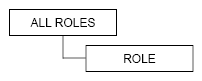
Role management and role proxy permissions use the following modelled hierarchy:
Synopsis
-
ALL ROLES
GRANT <permission>[, <permission> ...]
ON ALL ROLES
TO <role_name>;
where permission values are
ALL PERMISSIONS,ALTER,AUTHORIZE,CREATE,DESCRIBE, andDROP -
ROLE
GRANT <permission>[, <permission> ...]
ON ROLE <role_name>
TO <role_name>;
where permission values are
ALL PERMISSIONS,ALTER,AUTHORIZE,CREATE,DESCRIBE, andDROP -
Role as a permission set (applies if Role Manager
mode: internal)GRANT <role_name> TO <role_name>;Nesting roles gives all the permissions of the first role in the statement to the second. With internal role management, use permission set roles to create your own hierarchical permissions structures.
Role permissions
| Privilege | Resource | Permissions |
|---|---|---|
ALL PERMISSIONS |
ALL ROLES |
All role permissions. |
ALTER |
ALL ROLES |
ALTER ROLE any role |
ALTER |
ROLE <role_name> |
ALTER ROLE specified role |
CREATE |
ALL ROLES |
CREATE ROLE |
DESCRIBE |
ALL ROLES |
|
DESCRIBE |
ROLE <role_name> |
|
DROP |
ALL ROLES |
DROP ROLE on any role. |
DROP |
ROLE <role_name> |
DROP ROLE specified role. |
<role_name> |
<role_name> |
Grant role (as a set of permissions) to another role. Requires |
Restrict roles to datacenters
HCD supports restricting a role’s access to specific datacenters. A restricted role can only connect to nodes in the datacenters for which it is authorized.
Datacenter restrictions apply to non-superuser roles only. Superusers can connect from any datacenter regardless of restrictions.
To use datacenter-level restrictions, do the following:
-
Configure
CassandraNetworkAuthorizerin thecassandra.yamlfile:network_authorizer: class_name: CassandraNetworkAuthorizer -
Perform a rolling restart.
-
Set datacenter access when creating or altering a role using the
ACCESS TO DATACENTERSoption:CREATE ROLE ROLE_NAME WITH ACCESS TO DATACENTERS {'DC_NAME'};ALTER ROLE ROLE_NAME WITH ACCESS TO DATACENTERS {'DC_NAME'}; -
Optional: To restore access to all datacenters, run the following CQL command:
ALTER ROLE ROLE_NAME WITH ACCESS TO ALL DATACENTERS;
Replace the following:
-
ROLE_NAME: The name of the role to restrict. -
DC_NAME: The name of the datacenter to grant access to. You can specify multiple datacenters as a comma-separated list within the set. For example,{'dc1', 'dc2'}.
