About DSE Search
DSE Search integrates Apache Solr™ and Apache Lucene™ indexing and analyzers to enable full-text search capabilities across tables and nodes in a distributed database. You can use DSE Search indexes for simple keyword search as well as complex queries on multiple fields with faceted search results, such as full-text search, range search, and exact search. DSE Search also supports tokenized text search for use with analyzers.
DSE Search features
-
DSE Search is backed by a scalable database.
-
DSE Search integrates Apache Solr™ 6.0.1 to manage search indexes with a persistent store.
-
A fault-tolerant search architecture across multiple datacenters.
-
Add search capacity just like you add capacity in the DSE database.
-
Set up replication for DSE Search nodes the same way as other nodes by creating a keyspace or changing the replication factor of a keyspace to optimize performance.
-
DSE Search has two indexing modes: Near-real-time (NRT) and live indexing, also called real-time (RT) indexing. Configure and tune DSE Search for maximum indexing throughput.
-
Near real-time query capabilities.
-
TDE encryption of DSE Search data, including search indexes and commit logs.
-
CQL index management commands simplify search index management.
-
Local node (optional) management of search indexing resources with
dsetoolcommands. -
Read/write to any DSE Search node and automatically index stored data.
-
Examine and aggregate real-time data using CQL.
-
Fault-tolerant queries, efficient deep paging, and advanced search node resiliency.
-
Virtual nodes (vnodes) support.
-
Set the location of the search index.
-
Using CQL, DSE Search supports partial document updates that enable you to modify existing information while maintaining a lower transaction cost.
-
Supports indexing and querying of advanced data types, including tuples and User-defined type (UDT).
DSE Search with Apache Solr™ and Apache Lucene™
DSE Search is built with a production-certified version of Solr. It supports all Solr tools and APIs with the exception of several specific unsupported features.
For more information on using open-source Solr, see the following:
-
Solr cell project, including a tool for importing data from PDFs
DSE Search architecture
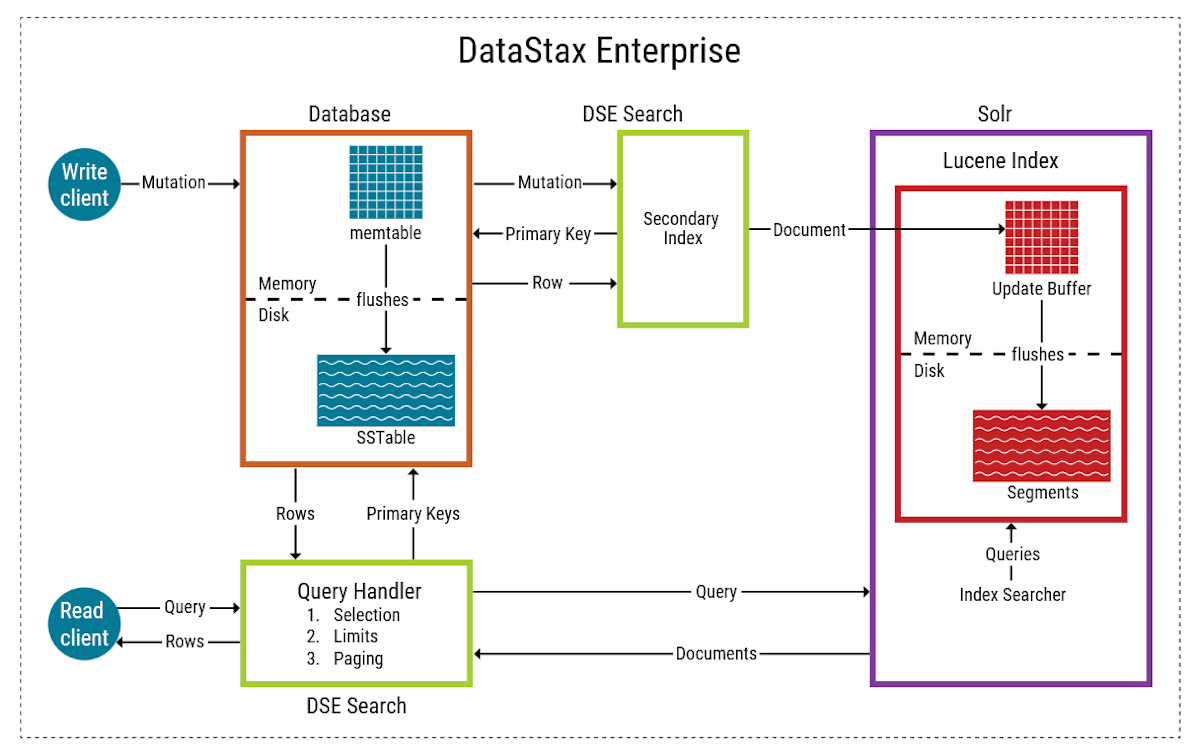
DSE Search integrates a DSE database with full-text search capabilities provided by Solr and Lucene. The correlation between database structures and search index structures is as follows:
-
Column: Field
-
Row: Document
-
Primary key: Unique key
-
Table: Search index (core), collection, or shard of a collection.
Each document (row) in a search index (table) is unique and contains a set of fields (columns) that adhere to a user-defined schema. The schema lists the field types and defines how they should be indexed.
Each table has a separate search index on a particular node. A shard is indexed data for a subset of the data on the local node.
-
Node: Not represented in the search index structure. Nodes are selected for a query based on partition token ranges..
-
Partition: Not represented in the search index structure. Search queries are routed to enough nodes to cover all token ranges.
The search engine considers the token ranges that each node is responsible for, taking into account the replication factor (RF), and computes the minimum number of nodes that is required to query all ranges.
With replication, a node or search index contains more than one shard (partition) of collection (table) data. Unless the replication factor is equal to the number of nodes, each node or search index contains only a portion of the data for an entire collection.
On DSE Search nodes, the shard selection algorithm for distributed queries uses a series of criteria to route sub-queries to the nodes most capable of handling them. The shard routing is token aware, but is not limited unless the search query specifies a specific token range.
-
Keyspace: Not represented in the search index structure, but the keyspace name is used as a prefix for the search index name. There is no equivalent structure to a keyspace in Solr.
DSE Search write path
Writes to tables with DSE Search indexes trigger index updates through a DSE Search write path, which engages Solr and Lucene components for reindexing:
-
A row mutation is performed in the DSE database, such as a CQL
INSERT,UPDATE, orDELETE. -
A thread in the Thread Per Core (TPC) architecture processes the mutation.
-
The mutation is forwarded to the secondary index API.
-
A Solr document is built from the latest full row in the backing table.
-
The document is placed in the Lucene RAM buffer.
Like writes to DSE databases, Lucene documents are first written to an in-memory buffer before being flushed to disk. The RAM buffer is flushed when a commit occurs for one of the following reasons:
-
The RAM buffer is full
-
The auto soft commit timer expires
-
A memtable flush runs on the DSE table
The Lucene documents are flushed to disk into a Lucene segment. Part of the Lucene flush process ensures that only one live document exists for each document identifier. Any documents with duplicate identifiers are reconciled to retain the latest version, and then the others are deleted.
Lucene merges segments periodically, similar to compaction on a DSE table. The number of segments affects read and write (indexing) speed.
-
-
Control is returned to the DSE database.
-
The write operation in the DSE database is completed.
Combined analytics and search
DSE Analytics and Search integration and DSE Analytics can use the indexing and query capabilities of DSE Search. DSE Search manages search indexes with a persistent store.
HTTP Basic Authentication and DSE Search clusters
|
Only use HTTP Basic Authentication with DSE Search clusters in your testing and development environments. Do not use internal authentication on DSE Search clusters in production. |
You can use HTTP Basic Authentication with DSE Search clusters, however it’s not recommended for production.
To secure DSE Search in production, enable DataStax Enterprise Kerberos authentication, or search using CQL.
If instead you enable Cassandra internal authentication, by specifying authenticator: org.apache.Cassandra.auth.PasswordAuthenticator in cassandra.yaml, clients must use HTTP Basic Authentication to provide credentials to Solr services.
Due to the stateless nature of HTTP Basic Authentication, this option can have a significant performance impact because the authentication process must be executed on each HTTP request. For this reason, DataStax does not recommend using internal authentication on DSE Search clusters in production.
Limitations
When issuing a filter query (fq) using the frange function, such as:
transaction_date:{!frange cost=200 l=NOW/DAY-179DAYS u=NOW/DAY+1DAY incl=true incu=false}transaction_dateThe NOW placeholder does not expand into its actual value in the context of the filter cache.
As a result, the same filter cache key is used for queries that are based on different NOW values:
"+FunctionRangeQuery(ConstantScore(frange(date(transaction_date)):[NOW/DAY-179DAYS TO NOW/DAY+1DAY]))",

compositefilter(positiveQueries=[+ConstantScore(frange(date(value)):[NOW/DAY-179DAYS TO NOW/DAY+1DAY])],negativeQueries=[_parent_:F])
This behavior results in a collision of entries in the filter cache.
To work around this limitation, users can:
-
Use the
[… TO …]syntax for ranges instead offrange -
Use the
cache=falseparser parameter instead of caching queries withfrange
Enable DSE Search
To enable DSE Search in a cluster, deploy a DSE Search datacenter. This datacenter provides access to DSE Search functionality from any node in the cluster. However, the DSE Search datacenter must contain only DSE Search nodes. For more information, see Start and stop DataStax Enterprise (DSE).
When you insert or update table data using CQL, the associated search indexes are updated automatically. Data is written to the database, and then the indexes are updated. By default, writes are durable; all writes to a replica node are recorded in memory (memtables) and in a commit log before they are acknowledged as a success. If a node goes down before the memtables are flushed to disk, the commit log is replayed on restart to recover any lost writes.