Phases of the Zero Downtime Migration (ZDM) process
With the Zero Downtime Migration (ZDM) process, your applications can continue to run while you migrate data from one database to another, resulting in little or no downtime and minimal service interruptions. Generally, any Cassandra Query Language (CQL)-compatible database is supported, including DataStax Enterprise (DSE), Hyper-Converged Database (HCD), Astra DB, and open-source Apache Cassandra®.
The ZDM process uses ZDM Proxy, ZDM Utility, and ZDM Proxy Automation to orchestrate live reads and writes on your databases while you move and validate data with a data migration tool, such as Astra DB Sideloader, Cassandra Data Migrator (CDM), or DataStax Bulk Loader (DSBulk).
ZDM Proxy keeps your databases in sync at all times through its dual-writes feature, which means you can seamlessly stop or abandon the migration at any point before the last phase of the migration (the final cutover to the new database). For more information about these tools, see Zero Downtime Migration (ZDM) tools.
When the migration is complete, all data is present in the new database, and you can switch your client applications to connect exclusively to the new database. The old database becomes obsolete and can be shut down.
|
True zero downtime migration with ZDM Proxy is only possible if your database meets the minimum requirements, including cluster compatibility, that are described in Compatibility requirements for ZDM Proxy If your database doesn’t meet these requirements, you can still complete the migration, but you might not be able to use ZDM Proxy and some downtime might be necessary to finish the migration. |
Migration phases
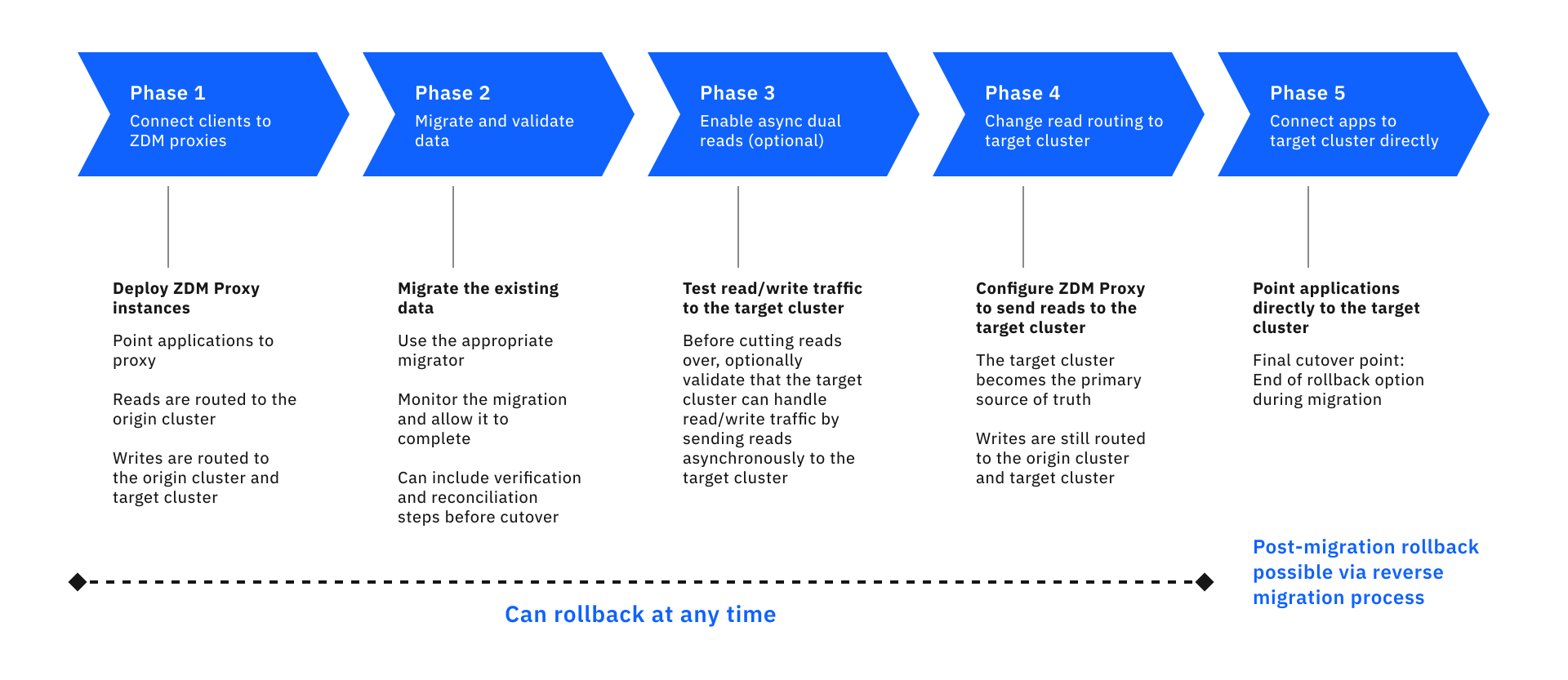
A migration project includes preparation for the migration and five migration phases.
The following sections describe the major events in each phase and how your client applications connect to your origin cluster, ZDM Proxy, and the target cluster during each phase.
The origin cluster is your existing Cassandra-based cluster where your data is currently stored.
The target cluster is your new Cassandra-based cluster where you want to migrate your data.
|
In the context of the ZDM process, the terms cluster and database are used interchangeably. |
Plan and prepare for your migration
From a functional standpoint, before you begin a migration with ZDM Proxy, your client applications perform read/write operations directly with your existing Cassandra-based database. Over the course of the migration, the contact points change to incorporate ZDM Proxy and eventually switch to the target database.
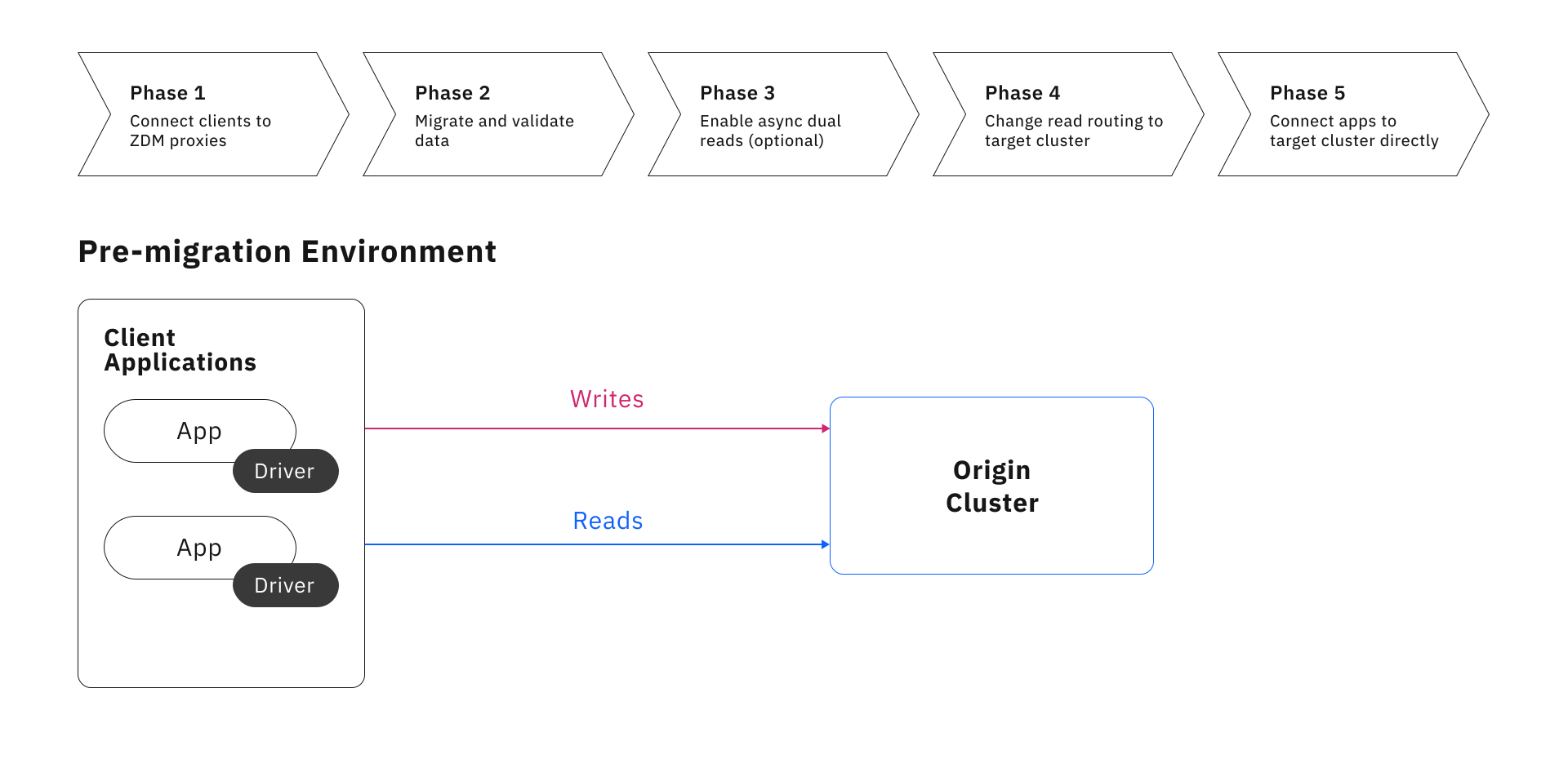
To plan and prepare for the migration, do the following:
-
Review compatibility requirements for ZDM Proxy: Make sure your clusters, data model, and application logic are compatible with ZDM Proxy, and understand how certain operations are handled by ZDM Proxy. If needed, adjust your data model or application logic to ensure compatibility between the two clusters during the migration and ongoing compatibility with the target cluster after the migration.
To successfully migrate with ZDM Proxy, a read or write request produced by your client application must be able to succeed without modification on both your origin (existing) and target (new) clusters. This means that the origin and target clusters must have matching schemas, including keyspace names, table names, column names, and data types.
-
Prepare the ZDM Proxy deployment infrastructure: Set up the infrastructure to host the ZDM tools.
-
Create the target environment: Set up your target cluster, and create schemas that match those on your origin cluster.
Phase 1: Deploy ZDM Proxy and connect client applications
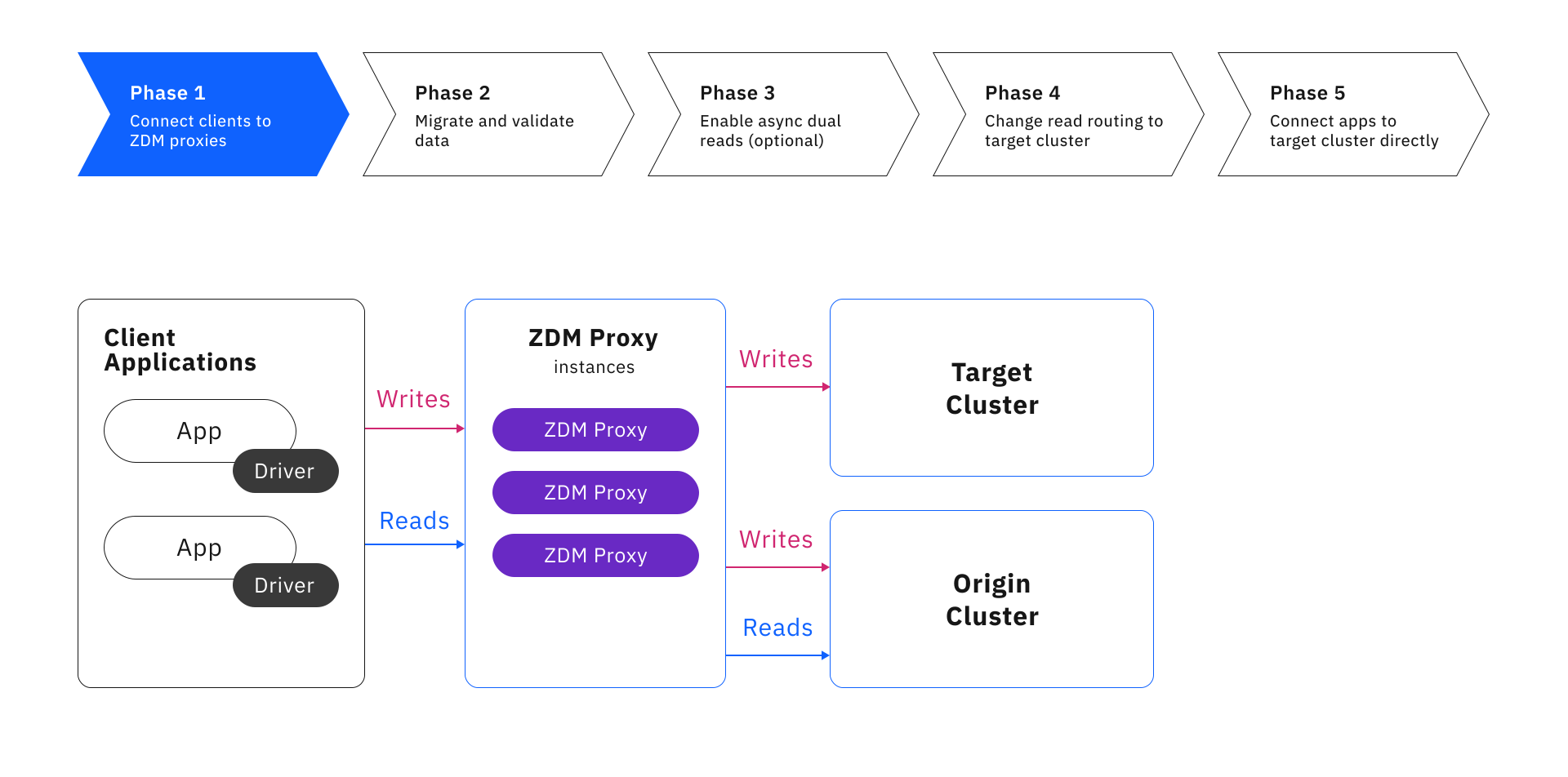
In the first phase of the ZDM process, deploy the ZDM Proxy instances and connect client applications to the proxies. This phase activates the dual-write logic that sends writes to both the origin and target databases, while sending reads to the origin database only.
To complete this phase, do the following:
-
Optional: Learn about managing ZDM Proxy instances, including common operations you will need to perform throughout the migration process.
Phase 2: Migrate data
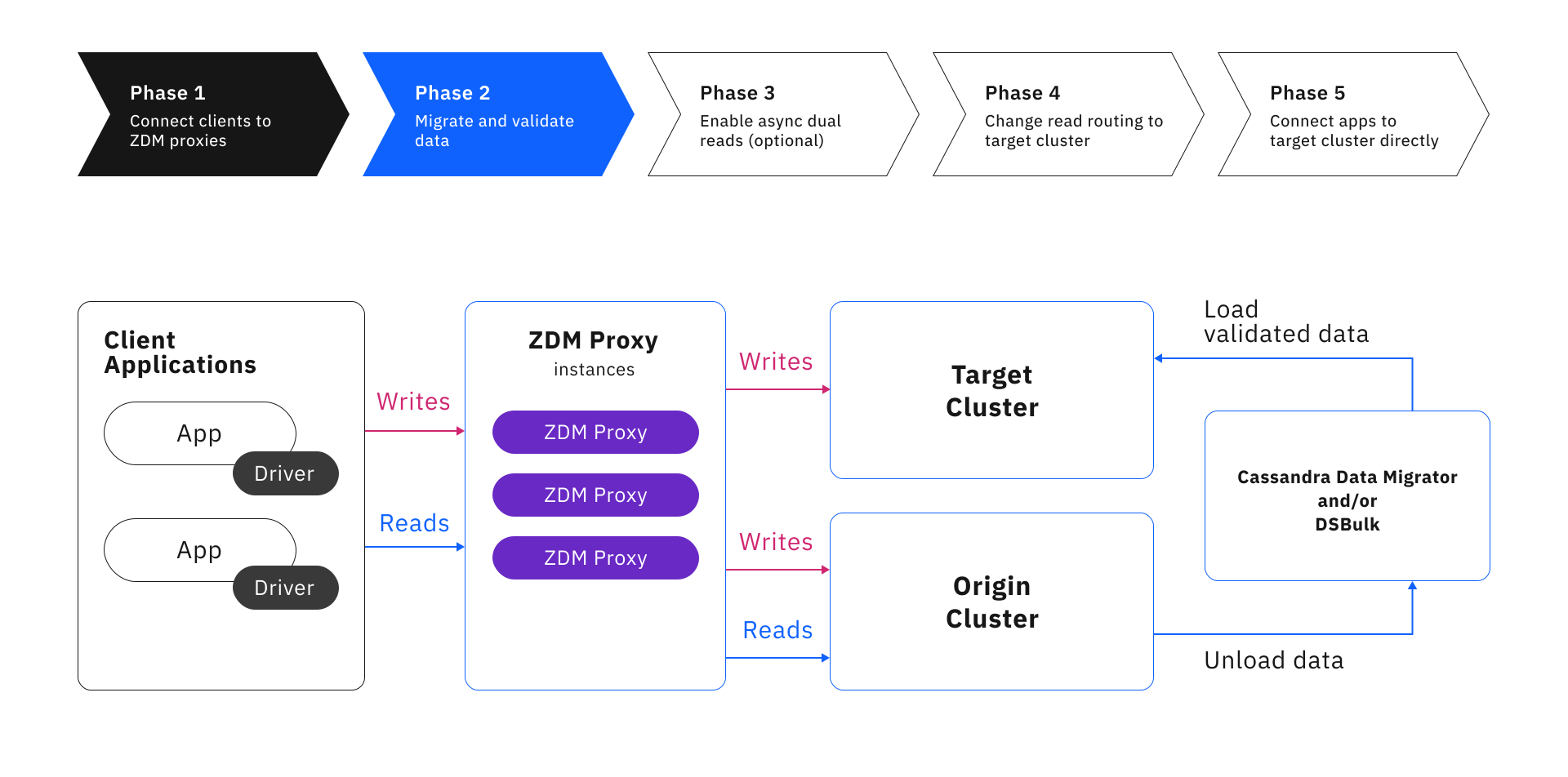
In this phase, you use a data migration tool to copy your existing data to the target database. ZDM Proxy continues to perform dual writes so that you can focus on moving data that was present before you connected ZDM Proxy. Then, you thoroughly validate the migrated data, resolving missing and mismatched records, before moving on to the next phase.
For more information and instructions, see Phase 2: Migrate and validate data.
Phase 3: Enable asynchronous dual reads
This phase is optional but recommended.
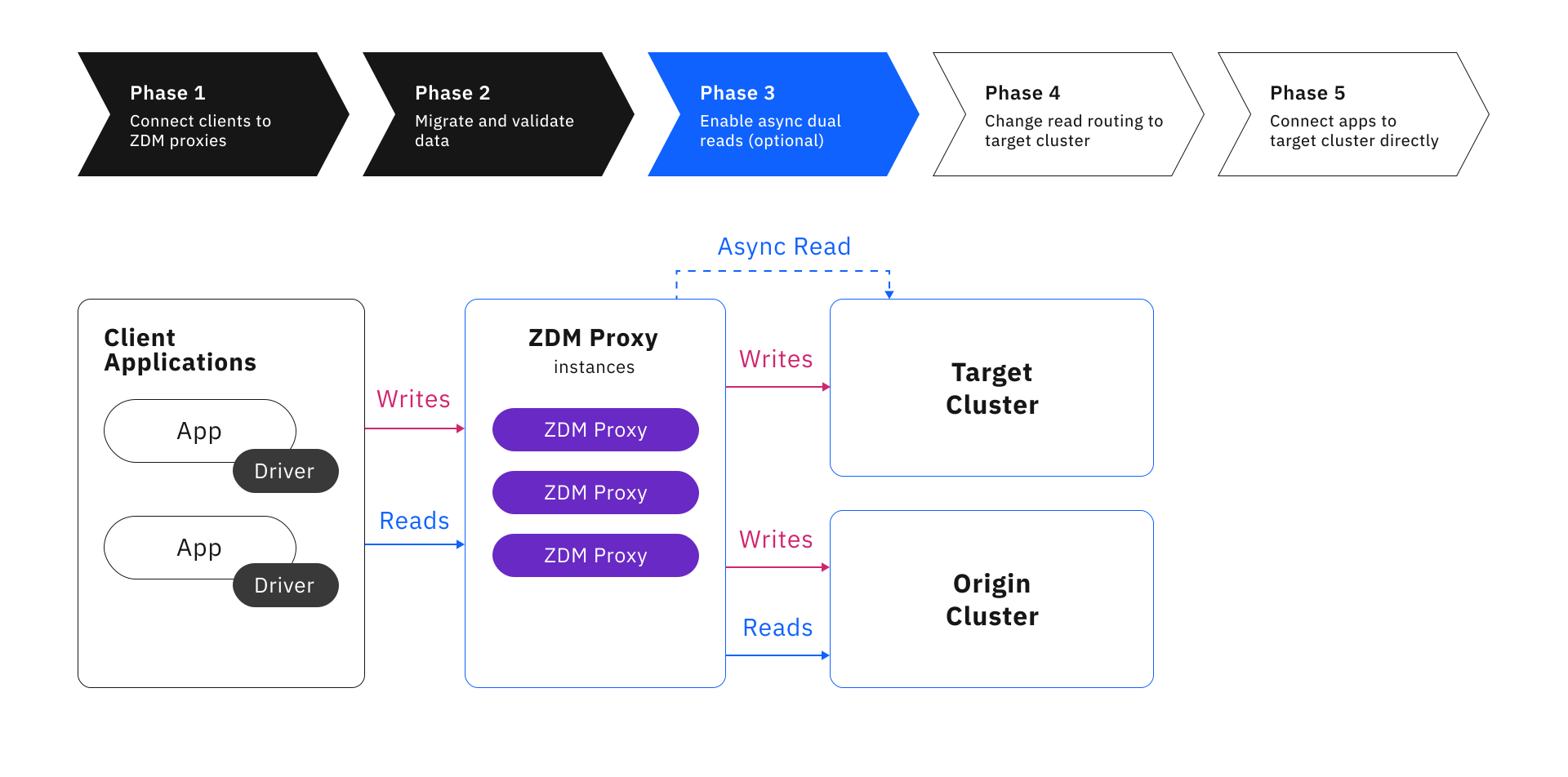
In this phase, you can enable the asynchronous dual reads feature to test the target database’s ability to handle a production workload before you permanently switch your applications to the target database at the end of the migration process.
When enabled, ZDM Proxy sends asynchronous read requests to the secondary database in addition to the synchronous read requests that are sent to the primary database by default.
For more information, see Phase 3: Enable asynchronous dual reads and How ZDM Proxy handles reads and writes.
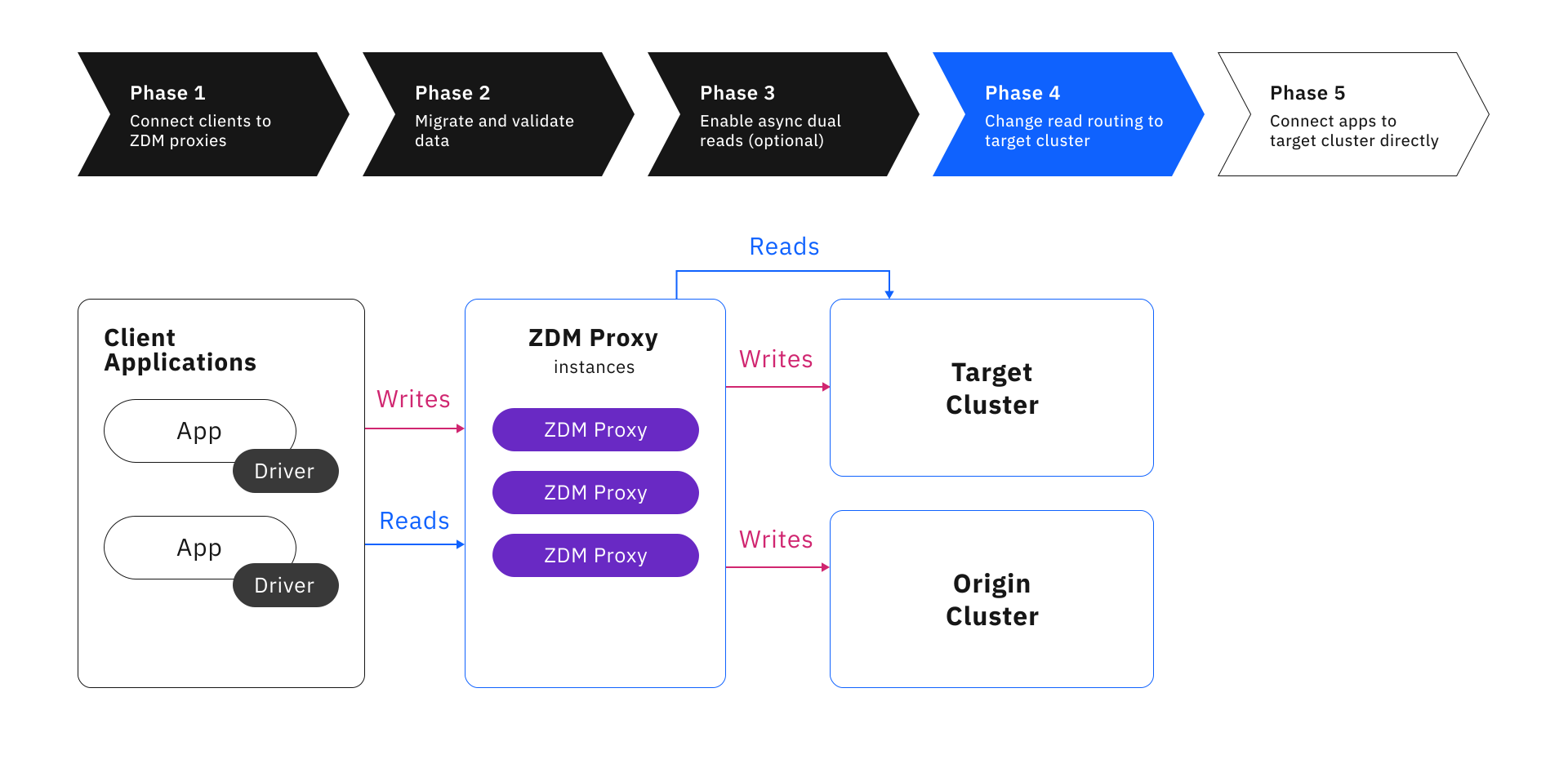
Phase 4: Route reads to the target database
In this phase, read routing on ZDM Proxy is switched to the target database so that all reads are executed on the target. Writes are still sent to both databases in case you need to rollback the migration.
At this point, the target database becomes the primary database.
For more information and instructions, see Phase 4: Route reads to the target.
Phase 5: Connect directly to the target database
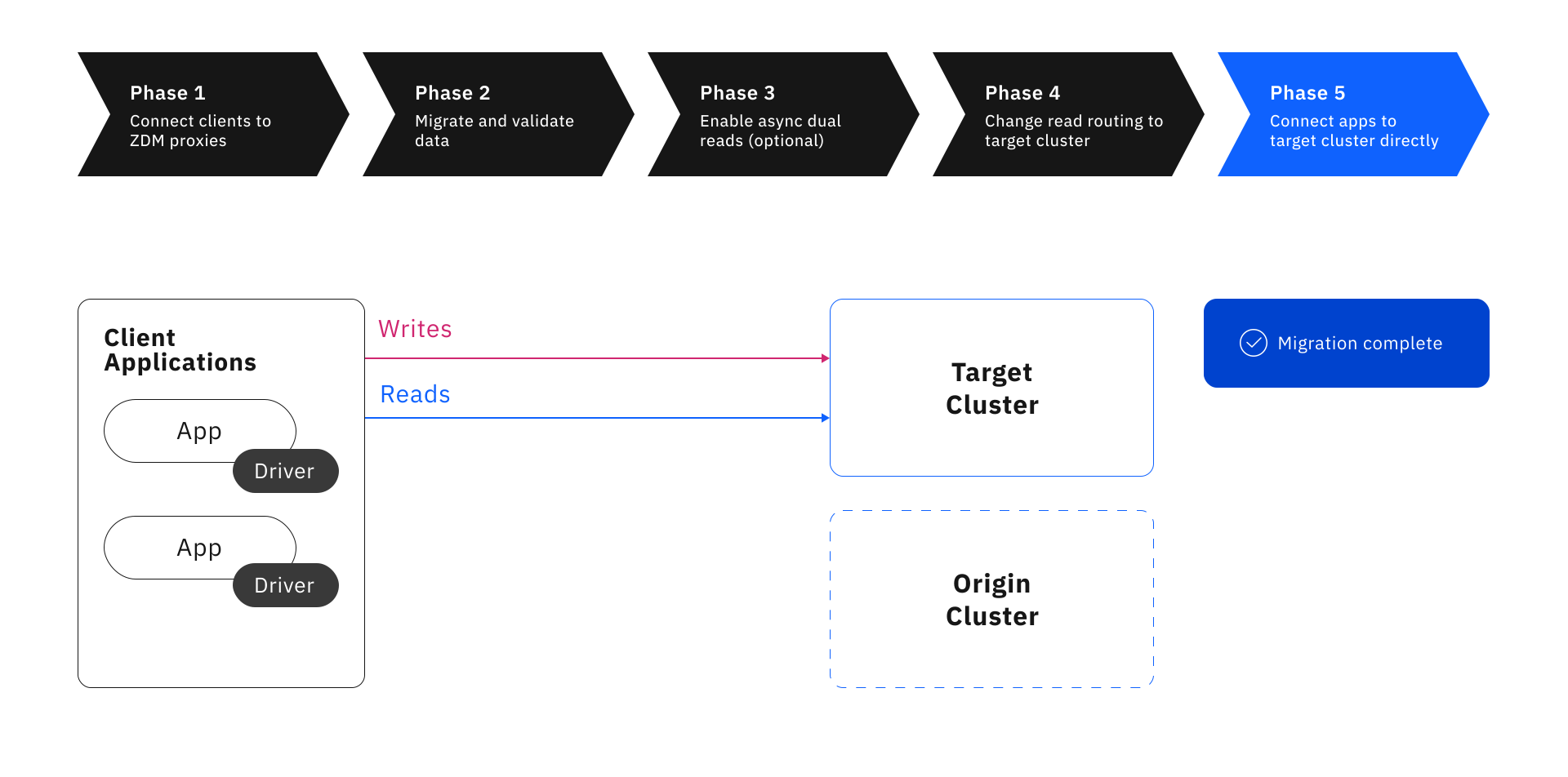
In the final phase of the migration, you move your client applications off ZDM Proxy and connect them directly to the target database.
Once this happens, the migration is complete, and you now exclusively use the target database.
Whether you choose to destroy to retain the origin database depends on your organization’s policies and whether you might need to revert to it in the future. However, be aware that the origin database is no longer synchronized with the target database, and the origin database won’t contain writes that happen after you disconnect ZDM Proxy.
For more information, see Phase 5: Connect client applications to the target cluster.
Rollback options
At any point from Phase 1 through Phase 4, if you encounter an unexpected issue and need to stop or roll back the migration, you can revert your client applications to connect directly to the origin cluster. No other changes are needed because ZDM Proxy synchronizes writes to both clusters as long as it is active.
After addressing the issue, you can restart the migration from the beginning. Be sure to clear the schema on your target cluster to avoid errors during Phase 2.
|
Phase 5 is the point of no return for seamless rollback. |
After moving your client applications off the ZDM Proxy instances (Phase 5), writes are no longer sent to both the origin and target clusters. The data on the origin cluster is no longer synchronized with the target cluster, and seamless rollback is no longer possible. This is the point at which you commit to using the target cluster permanently. The ZDM Proxy deployment can be shut down, and the origin cluster is no longer needed by your client applications.
However, if you decide to move back to the origin cluster later, or if you want to move to a new cluster entirely, you can run the ZDM process in reverse. In this case, you use your original target cluster as the new origin cluster, and you set the new target cluster to whatever cluster you want to migrate to (which could be the original ancestor origin cluster).
ZDM interactive lab
As a companion to the ZDM documentation, you can use the ZDM interactive lab to try the entire migration process in a demo environment.
The lab only requires a GitHub account and a supported browser. All browsers are supported except Safari.
You don’t need to install anything because the lab uses a pre-configured GitPod environment.
This lab provides an interactive, detailed walkthrough of the migration process, including pre-migration preparation and each of the five migration phases. The lab describes and demonstrates all steps and automation required to prepare for and complete a migration from any supported origin database to any supported target database.
Migration terminology
The following terms refer to where your data is located during the migration process, and where read and write requests are sent by ZDM Proxy:
- Database or cluster
-
In the context of the ZDM process, the terms cluster and database are used interchangeably to refer to the source and destination for the data that you are moving during your migration.
- Origin and target
-
The origin cluster is your existing database that you are migrating away from.
The target cluster is your new database that you are migrating to.
You must provide credentials for the origin and target clusters in your ZDM Proxy configuration so it can connect and send requests to both clusters.
- Primary and secondary
-
The primary cluster is the database that is designated as the source of truth for read requests during the migration. It receives all read requests by default, and the responses from these read requests are returned to the client application. The primary cluster is set by ZDM Proxy Automation through the
primary_clustervariable, or you can set it directly through the ZDM ProxyZDM_PRIMARY_CLUSTERenvironment variable.The other database is the secondary cluster. It doesn’t receive read requests unless you enable asynchronous dual-reads.
For the majority of the migration process, the origin cluster is the primary cluster, and the target cluster is the secondary cluster. Near the end of the migration, when you have validated that all pre-existing data has been replicated to the target cluster, you set the target cluster as the primary cluster.
Throughout the entire migration, until you decommission ZDM Proxy, both clusters receive all write requests through the dual writes feature. For more information, see How ZDM Proxy handles reads and writes.
