BATCH
|
Batches aren’t designed to optimize all possible writes. Batching is most effective for writes to one partition. Batches targeting multiple partitions often degrade performance, even with deliberate planning and judicious use. Only use a multiple partition batch when there is no other viable option, such as asynchronous writes. Knowing how your data is partitioned is crucial for understanding the performance implications of |
BATCH combines multiple data manipulation language (DML) statements, such as INSERT, UPDATE, and DELETE, into a block of statements.
Batching is useful when atomicity is a primary concern for a group of operations. Atomicity means all operations are treated as an indivisible unit of work, and all operations must be executed or the entire series is rejected.
Atomicity is determined by the number of partitions involved in a batch:
- Single partition batch
-
A batch that targets a single partition is automatically atomic and isolated. This is because the batch applies all DML statements within a single partition before the data is available.
Single partition batch operations are processed on the server side as a single mutation, if the number of operations doesn’t exceed the maximum size of a single operation or cause the query to time out. A well-constructed batch targeting a single partition can be more performant and efficient compared to other strategies for executing multiple operations.
A single partition batch sends one message to the coordinator for all operations. All replicas for the single partition receive the data, and the coordinator waits for acknowledgement. No batchlog mechanism is necessary. The number of nodes involved in the batch is bounded by the number of replicas.
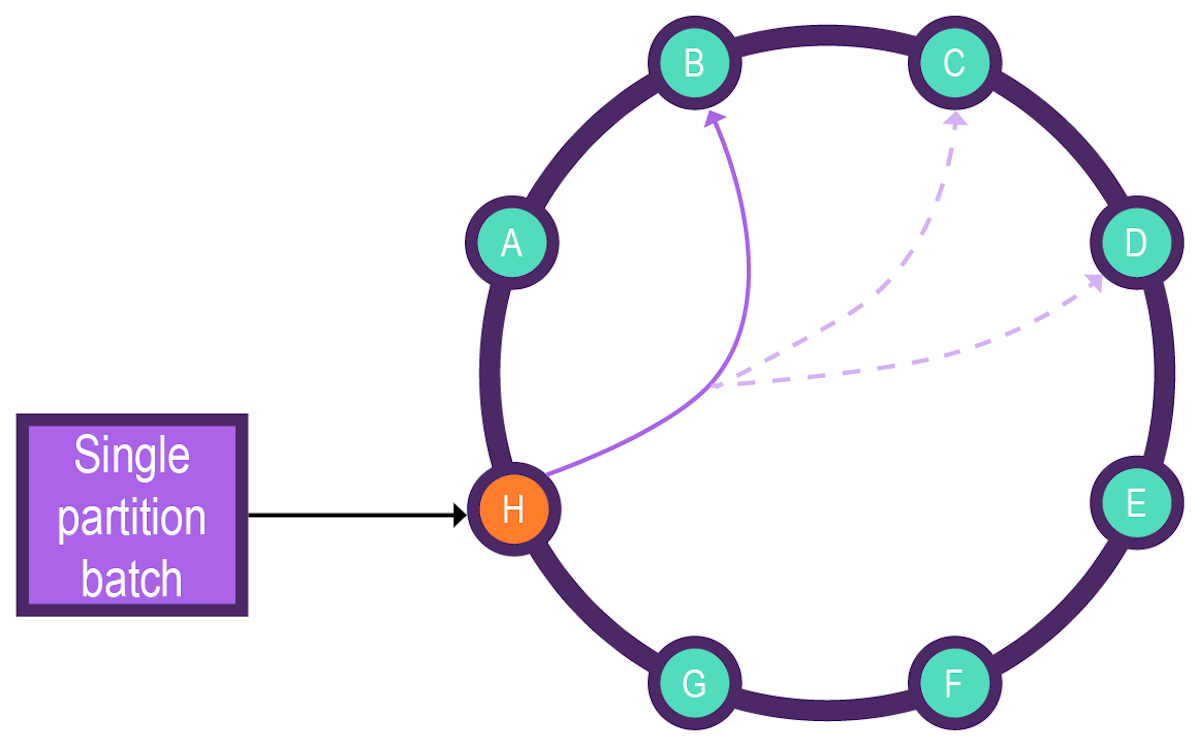
A
BATCHthat targets multiple tables in the same keyspace with the same partition key is considered a single partition batch. There will be a single mutation for each table because the two tables could have different columns, even though the keyspace and partition are the same. - Multiple partition batch with batchlog
-
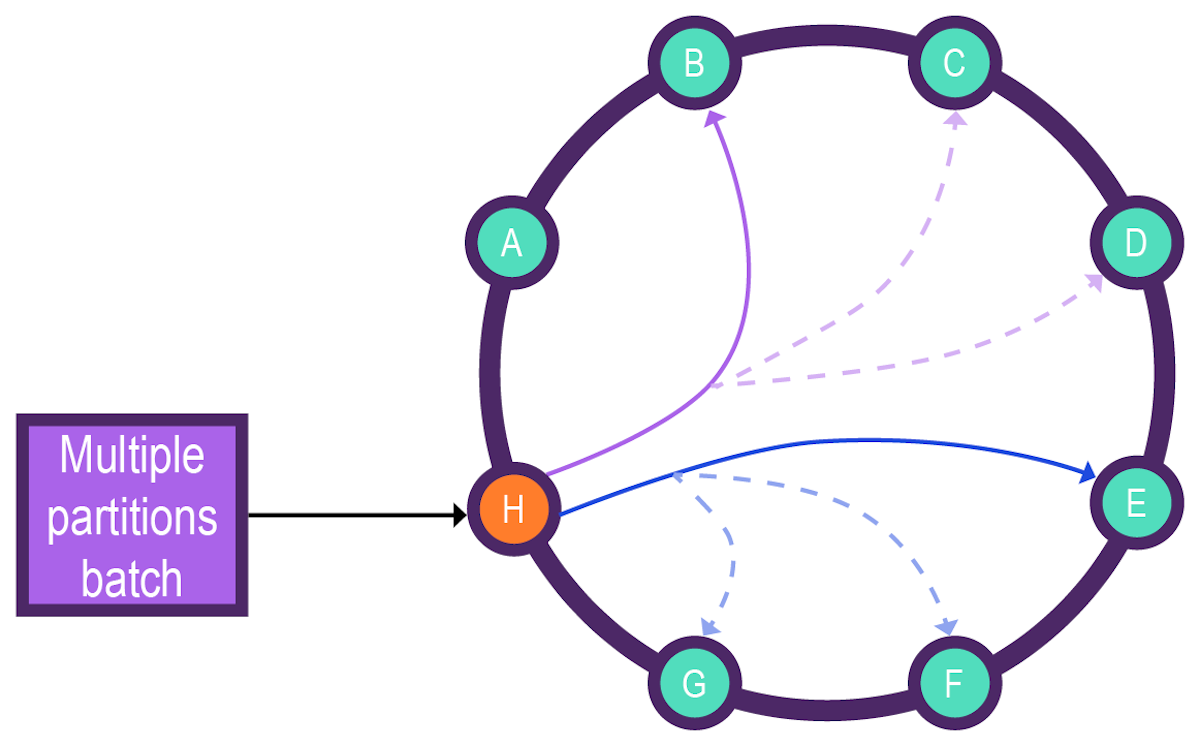
A batch that targets multiple partitions requires a batchlog to ensure atomicity.
Aside from logging, there is no other transaction enforcement at the batch level:
-
Batch isolation is impossible with multi-partition batches because isolation is, by definition, only possible for writes to a single partition.
-
Multiple partition batches aren’t isolated among client programs. Clients can read the first updated rows from a batch while other rows are still being updated on the server. In contrast, in single partition batches, clients cannot read a partial update from any row until the batch is completed.
-
Batching doesn’t self-limit or auto-reject based on the number of partitions involved.
-
Batch operations inherently place a greater burden on the coordinator node, require additional nodes for the batchlog, and increase the overall complexity and duration of the write path.
-
There is no batch rollback functionality, which means that a batch cannot be undone.
-
Synopsis
BEGIN [ ( UNLOGGED | LOGGED ) ] BATCH
  [ USING TIMESTAMP [ <epoch_microseconds> ] ]
  <dml_statement> [ USING TIMESTAMP [ <epoch_microseconds> ] ] ;
  [ <dml_statement> [ USING TIMESTAMP [ <epoch_microseconds> ] ] [ ; ... ] ] ;
APPLY BATCH ;| Syntax conventions | Description |
|---|---|
UPPERCASE |
Literal keyword. |
Lowercase |
Not literal. |
|
Variable value. Replace with a user-defined value. |
|
Optional.
Square brackets ( |
|
Group.
Parentheses ( |
|
Or.
A vertical bar ( |
|
Repeatable.
An ellipsis ( |
|
Single quotation ( |
|
Map collection.
Braces ( |
|
Set, list, map, or tuple.
Angle brackets ( |
|
End CQL statement.
A semicolon ( |
|
Separate the command line options from the command arguments with two hyphens ( |
|
Search CQL only: Single quotation marks ( |
|
Search CQL only: Identify the entity and literal value to overwrite the XML element in the schema and solrConfig files. |
Options
- UNLOGGED | LOGGED
-
Determines whether the batch is logged or unlogged. The default behavior depends on the number of partitions:
-
Multiple partition batches are logged by default. The batchlog is the only way to enforce atomicity for multiple partition batches, but it increases the number of nodes and resources required to execute the batch.
Unlogged multiple partition batches aren’t recommended. If you choose to do so, you can use the
UNLOGGEDkeyword to disable the batchlog. -
Single partition batches are unlogged by default. These are the only batch operations where
UNLOGGEDis recommended because single partition batches are inherently atomic and isolated. To force logging for a single partition batch, use theLOGGEDkeyword.
By default, an unlogged batch issues a warning if it involves too many operations or too many partitions. These warnings don’t prevent the cluster from attempting to execute the unlogged batch. In the
cassandra.yamlfile, you can configure batch warning and failure thresholds. -
- COUNTER
-
Use the
COUNTERoption for batched counter updates.Counter updates aren’t idempotent, even in batches.
- USING TIMESTAMPS
-
Sets the write time for transactions executed in a
BATCH. By default, the database applies the same timestamp to all data modified by the batch, regardless of the actual order in which the statements are executed. If statement-specificwritetimetimestamps are required, set client-supplied timestamps on each DML statement.-
USING TIMESTAMP: Applies the current time as the write timestamp for the batch. -
USING TIMESTAMP <epoch_microseconds>: Applies the specified epoch time in microseconds as the write timestamp for the batch. -
<DML_statement> USING TIMESTAMP: Applies the current time as the write timestamp for an individual DML statement. -
<DML_statement> USING TIMESTAMP <epoch_microseconds>: Applies the specified epoch time in microseconds as the write timestamp for an individual DML statement.
DML-specific timestamps can be set on one, many, or all statements within a batch. Any statements without a specific
USING TIMESTAMPclause inherit the batch-level timestamp.USING TIMESTAMPdoes not support LWT (lightweight transactions), such as DML statements that have anIF NOT EXISTSclause.For examples, see Apply a client-supplied timestamp.
-
Batchlog
The batchlog is required to ensure atomicity of multiple partition batches. For this reason, multiple partition batches are logged by default.
However, the batchlog inherently impacts performance because it is written to system tables and validated by designated batchlog nodes. These nodes are separate from the coordinator and replica nodes that execute the batch statements. Batchlog nodes store and confirm the batchlog, and they serve as backups if the coordinator node goes down.
The following example explains how the batchlog is used to execute a multiple partition batch:
-
A client sends a batch request to the coordinator node.
-
The serialized batch is written to the
system.batchestable, which consumes the serialized batch as blob data. -
The coordinator node sends a copy of the batchlog to batchlog nodes, which is acknowledged by the batchlog nodes.
For this example, there are two batchlog nodes. In
cassandra.yaml, you can set the` batchlog_endpoint_strategy` for batchlog node selection.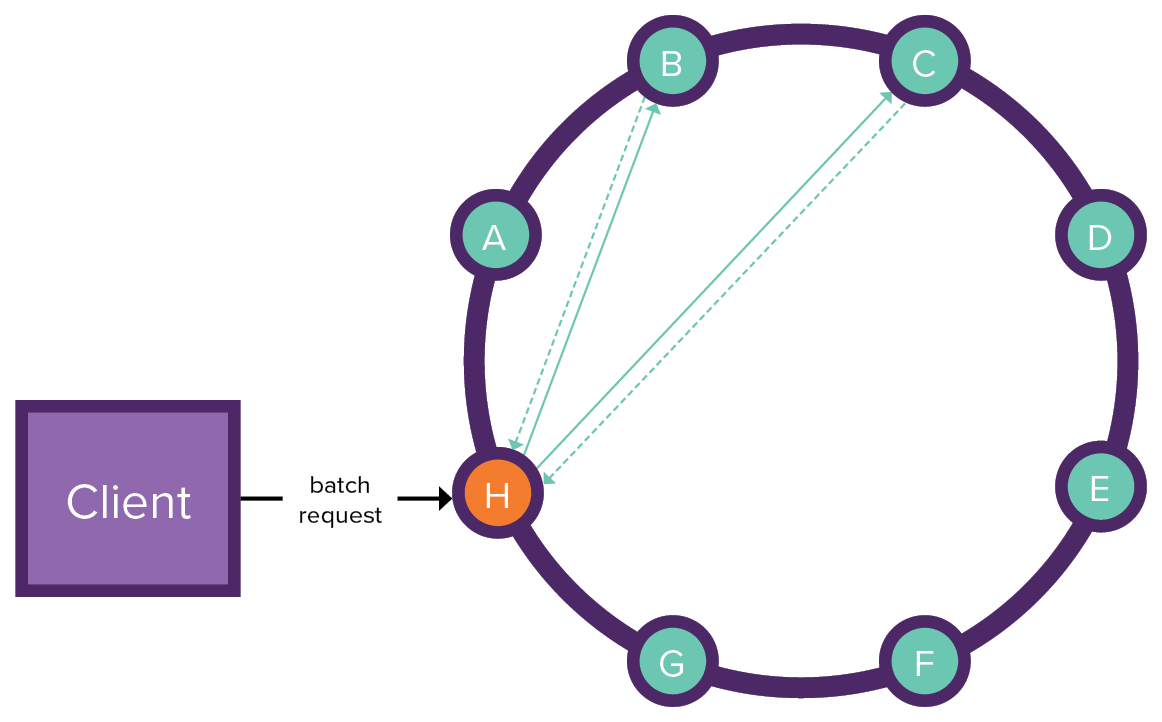
-
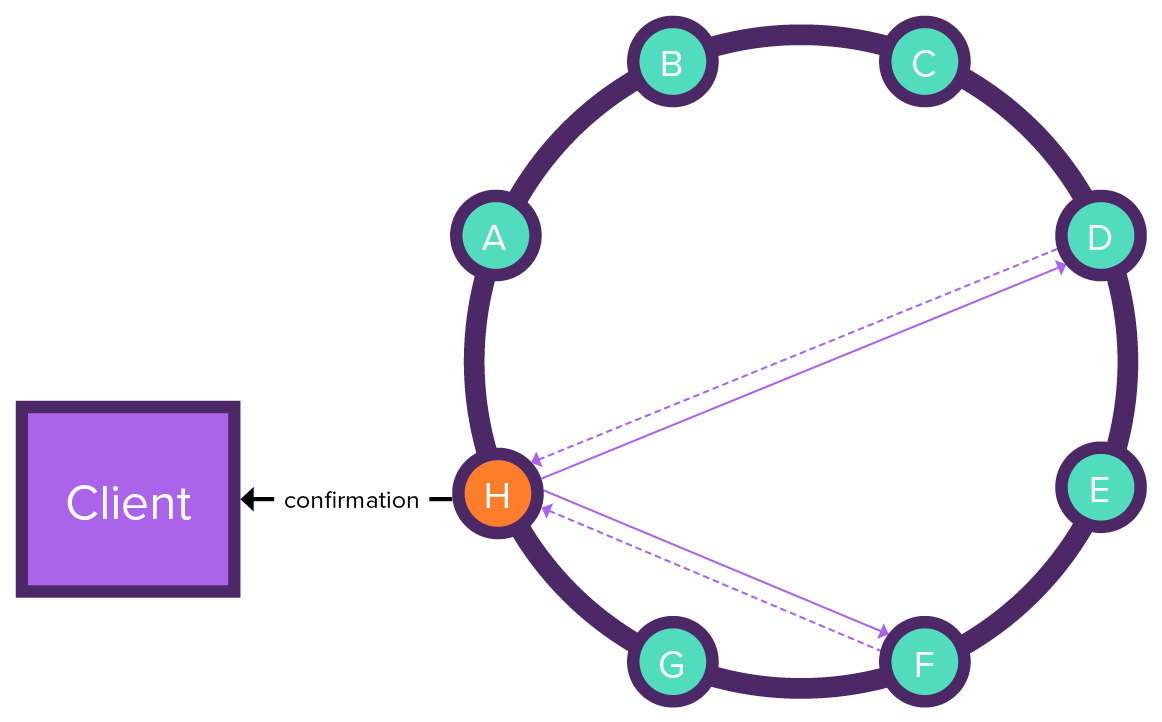
The coordinator node executes the batch statements on the replicas, and the replicas return the execution results to the coordinator node.
Then the coordinator must wait for all nodes with an affected partition to acknowledge the operations before removing the logged batch.
-
The coordinator node removes the batchlog from the batchlog nodes and sends confirmation to the client.
After a successful write, the rows are persisted (or hinted) and the batchlog data is removed.
If any DML operations cannot be executed, the entire batch is rejected. The batchlog is required to orchestrate complete rejection of a multiple partition batch.
-
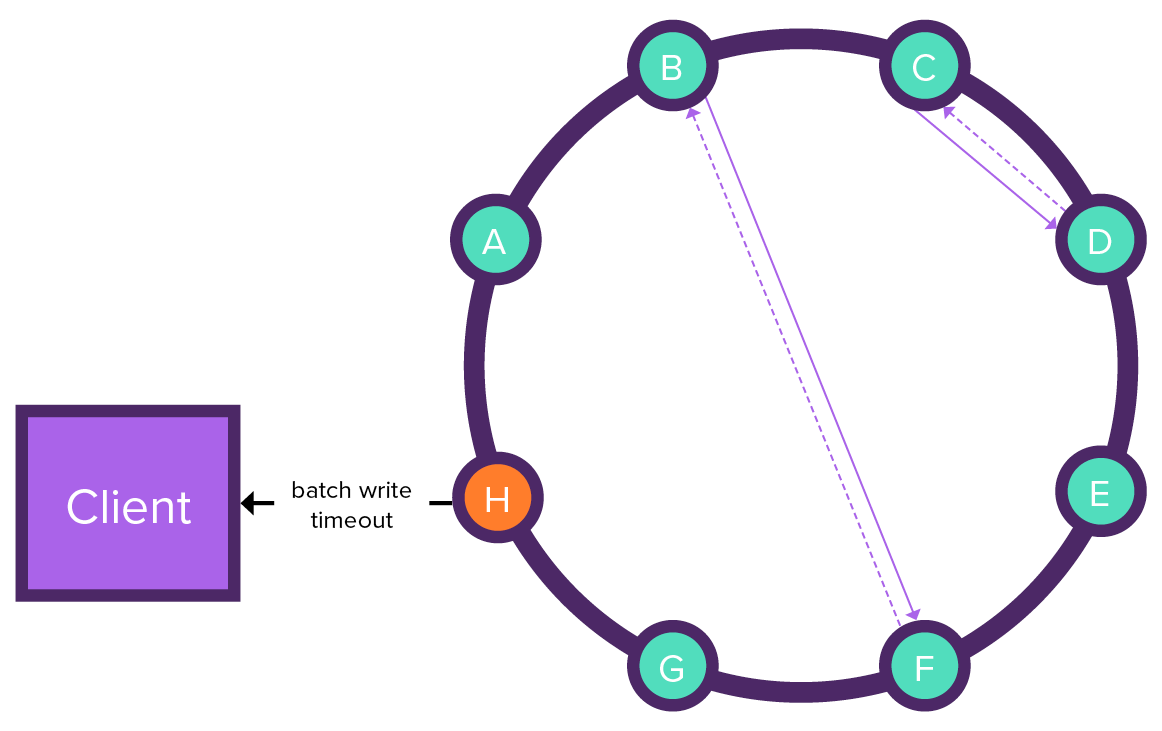
If the coordinator node fails during batch execution, the batchlog nodes try to execute the batch, and the coordinator node sends a batch write timeout to the client.
The batchlog nodes continue their attempts until results are received from each replica. Once all results are received, the batchlog is removed from the batchlog nodes. A subsequent response isn’t sent to the client because the coordinator node failed and it already sent a batch write timeout.
Unlogged multiple partition batches aren’t recommended.
If you choose to run an unlogged multiple partition batch, use the UNLOGGED keyword in the batch statement.
Batching conditional updates
Batches with conditional updates, such as INSERT … IF NOT EXISTS introduce lightweight transactions (LWTs).
Conditional batches have the following limitations:
-
A batch containing conditional updates can operate only within a single partition because the underlying Paxos implementation only works at partition-level granularity.
-
If one statement in a batch is a conditional update, the conditional logic must return true, or the entire batch fails.
-
If the batch contains two or more conditional updates, all the conditions must return true, or the entire batch fails.
-
Conditional batches cannot provide custom timestamps. If you attempt to provide a custom timestamp in a conditional batch, an error is returned:
InvalidRequest: Error from server: code=2200 [Invalid query] message="Cannot provide custom timestamp for conditional BATCH" -
UPDATEandDELETEstatements within a conditional batch cannot useINconditions to filter rows.
For an example, see Single partition batch.
Batching counter updates
A batch of counters should use the COUNTER option because counter writes aren’t idempotent operations.
BEGIN COUNTER BATCH

  UPDATE cycling.popular_count
  SET popularity = popularity + 1
  WHERE id = 6ab09bec-e68e-48d9-a5f8-97e6fb4c9b47;

  UPDATE cycling.popular_count
  SET popularity = popularity + 125
  WHERE id = 6ab09bec-e68e-48d9-a5f8-97e6fb4c9b47;

  UPDATE cycling.popular_count
  SET popularity = popularity - 64
  WHERE id = 6ab09bec-e68e-48d9-a5f8-97e6fb4c9b47;

APPLY BATCH;
Counter batches cannot include non-counter columns in the DML statements. Similarly, a non-counter batch cannot include counter columns.
Counter batch statements cannot provide custom timestamps.
Examples
The following examples illustrate various BATCH operations.
Most of these examples use the following table that tracks expenses for a cycling team.
Note that balance is a static column.
CREATE TABLE IF NOT EXISTS cycling.cyclist_expenses (
  cyclist_name text,
  balance float STATIC,
  expense_id int,
  amount float,
  description text,
  paid boolean,
  PRIMARY KEY (cyclist_name, expense_id)
);
Single partition batch
The following example shows an optimal, beneficial use of a single partition BATCH statement with conditional logic.
The cyclist_expenses table stores records about each purchase by a cyclist and includes the running balance of all the cyclist’s purchases.
Because the balance column is static, all purchase records for a cyclist have the same running balance, and you can only provide the partition key when updating the data.
To update a non-static column, you must also provide a clustering key.
For this example, batched conditional updates can be used to maintain the running balance. This works because the balance and expenses are stored in the same table. If these values were in separate tables, batching would fail because a batch with conditional updates cannot span multiple partitions.
All the INSERT and UPDATE statements in this batch write to the same partition, which permits conditional updates and minimizes write latency:
BEGIN BATCH

  INSERT INTO cycling.cyclist_expenses (
    cyclist_name, balance
  ) VALUES (
    'Vera ADRIAN', 0
  ) IF NOT EXISTS;

  INSERT INTO cycling.cyclist_expenses (
    cyclist_name, expense_id, amount, description, paid
  ) VALUES (
    'Vera ADRIAN', 1, 7.95, 'Breakfast', false
  );

APPLY BATCH;
An acknowledgement of the batch statement is returned if the batch operation is successful:
 [applied]
-----------
      True
The resulting table has one record so far because all mutations applied to the same row:
 cyclist_name | expense_id | balance | amount | description | paid
--------------+------------+---------+--------+-------------+-------
  Vera ADRIAN |          1 |       0 |   7.95 |   Breakfast | False

(1 rows)
The balance can be adjusted separately with an UPDATE statement:
UPDATE cycling.cyclist_expenses SET balance = -7.95
  WHERE cyclist_name = 'Vera ADRIAN' IF balance = 0;
cyclist_name | expense_id | balance | amount | description | paid
--------------+------------+---------+--------+-------------+-------
Vera ADRIAN | 1 | -7.95 | 7.95 | Breakfast | False
(1 rows)|
When the order of operations is essential, don’t mix All statements in a For example, if the previous |
Multiple partition batch
The following examples demonstrate multiple partition batch operations. The first example is a reasonable use of a multiple partition batch. The second example is an inefficient multiple partition batch that is likely to degrade performance.
- Acceptable use of multiple partition batch
-
The following
BATCHperforms a multiple partitionINSERTby writing the same data to two related tables that must be synchronized. Because this operation contains only two statements, the performance impact might be minimal and acceptable in certain use cases. Another common use for this type of batch operation is updating usernames and passwords.BEGIN BATCH INSERT INTO cycling.cyclist_name ( id, lastname, firstname ) VALUES ( 6ab09bec-e68e-48d9-a5f8-97e6fb4c9b12, 'SMITH', 'John' ); INSERT INTO cycling.cyclist_expenses ( cyclist_name, expense_id, amount, description, paid ) VALUES ( 'John SMITH', 3, 15.00, 'Lunch', false ); APPLY BATCH; - Inefficient multiple partition batch
-
Because different partitions can be stored on different nodes, writing to multiple partitions can significantly increase the number of nodes involved in an operation. Coordinator nodes must wait for nodes to acknowledge a request, with the minimum number of nodes determined by the consistency level. Stricter consistency levels, such as
ALL, can further increase latency.Max possible nodes = Partitions in BATCH x Consistency levelThe following example shows an inefficient
BATCHstatement that writes to four different partitions, given the partition keyid. By writing to four partitions, the number of nodes required to complete the request can be up to four times the write consistency level.BEGIN BATCH INSERT INTO cycling.cyclist_name ( id, lastname, firstname ) VALUES ( 6d5f1663-89c0-45fc-8cfd-60a373b01622,'HOSKINS', 'Melissa' ); INSERT INTO cycling.cyclist_name ( id, lastname, firstname ) VALUES ( 38ab64b6-26cc-4de9-ab28-c257cf011659,'FERNANDES', 'Marcia' ); INSERT INTO cycling.cyclist_name ( id, lastname, firstname ) VALUES ( 9011d3be-d35c-4a8d-83f7-a3c543789ee7,'NIEWIADOMA', 'Katarzyna' ); INSERT INTO cycling.cyclist_name ( id, lastname, firstname ) VALUES ( 95addc4c-459e-4ed7-b4b5-472f19a67995,'ADRIAN', 'Vera' ); APPLY BATCH;
Apply a client-supplied timestamp
In a BATCH statement, the USING TIMESTAMP option applies a writetime timestamp to all DML operations within the batch.
If no timestamp is specified or USING TIMESTAMP is omitted, the database inserts the current time as the writetime for each DML operation.
Alternatively, you can set a global client-supplied timestamp or a DML-specific timestamp with USING TIMESTAMP.
-
Insert rows with a client-supplied timestamp:
-
Global timestamp for all DML statements in the batch:
BEGIN BATCH USING TIMESTAMP 1481124356754405 INSERT INTO cycling.cyclist_expenses ( cyclist_name, expense_id, amount, description, paid ) VALUES ( 'Vera ADRIAN', 2, 13.44, 'Lunch', true ); INSERT INTO cycling.cyclist_expenses ( cyclist_name, expense_id, amount, description, paid ) VALUES ( 'Vera ADRIAN', 3, 25.00, 'Dinner', false ) IF NOT EXISTS; APPLY BATCH; -
Individual timestamp for a specific DML statement:
BEGIN BATCH

  INSERT INTO cycling.cyclist_expenses (
    cyclist_name, expense_id, amount, description, paid
  ) VALUES (
    'Vera ADRIAN', 2, 13.44, 'Lunch', true
  ) USING TIMESTAMP 1481124356754405;

  INSERT INTO cycling.cyclist_expenses (
    cyclist_name, expense_id, amount, description, paid
  ) VALUES (
    'Vera ADRIAN', 3, 25.00, 'Dinner', false
  ) IF NOT EXISTS USING TIMESTAMP 1481123256755000;

APPLY BATCH;
-
-
Get the timestamp values:
SELECT * FROM cycling.cyclist_expenses;The dataset for this example is small, so a
SELECT *query is acceptable. On production datasets, use more specific queries.Using the global timestamp, both records have the same
writetimetimestamp:cyclist_name | expense_id | amount | writetime(amount) | description | writetime(description) | paid | writetime(paid) --------------+------------+--------+-------------------+-------------+------------------------+------+------------------ Vera ADRIAN | 2 | 13.44 | 1481124356754405 | Lunch | 1481124356754405 | True | 1481124356754405 Vera ADRIAN | 3 | 25 | 1481124356754405 | Dinner | 1481124356754405 | True | 1481124356754405 (2 rows)Using the individual timestamps, each record has its own
writetimetimestamp:
 cyclist_name | expense_id | amount | writetime(amount) | description | writetime(description) | paid | writetime(paid)
--------------+------------+--------+-------------------+-------------+------------------------+------+------------------
  Vera ADRIAN |          2 |  13.44 |  1481124356754405 |       Lunch |       1481124356754405 | True | 1481124356754405
  Vera ADRIAN |          3 |     25 |  1481123256755000 |      Dinner |       1481123256755000 | True | 1481123256755000

(2 rows)