Portfolio Manager demo using Apache Spark
The Portfolio Manager demo runs an application that is based on a financial use case. You run scripts that create a portfolio of stocks. On the OLTP (online transaction processing) side, each portfolio contains a list of stocks, the number of shares purchased, and the purchase price. The demo’s pricer utility simulates real-time stock data. Each portfolio gets updated based on its overall value and the percentage of gain or loss compared to the purchase price. The utility also generates 100 days of historical market data (the end-of-day price) for each stock. On the DSE OLAP (online analytical processing) side, an Apache Spark™ job calculates the greatest historical 10 day loss period for each portfolio, which is an indicator of the risk associated with a portfolio. This information is then fed back into the real-time application to allow customers to better gauge their potential losses.
DataStax demos do not work with LDAP or internal authorization (username/password) enabled.
To run the demo, do the following:
-
For package installations, install the demos packages with DSE.
Default network interface
localhost(127.0.0.1) is required for the demo. -
Start DSE in DSE Analytics mode:
-
Package installations: Set
SPARK_ENABLED=1in/etc/default/dse, and then start the node:sudo service dse start -
Tarball installations: Start the node with the
-koption to enable DSE Analytics mode:INSTALL_DIRECTORY/bin/dse cassandra -k
-
-
In a terminal, change to the
/demos/portfolio_managerdirectory in your DSE installation:The default location of the
demosdirectory depends on the type of installation:-
Package installations:
/usr/share/dse/demosYou might need to install the demos packages, if you didn’t install them during your initial installation. For more information, see Install DataStax Enterprise (DSE) 6.9 on Debian-based systems with APT and Install DataStax Enterprise (DSE) 6.9 on RHEL-based systems with Yum.
-
Tarball installations:
INSTALL_DIRECTORY/demos
README.mdfiles are provided with your DSE installation and in thedemosdirectories with instructions on building and running the demo applications. -
-
Run the
pricerutility to generate stock data for the application:bin/pricer -o INSERT_PRICES && bin/pricer -o UPDATE_PORTFOLIOS && bin/pricer -o INSERT_HISTORICAL_PRICES -n 100The utility takes several minutes to run.
For help, run
bin/pricer --help. -
Start the web service:
cd website && sudo ./start -
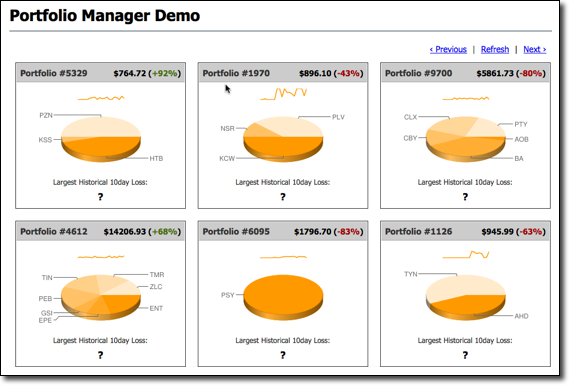
Open a browser and go to http://localhost:8983/portfolio.
The real-time Portfolio Manager demo application is displayed.
-
Open another terminal.
-
Run the Spark SQL job in the 10-day-loss.q file.
dse spark-sql -f 10-day-loss.q -
Run the equivalent Spark Scala job in the
10-day-loss.shscript.The Spark application takes several minutes to run.
./10-day-loss.sh -
Run the equivalent Spark Java job in the 10-day-loss-java.sh script.
./10-day-loss-java.sh -
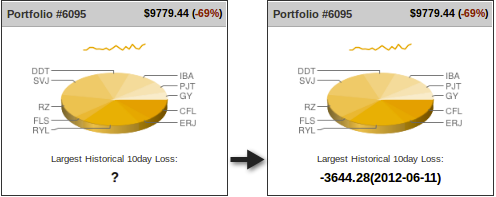
After the job completes, refresh the Portfolio Manager web page.
The results of the Largest Historical 10 day Loss for each portfolio are displayed.
You can find the Scala and Java source code for the demo in the src directory.
